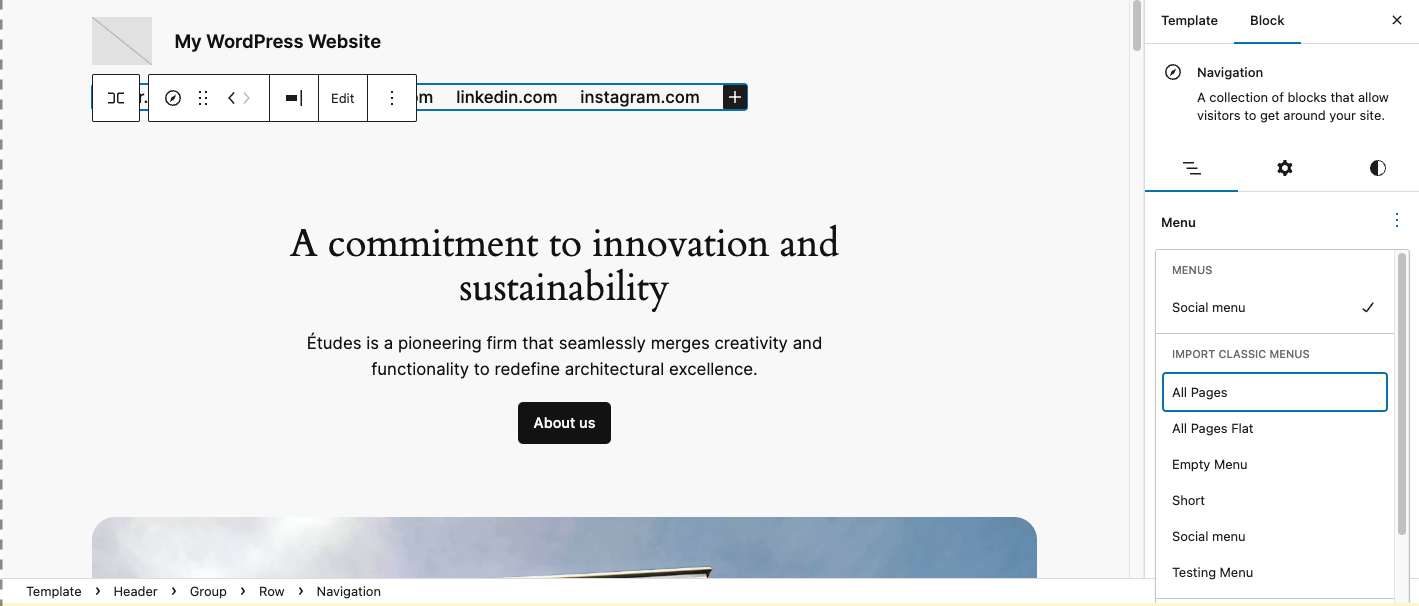
There was a question in the forums, if one needs to rebuild all the menus when switching from a classic theme to a block theme. In other words, how can you add an existing menu to the Navigation block.
If there is only one classic menu, it will be displayed in the navigation block. But if there are multiple classic menus on the site, it doesn’t automatically convert it to a navigation block. In that case, it takes a manual step after you switched the theme, but you don’t have to recreate the menus.
Here are the steps to follow along with a separate test environment.
- Open a new website via WordPress Playground and included the Twenty-Twenty-One Theme.
- Imported the theme test data file (more specifically, this)
- Set Display Location of imported menu to Primary Menu to ensure Twenty Twenty One has a menu on top of the landing page
- Switch to Twenty Twenty-Four
- The menu disappeared, only the social link menu showed.
Now the steps on how to get the classic menu back into the template?
- Click on the Template header,
- Click on the Navigation block
- The sidebar with the setting for the navigation block should open.
- Use the 3-dot menu to select the classic menu “All pages”
- Click on the Save button.
And here is the video of the whole process:
Thank you to JuanMa Garrido for the testing instructions.