Howdy,
it’s been a week that I returned from WordCamp Europe, and I am still looking at photos of Torino, and my notes. There were so wonderful conversations in Torino with colleagues, long-time friends, I made new friends again. You can follow along via my Twitter (now X) feed #WCEU to get a tiny glimpse.
After a day and a half of recovery I worked on what’s next: WordPress 6.6, Gutenberg 18.6 a podcast episode, a Hallway Hangout, this newsletter, Q 2 recap, planning for Q 3. Welcome to the fast lane.
The good news is that after five weeks of traveling or preparing to travel, we will stay put in Munich until early August, and hope to get back to our ‘normal’ life, whatever that might look like.
Yours, 💕
Birgit
Developing Gutenberg and WordPress
Ryan Welcher publish the What’s new for developers? (June 2024) on the Developer Blog. In the latest monthly round up he looked at the progress made towards WordPress 6.6 and more.
WordPress 6.6 Beta 3 was released this week. The post lists four different ways you can test the new version. It’s definitely time to make sure your site’s plugins and theme are compatible.
in preparation for the Field Guide, Dev Notes are coming it as well. The Field guide will be published around Release candidate 1 scheduled for June 25, 2024
This is the list of the already published Dev Notes.
- Site-wide background images in WordPress 6.6
- Theme.json version 3
- Grid layout type
- Editor: Unified Extensibility APIs in 6.6
- WordPress 6.6 CSS Specificity
In their update post about Data Views, Anne McCarthy shared a progress report on the new feature that is right now only available through the site editor and used for pages, template, and template parts and patterns. The post covers what will be available in WordPress 6.6 and beyond. The below screenshot shows a mock-up of how the media library views could look using the new Data view components.

Dan Richards release Gutenberg 18.6. It’s mainly a release with bug fixes during WordPress 6.6 Beta phase. In his release post What’s new in Gutenberg 18.6 Richards highlighted
Jessica Lyschik and I had a great time recounting our WordCamp Europe experiences, discussing upcoming events, WordPress 6.6, Gutenberg 18.6 and also what’s being worked on for the next major WordPress version. We recorded it all as the next Gutenberg Changelog episode (#102) that will arrive in your favorite podcast app over the weekend.

Plugins, Themes, and Tools for #nocode site builders and owners
Punted from WordPress 6.5 and refactored, synced patterns overrides are now coming to WordPress 6.6. Nick Diego posted an introduction to overrides in Synced Patterns on the Developer Blog. As a side note, we are still looking for a better name and the window is closing.
During the latest Developer Hours: Exploring Synced Pattern Overrides in WordPress 6.6, Nick Diego and Ryan Welcher explored how you’ll be able to implement overrides in 6.6 (or today using the Gutenberg plugin) and how they work under the hood.
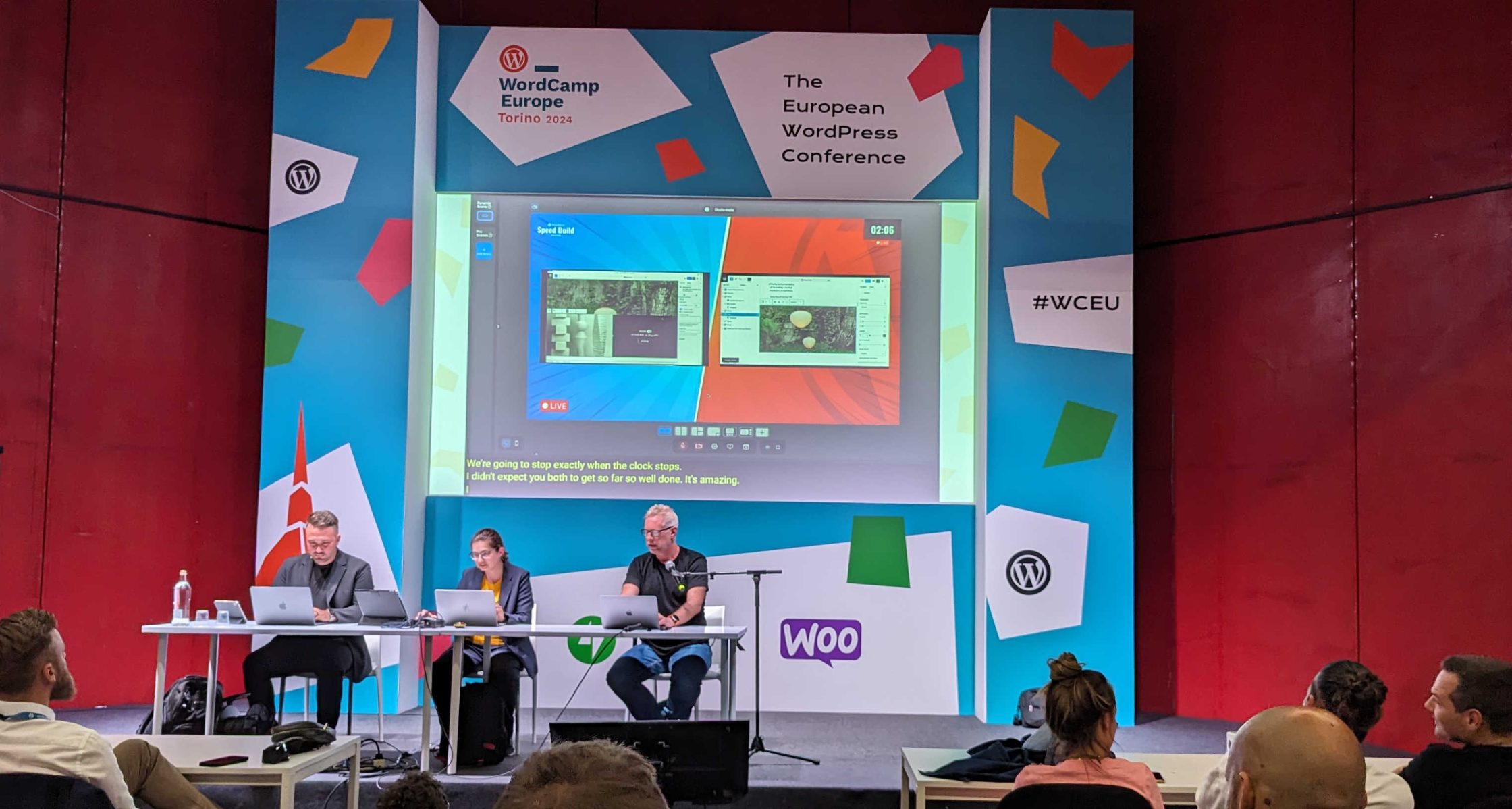
WordCamp Europe was the first WordCamp where Jamie Marsland brought the Speed Build Challenge to a live stage at the event, and Rich Tabor and Jessica Lyschik competed in recreating the Noguchi Museum home page in 30 minutes. Watching Lyschik and Tabor and other Speed build challenges on YouTube taught me a lot about how to approach building themes with the site editor. It’s a special way of problems solving in public. The time constraint is an added thrill, to show, what is possible once one gets over the learning curve. The video of the session will be available on WordPressTV in a few weeks, unless Marsland publishes a version sooner.
During Q & A of Matt Mullenweg’s Summer Update, Lyschik asked Mullenweg when he will take part in a Speed Build Challenge. Mullenweg quick on his feet, throw down the gauntlet and challenged Jessica Lyschik to be his opponent. Or course she said yes. Then Mullenweg whispered to Matias Ventura sitting in the first row: “Matias, you need to train me.” You can learn the details on our next Gutenberg Changelog podcast episode (102).
Nathan Wrigley interview Jamie Marsland on the WordCamp Europe Speed Building Challenge in the 123rd episode of the WPTavern Jukebox podcast. “Jamie shares how this concept evolved from his website recreations and how it quickly gained popularity within the WordPress community. He elaborates on the insights and feedback that both participants and viewers have gained from these speed builds, making it more than just a fun challenge.” Wrigley wrote.

Vikas Singhal of InstaWP explored the WordPress landscape of tab solutions and shared the 6 Best WP Tabs Alternatives: WordPress Tab Plugins. “This comprehensive guide delves into some top WordPress Tab Plugins that serve as great alternatives to the default WP Tabs plugin.” he wrote.
Theme Development for Full Site Editing and Blocks
Dan Richards posted about Social Links block changes in WordPress 6.6. This is particular interesting for theme developer styling the Social Link blocks nested inside a Navigation block. as it includes some class name changes.
Nick Diego announced that the Theme Directory gets a refresh and is now powered by blocks. “It’s important to reiterate that this refresh was not a complete redesign. The aesthetic and architectural updates in this iteration purposefully did not alter how the Theme Directory works at a fundamental level. Future updates should build on this work and address the functional changes requested by the community.” Diego wrote.

This week, I was facilitating the Hallway Hangout: Theme Building with Playground, Create-block-theme plugin, and GitHub. Beatriz Fialho demo’d her workflow when updating a theme that is housed on GitHub. You can view the demo on VideoPress.
The full one-hour session discussing the various pieces of the workflow is available on YouTube. I am working on a Recap post for the Make Blog that will be available next week.
In his latest post, Styling sections, nested elements, and more with Block Style Variations in WordPress 6.6, Justin Tadlock walks you through how you can add styles for your block variations to your theme.json file. Now you don’t need any more additional block style sheets for your block variations and can manage them all in one space. You still need to register the variations via the functions.php. Follow along the post to also learn about Section styles for a set of nested blocks via additional .json files. WordPress 6.6 opens up a new layer of design for theme builders, including the user interface for site editors to enable them for their sites.
WPBeginners editorial staff published a tutorial to answer the questions: What Is theme.json File in WordPress and How to Use It. “The theme.json file is a crucial part of the full site editing experience in WordPress. As block themes become more widespread, it’s important to understand what theme.json does and how to edit it properly” they wrote. This comprehensive guide covers all sections of theme.json: settings, styles, patterns, templates, and template parts. It also touches on how to use the Create block theme plugin and how you can modify the theme.json file via the Global Styles interface.
Rich Tabor blogged about how he made 720 WordPress theme styles. “Typically, WordPress themes come with a handful of theme style variations at most. But by leveraging the new capabilities of theme style variations landing in WordPress 6.6, this theme shatters the norm.” he wrote.
Upcoming Events
Justin Tadlock and Nick Diego will hold live Developer Hours: What’s new for theme developers in WordPress 6.6 on June 25 at 15:00n UTC, and will cover this topic as well.
Also next week, you can join me, Isabel Brison and others at the Hallway Hangout: Exploring Grid Layouts June 26 at 11:00 UTC – There will be a short demo of what’s coming to WordPress 6.6 and what cool layouts you can create with these features. We also chat about what is in the works for following WordPress releases.
Building Blocks and Tools for the Block editor.
In his Developer Blog post, How to create an animated timeline plugin, Damon Cook, developer advocate for WP Engine, walks you through the process of creating a timeline effect by extending core blocks and adding in some custom CSS and JavaScript.
In his Proposal: Bits as dynamic tokens., Dennis Snell explains a plan to bring inline shortcuts to the block editor. “A Bit is a small token of semantic meaning. It references content sourced beyond the post or content in which it’s found. It could refer to metadata about a post, a post meta field, a stock price sourced from an API call, a countdown to a particular date, the local time of a given timestamp in the reader’s timezone, a plugin URL, a view counter, a render for a math formula, or any other bit of knowledge that is provided by the server when rendering a post.” Snell explained. If I understood the timeline correctly, some foundational work was already committed to Core to be in WordPress 6.6, so this feature can be tested in the next Gutenberg plugin releases. If all works as expected, the feature might make into WordPress 6.7.
Ryan Welcher livestreamed about Connecting ACF/Pods to blocks using Block Bindings and explore how he can use some experimental features of WordPress to connect meta frameworks like Advanced Custom Fields and Pods to block using the change to Block Bindings that will ship with WordPress 6.6.
Hardeep Asrani wrote a Beginner’s Guide to the WordPress Interactivity API and added two examples: A live search block and how to set up communication between two blocks by using the same store.
Need a plugin .zip from Gutenberg’s master branch?
Gutenberg Times provides daily build for testing and review.
Now also available via WordPress Playground. There is no need for a test site locally or on a server. Have you been using it? Email me with your experience

Questions? Suggestions? Ideas?
Don’t hesitate to send them via email or
send me a message on WordPress Slack or Twitter @bph.
For questions to be answered on the Gutenberg Changelog,
send them to changelog@gutenbergtimes.com