Category: Updates

  • WordPress 7.1 arrives at WordCamp US, Abilities API for developers, and a new theme for Gutenberg Times and more — Weekend Edition #373

    WordPress 7.1 arrives at WordCamp US, Abilities API for developers, and a new theme for Gutenberg Times and more — Weekend Edition #373

    Hi there,

    Before you read any further, another security updates needs your attention: WordPress 7.0.4 is out. Update now! ⚠️

    You might have noticed, that the Gutenberg Times website has a new theme. It’s built on top of the Twenty Twenty-Five default theme. I started working on it last year, but was pulled away by other priorities. Then AI Enablement weeks arrived and I started to use all kinds of different AI tools for design and WordPress. None of them were really good at block themes at first. Then Telex got me close and I used it for my Block theme workshop. As the final stack I used WordPress Studio with the new AI Agent (Beta) and Claude. Both competently used theme.json and block markup for patterns, template and template parts.

    The biggest hurdle, and that’s why it took multiple trials, was that the podcast data wasn’t block-theme ready so I had to build a plugin that handles all the block bindings and assembles them into templates. The plugin is in the WordPress repository (still beta), if you are interested. During the process I used Claude and WordPress Agent skills. Between November 2025 and August 2026 the quality of Claude’s work has improved considerably and it produced much more robust code. The deployment to GitHub and WordPress repository was a breeze. Take a look at the new podcast page. All feedback is welcome!

    The WCUS program team announced great keynote speakers:: Bo English-Wiczling, PayPal, Loyal Pyczynski, Disney and Meta, Amanda Ventura, Waymo and the fireside chat w/ Matt Mullenweg round up a fantastic roster of speakers and topics. If you can make it get your ticket now. And I see you on the WCUS Livestream! 🎉

    Have a great weekend!

    Yours, 💕
    Birgit


    Developing Gutenberg and WordPress

    WordPress 7.0.4 shipped as a security release fixing a single vulnerability: an authenticated remote code execution via malicious file upload, affecting sites running Imagick with Ghostscript, responsibly reported by the team at pwn.ai. Release lead John Blackbourn notes the fix is being backported all the way to the 4.7 branch and into the 7.1 release candidate. If your site doesn’t update automatically, head to Dashboard → Updates and click Update Now.


    Release day falls on the last day of WordCamp US, and Justin Tadlock’s August roundup of what’s new for developers tells you what to test in the days that remain: responsive block styles with theme-configurable breakpoints, pseudo-states for Buttons and Navigation Links, the now-public SVG Icon API, and the always-iframed post editor. He also flags the change most likely to quietly break something — post list table row headers moved — and notes React 19 is punted again.


    Joe Dolson tallies 88 accessibility enhancements and bug fixes in WordPress 7.1, 45 in core, 43 in the editor. Highlights are the new accessible tooltips API, post list tables that identify rows by title instead of checkbox, a decorative toggle for the Image block, and stronger focus indicators throughout. He’s equally candid about the known regression: the Media Library’s infinite scroll is an inaccessible pattern, and the note walks you through three ways to turn it off.


    Just in time for WCUS Contributor Day, JuanMa Garrido released v1.0 of the WordPress Contributor Toolkit. Your first Core contribution no longer starts with installing Git, Node.js, and Docker — this desktop app handles it all. After running the setup wizard, contributors can link a Trac ticket, apply and test existing patches on a running site, then open a pull request, attach a patch, or hand their work to a mentor. If you are heading to Phoenix and want to join the Core table, download it and create your first site before Sunday, so you can hit the ground running.

    🎙️ The latest episode is Gutenberg Changelog #133 – Gutenberg 23.6 Release and WordPress 7.1 with special guest Faith Imokol, webdeveloper from Uganda.

    48 fixes for the small annoyances that add up: Ella van Durpe opened a round of Block Editor Paper Cuts for the WordPress 7.2 cycle. The list spans big tasks like rethinking appenders and inserters, writing-flow improvements, and long-standing bugs — pasting from Excel, Safari selection quirks, multi-block selection on iOS. Nine items are already done and several more have PRs in progress, so if one of these papercuts has been bugging you, now’s the time to test or comment.


    Jeff Paul opend the call for volunteers for WordPress 7.2 release squad. The release is scheduled for December 9th, 2026. That’s of course, still preliminary.

    Plugins, Themes, and Tools for #nocode site builders and owners

    Elliott Richmond pulled fourteen WordPress 7.1 features from the Source of Truth and tested every one hands-on against the release candidate for his latest video — no speculation, no reciting release notes. You’ll see responsive styling controls, custom breakpoints in theme.json, hover, focus and active states, the new Icon, Tabs and Playlist blocks, the media editor modal and the mark-as-decorative accessibility option. Thirteen earn a genuine thumbs up; the one mixed verdict only asks you to think backwards for a bit.


    Image processing moves from your server to the browser in WordPress 7.1, and Carlo Daniele’s rundown of client-side media processing, design tools, and the Abilities API for Kinsta explains what that shift means: libvips compiled to WebAssembly produces images roughly 15% smaller while cutting server CPU and RAM. He also covers rich-text Notes with @mentions, the Playlist and Tabs blocks, four new Abilities API lifecycle filters, and the design tokens plugin developers can use to style admin screens.


    Do custom field builders need to worry about WordPress 7.1? Lua Nguyen answers for the Meta Box community with a look at what’s new and how it affects Meta Box users. The always-iframed editor is the big one — Meta Box blocks already run on Block API v3 with modal-based editing, so you can upgrade without changes. Client-side media processing covers the Image fields automatically, and editable blocks inside Custom HTML give developers finer control over what clients may touch.


    WooCommerce 11.0.1 arrived as a security and compatibility dot release, and Brian Coords lists what’s inside: a stronger, salted hashing scheme for guest session cookies, sanitized notices in Cart and Checkout blocks, capability checks on image matching, onboarding and Marketplace endpoints — plus faster logging that cuts checkout latency on stores with large log backlogs. It also readies the Orders list for WordPress 7.1’s changed list-table markup, so update your stores before August 19.

    Theme Development for Full Site Editing and Blocks

    Your hero area looks gorgeous on desktop and clunky on a phone — a scenario Eric Karkovack solves in his walkthrough on how to hide WordPress blocks based on device. He builds two versions of the hero, then uses the Block Visibility controls from WordPress 7.0 to hide one on mobile and the other on desktop and tablet — no plugin, no custom CSS. A neat companion piece to the responsive block styles arriving in 7.1.


    WordPress uses “patterns” for two related but different things, and Gina Lucia sorts them out in her guide to WordPress patterns vs reusable blocks — the latter renamed synced patterns back in WordPress 6.3. Regular patterns become independent copies once inserted; synced patterns stay connected, so one edit updates every instance, with partially synced overrides for things like team member cards. She also draws the line between patterns and templates and shows you how to save your own.


     “Keeping up with Gutenberg – Index 2026” 
    A chronological list of the WordPress Make Blog posts from various teams involved in Gutenberg development: Design, Theme Review Team, Core Editor, Core JS, Core CSS, Test, and Meta team from Jan. 2024 on. Updated by yours truly. 

    The previous years are also available:
    2020 | 2021 | 2022 | 2023 | 2024 | 2025

    Building Blocks and Tools for the Block editor

    If your plugin styles the post list table or expects a non-iframed editor, WordPress 7.1 has surprises in store. Jonathan Bossenger spent a livestream testing the developer-focused changes from our Source of Truth ahead of release day: responsive per-viewport block styles, hover, focus and active states, the admin bar rendering as a block, the Playlist and Tabs blocks, and the reworked Notes with mentions. He flags a gradient-over-background-image bug live and shares migration notes for both breaking changes.


    One npx command scaffolds the whole plugin — from there, Emre Ekener‘s six-step tutorial on building your first custom Gutenberg block from scratch has you shipping an editable CTA block with heading, description, and button. Along the way you’ll learn what actually matters: attributes in block.json, the split between edit.js and save.js, RichText for inline editing, and InspectorControls for sidebar settings. As he puts it, the complexity scales, but the structure stays the same.

    Ai and WordPress

    You configure an AI provider once, and every plugin on the site can use it — no keys in plugin settings, no provider lock-in. Team WPShout’s developer guide to the AI connectors and wp_ai_client_prompt() covers where credentials live, why environment variables beat the database (keys there sit unencrypted), and builds a complete post-summarizing plugin whose actual AI work takes five lines. The gotchas section warns you: core ships no spend limit, so gate every feature behind the support checks.


    Greg Ziółkowski‘s walkthrough of the Abilities API in WordPress 7.1 covers the three areas the release fills in: an execution lifecycle you can observe with actions and steer with filters, a shared preparation layer that turns canonical schemas into portable Draft 4 copies for REST and AI clients, and discovery filtering in wp_get_abilities() by category, namespace, and metadata. Each extension point comes with a working code example and the trade-offs he’d weigh before reaching for it.

    Need a plugin .zip from Gutenberg’s master branch?
    Gutenberg Times provides daily build for testing and review.

    Now also available via WordPress Playground. There is no need for a test site locally or on a server. Have you been using it? Email me with your experience.


    Questions? Suggestions? Ideas?
    Don’t hesitate to send them via email or
    send me a message on WordPress Slack or Twitter @bph.


    For questions to be answered on the Gutenberg Changelog,
    send them to changelog@gutenbergtimes.com


    We hate spam, too, and won’t give your email address to anyone except to Mailchimp to send out our Weekend Edition.

  • WordPress 7.1 Source of Truth

    WordPress 7.1 Source of Truth

    Welcome to the Source of Truth for WordPress 7.1!

    Before you dive headfirst into all the big and small changes and pick your favorites, make sure to read these preliminary thoughts about this post and how to use it. If you have any questions, leave a comment or email me at pauli@gutenbergtimes.com.

    A huge “Thank you” to Anne McCarthy, Justin Tadlock, Isabel Brison, Adam Silverstein, Ramon Dodd, Andrew Serong, Hans-Gerd Gerhards, Marin Atanasov, Krupa Nanda, Aaron Robertshaw, Ben Dwyer, Brent MacKinnon, Ashar Fuadi, and a lot more. It still takes a village. Also huge respect to the whole release squad on getting WordPress 7.1 over the finish line.

    Estimated reading time

    37–56 minutes

    at

    8,837 words

    Table of Contents

    Changelog

    Any changes are cataloged here as the release goes on.

    August 14, 2025

    August 12, 2026

    • Corrected the Interactive states section: Global Styles state controls ship for the Button block only.
    • Change the order of Changelog items to newest updates first.

    August 11, 2026

    • Updated the Highlight grid with latest iteration
    • Updated the Featured image with the 7.1 color schema

    August 5, 2026

    August 4, 2026

    • Removed On This Day widget information per this ticket. Punted to 7.2 pending more design input.
    • Corrected the "-current": { "color": { "text": "pink" }” code example.

    August 3, 2026

    July 31, 2026

    July 30, 2026 – First edition.

    Important note/guidelines

    Try not to just copy and paste what’s in this post since it’s going to be shared with plenty of folks. Use this as inspiration for your own stuff and to get the best info about this release. If you do copy and paste, just remember that others might do the same, and it could lead to some awkward moments with duplicate content floating around online.

    Each item has been tagged using best guesses with different high-level labels so that you can more readily see at a glance who is likely to be most impacted.
    Each item has a high-level description, visuals (if relevant), and key resources if you would like to learn more.

    Overview

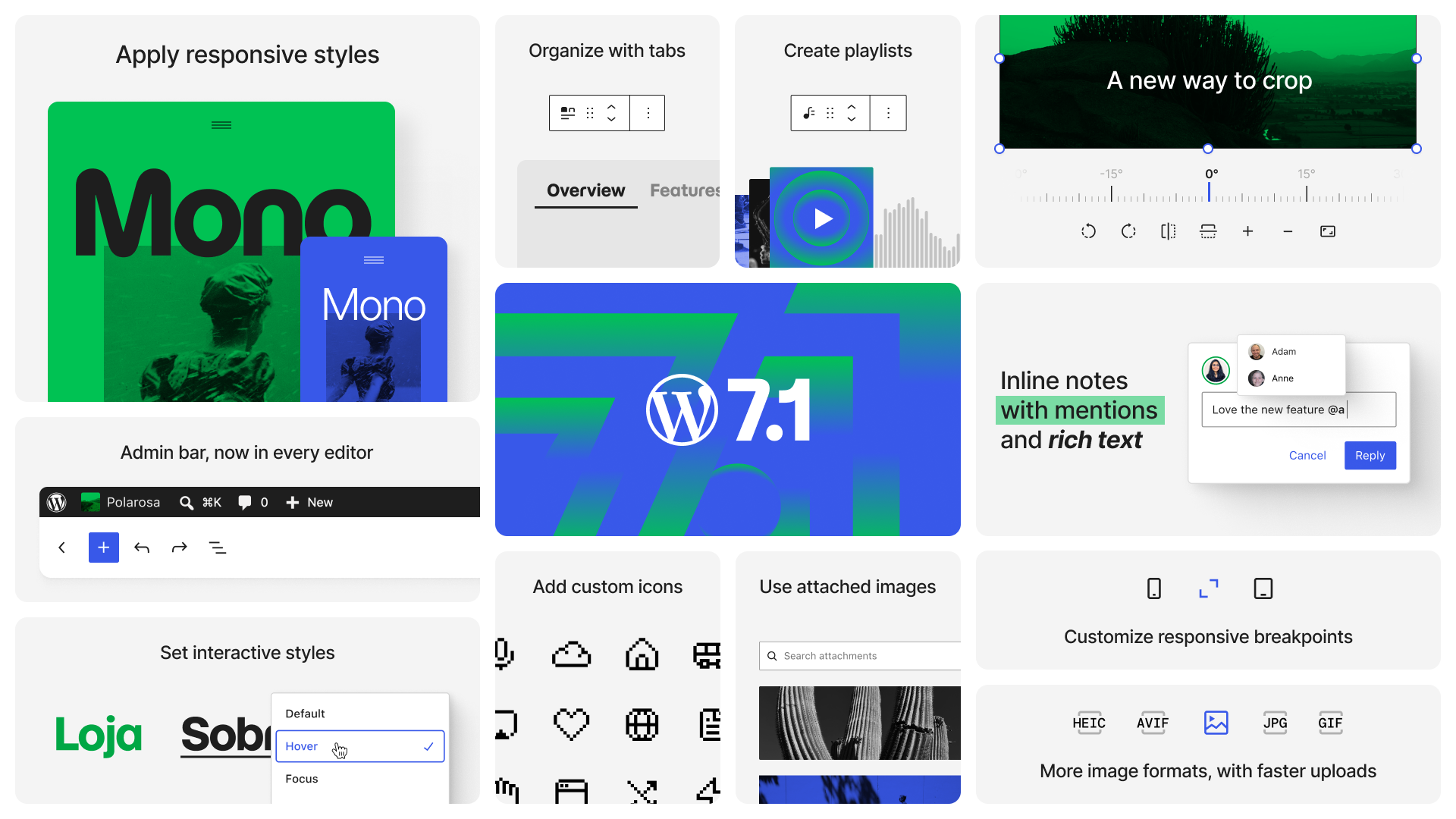
    WordPress 7.1 Highlight grid draft August 10, 2026

    WordPress 7.1 rounds out the block editor’s styling controls and makes working with media noticeably smoother. Long-requested features let you style how blocks look across three screen sizes and in interactive states like hover and focus — all without writing custom CSS. The admin experience becomes more personal, too, following you with your own color scheme and toolbar across every screen.

    Handling images gets a considerable upgrade, too. The new media editor modal brings free-form cropping, rotation, and metadata editing into one workflow, and client-side media processing makes uploads faster and more resilient, with broader format support and better-optimized files.

    The new Playlist and Tabs blocks enrich the layout options available out of the box and make for more creative information presentation. In the same realm fall the expanded Icon API with custom icon collections, dynamic galleries, and background gradients for more blocks.

    The unification of WP Admin and the block editors progresses as well: the editors now respect your admin color scheme, and the admin bar stays with you on every screen — including the editors and the front end.

    While real-time collaboration has been punted to a future WordPress version, the asynchronous collaboration in Notes took real steps forward with inline notes on partial text selections, @mentions, rich text formatting, and multiple notes per block.

    Beyond the headliners, core blocks receive many quality-of-life improvements and bug fixes to make editing content in WordPress streamlined, consistent, and fast — and developers get an expanding set of APIs to build on.

    Assets 

    In this Google Drive folder you can view all assets in this document.

    Tags

    To make this document easier to navigate based on specific audiences, the following tags are used liberally: 

    • [end user]: end user focus. 
    • [theme builder]: block or classic theme author. 
    • [plugin author]: plugin author, whether block or otherwise.
    • [developer]: catch-all term for more technical folks. 
    • [site admin]: this includes a “builder” type. 
    • [enterprise]: specific items that would be of interest to or particularly impact enterprise-level folks
    • [all]: broad impact to every kind of WordPress user. 

    How can you use these? Use your browser’s Find capability and search for the string including the brackets. Then use the arrows to navigate through the post from one result to the next.

    Short video on how to use the tags to navigate the post.

    Responsive styles for blocks

    Community feedback from the Call for Testing made sure this feature ships with an off switch via a new responsiveEditingEnabled editor setting: turned off, both the Responsive styles option in the View menu and the viewport selector in Global Styles disappear. It gates the editing interface only. Responsive styles already saved keep rendering as before. (#80814). See code examples are in the responsive styles dev note.

    Viewport breakpoint customization

    Themes can now define custom breakpoints in theme.json, so both responsive styling and per-viewport block visibility work from your design system’s breakpoints instead of WordPress’s defaults. For theme developers and designers, this provides fine-grained, device-agnostic control over responsive behavior. (79104).

    JSON
    "settings": {
    		"viewport": {
    			"mobile": "30rem",
    			"tablet": "45rem"
    		}
    	}
    

    Tracking: WordPress 7.1: Block visibility configurable breakpoints and theme.json integration (#75707)

    This makes interactive design accessible to non-coders and theme builders. It eliminates the need to add custom CSS snippets for common interactions. 

    Interactive states styling (hover, focus)

    You can now style interactive pseudo-states (:hover, :focus, or :active) without writing any CSS. For the Button block, this works both per-instance and site-wide in Global Styles. For navigation link blocks (Custom Link, Page Link), the state controls are available per-instance in the block inspector; in Global Styles, the state selector is enabled per block, with Button as the first, so styling navigation states site-wide currently goes through theme.json.
    An editor UI for the current-item state is also in development as part of the custom states iteration for 7.2.

    The Dev Note give you more details Pseudo and custom style states in WordPress 7.1 and more code examples.

    JSON
    
    "core/navigation-link": {
      "-current": {
        "color": { "text": "#ff0000" },
        "typography": { "fontWeight": "700" },
        ":hover": {
          "color": { "text": "#0000ff" }
        },
        ":focus": {
          "color": { "text": "#00aa00" }
        },
        ":active": {
          "color": { "text": "#ff6600" }
        }
      }
    }
    

    Media editor modal and free-form image cropper

    [end user][site admin]

    The new media editor modal replaces the inline cropping tool, accessed via the familiar Crop button, and brings together free-form and aspect-ratio cropping, flip, fine-grained rotation with snap guides, and metadata editing in one unified workflow. (78653, 78935, 78792

    This considerably improves the editing experience in WordPress Block editor. The goal was to eliminate the need for external tools for basic image editing. You can now exercise faster, more precise control over your images—fine-tuning framing, fixing orientation, or mirroring an image to better fit your layout in just a few clicks, all without breaking your editing flow.

    For the Cover Block, this new media editor modal is hooked up to the Crop background image button. The option appears whenever the Cover block uses an editable image, and the block automatically recalculates its overlay color and contrast after an edit, so text stays readable even if the crop removes the image’s brightest or darkest areas (79258 )

    Tracking: Media Editor Modal task tracking (#73771)

    Client-side media processing improvements

    [developer][site admin][enterprise]

    When you upload an image in the block editor, your browser — not your server — will now handle the creation of all sub-sized images using a WebAssembly (WASM) version of libvips (wasm-vips), a high-performance image processing library. The result stored on your server is improved over what server-side processing produced until today: smaller files generated directly on your device. Server-side image processing CPU usage could decline by more than 80% on capable devices (79188)

    The update also comes with broader modern image  format support that includes HEIC (the default format for iPhone photos), JPEGS with HDR gain maps (used by UltraHDR and Adaptive HDR), AVIF and WebP support built in. A great performance improvement is the GIF-to-video conversion feature for lighter, more efficient files that are faster to load on the front-end. This feature is opt-in right now. Uploads are also more resilient, with a progress indicator and automatic retries if your data connectivity drops off (76765, 79307).

    For content creators uploading media, this update means better support for HDR images,  faster, more reliable uploads, broader format support, and better-optimized files without manual intervention.

    Plugin developers should note that some server-side hooks, including `wp_generate_attachment_metadata`, `image_resize_dimensions`, and `wp_handle_upload` may not fire as before. The team is working on documentation and mitigation strategies. (74333)

    More in-depth information is available in the Dev Note Client-Side Media Processing in WordPress 7.1

    Icons now inherit color, and the Icons API takes shape

    [theme builder][plugin author][developer][enterprise]

    WordPress 7.0 shipped a built-in set of SVG icons for the block editor and the Icon block. With WordPress 7.1, this grows into a proper, public API: plugins and themes can register their own icons, group them into collections, render them on the server, and read them over the REST API.

    For content creators, the most visible change is the Icon block’s picker: it now groups icons by collection, with a tab per collection plus an “All” tab, and your search query carries over as you switch tabs. Custom icons from plugins and themes appear right alongside the core set. The block itself picked up several refinements: it inserts a default icon so you’re never staring at an empty placeholder, offers flip and rotate controls in the toolbar, and shows text and background color controls by default.

    For developers: Registering more collections

    For developers, the pieces come together on the PHP side: register a collection with wp_register_icon_collection(), add icons with wp_register_icon() — from an inline SVG string or an .svg file — and print any registered icon with wp_get_icon(), including size, CSS class, and an accessible label. Icon names get strict validation, the registry’s register method is now public, and REST API endpoints expose collections and icons to your own code. A dev note with full code examples is on its way to the Make Core blog.

    One breaking change to flag: all 330 icons in @wordpress/icons v15 now declare fill="currentColor", so icons inherit the surrounding text color by default. If you’ve been tinting icons with the CSS fill property, switch to color — it’s more reliable, since an icon may use fill, stroke, or both internally. If you register your own icons, add fill=”currentColor” to their <svg> element to get the same behavior.

    The Dev Note Registering and rendering SVG icons in WordPress 7.1 holds all the details. 

    Tracking: SVG Icon API: Iteration for WordPress 7.1 (#75715)

    Admin Bar everywhere 

    [all]

    With WordPress 7.1, the WordPress admin bar which sits at the top of your site’s front end and other admin pages is now displayed when using block editor by default. It stays hidden when Fullscreen mode and Distraction-free mode are both turned on. 

    Until now, entering the editor in its default fullscreen mode meant the admin bar disappeared, cutting you off from the rest of wp-admin. Since the admin bar now provides site context, the update also replaces the top-left W/site icon in the site editor with an explicit back button, making the navigation control more obvious (79197). 

    With this update also comes a design refresh: 

    • your site icon replaces the home icon, 
    • the profile avatar becomes circular, and 
    • the command palette keyboard shortcut moves into the Admin bar to remove visual clutter and resolve shortcut conflicts. (79060

    This keeps the familiar navigation with you on all screens again. 

    Dev Notes with all the details for users and developer can be found here: Consistent navigation in WordPress 7.1 with persistent toolbar.

    New Blocks

    [all]

    This release expands the block library with versatile new tools. These additions provide content creators with improved ways to display interactive media and organize information.

    Playlist block

    The new Playlist block lets you create audio playlists with waveform visualization, making it easy to showcase multiple tracks or podcast episodes in a single interactive player. Visitors can browse and play through your audio content without leaving the page. For content creators this provides a rich, modern listening experience built right into WordPress to highlight podcast episodes, track of music or talks. 

    Each track comes with its metadata: artwork, artist name, track number, and track length. The tracklist itself is configurable — you can set the play order and toggle artwork, artist names, track numbers, and track length individually to suit the design of your page.

    The WaveformPlayer visualization comes with a visualization style selector. You can set waveform and waveform background colors for more granular theming and show the track artwork on the play button, accessible for all visitors. The Playlist and Playlist Track blocks are available in the default block library.

    This is the first version and contributors are working on improvements for the next WordPress version, too looking to add more waveform styles, shuffle and skip buttons, a hover overlay for more intuitive track scrubbing, as well as performance improvements.

    Tracking: Playlist Block: Iteration issue for 7.1 (#77421)

    Tabs block

    The new Tabs block organizes content into separate tabbed panels that visitors click through to navigate. It’s a design pattern that presents information compactly without overwhelming readers with a wall of text. It’s a common layout for FAQs, product features, or any content where you want to show options side-by-side. For editors, it’s a familiar, flexible layout pattern now available natively in WordPress.

    The block family consists of a Tab List for the navigation and Tab Panels for the content. Each panel accepts any blocks you like, and the tab buttons come with their own color, typography, border, and spacing controls, so the navigation can be styled to match your theme. Using the toolbar buttons you can reorder the tabs quickly. 

    Under the hood, the markup and keyboard behavior follow the best practices set out in the tabs pattern from the W3C ARIA Authoring Practices Guide.

    Tracking: Stabilize Tabs Blocks (#73230)

    Improved Blocks and Block handling

    Core blocks receive numerous quality-of-life improvements in 7.1. These updates refine existing editing workflows, simplify media handling, and provide deeper customization for layouts and design.

    Block transforms: preview first, convert faster

    [end user][site admin]

    Switching a block’s look or type is now much easier to evaluate before you commit. When you open the block switcher in the toolbar, the style options a theme provides — say, a Button’s “Outline” style — show live previews on hover, so you see exactly how your block will look with the style applied. (75889) The same previews in the inspector’s Styles panel now match the toolbar presentation, so it no longer matters where you make the switch. (75989) A small polish fix also centers the Navigation block’s preview in its preview pane. (75741)

    Transforms got more capable, too: a block can now transform directly into a variation of another block. Instead of converting to a Group and then picking Row afterwards, the transform menu offers Row or Stack as direct targets — one step instead of two. (78713)

    The same “one step instead of two” thinking extends to legacy content. Pasting or converting an shortcode now creates a proper Embed block instead of leaving raw shortcode text behind, so embeds from YouTube and other services display correctly right away (77937)— and if you change your mind, undo restores a paragraph with the URL rather than deleting it. (77551).

    The Shortcode block joins in as well: when its content matches a registered shortcode, it now offers block-specific transforms to convert it into the equivalent block. (77944)

    For anyone maintaining a site with years of shortcode-based posts, that removes a tedious cleanup step on the way to block-based editing.

    Combine gradient and image backgrounds

    [end user] [theme builder][site admin]

    More blocks now support background gradients through the new background.gradient block support, which layers a gradient on top of a background image instead of one overwriting the other — a translucent color wash over a photo, for instance, without custom CSS.

    Previously, gradients lived only in the Color panel, stored as a CSS background shorthand that clashed with any image on the block. The new support adds a Gradient control to the Background panel next to the existing Image control, and the style engine combines both into a single layered background-image value on individual blocks, in Global Styles, and via theme.json. A follow-up allows modern color functions in standalone gradients, and the text and background color controls moved to the Typography and Background panels to match.

    To place the two color settings for background and gradients in the sidebar together, the controls needed to be split up from the text color. So now the color settings for text color and background colore are in two different panels.

    WordPress 7.1 ships with six blocks supporting the new gradients: Group, Verse, Accordion, Pullquote, Post Content, and Quote. More will follow, with a long-term plan to migrate the older color.gradient to the new system across all blocks. There’s no built-in migration path in 7.1 yet.

    For extenders, opting in follows the familiar block supports pattern. Custom blocks declare it in their block.json:

    JSON
    "supports": {
    	"background": {
    		"gradient": true
    	}
    }
    

    Themes control the setting via theme.json under settings.background.gradient (it’s also included in appearanceTools), and can define gradient values in styles — at the root, per block, or in style variations:

    JSON
    {
    	"styles": {
    		"background": {
    			"gradient": "linear-gradient( 135deg, #000 0%, #fff 100% )"
    		},
    		"blocks": {
    			"core/group": {
    				"background": {
    					"gradient": "var:preset|gradient|vivid-cyan-blue"
    				}
    			}
    		}
    	}
    }
    

    All the salient details in this Dev Note New Block Support in WordPress 7.1: Background Gradient (background.gradient)

    Cover Block: control video embed providers

    [theme builder][plugin author][enterprise][developer]

    Besides gaining the new media editor modal for background images, the Cover block addresses a request from community feedback. When the block’s “Embed video from URL” feature shipped in WordPress 7.0, site builders asked for a way to curate or disable it. WordPress 7.1 adds a new allowedVideoProviders attribute to restrict which video providers are offered, or to remove the URL-embed option entirely by allowing none (#80092). Existing embeds keep working; only new URL input in the editor is restricted. 

    The details are already reflected in the Cover block’s documentation.

    Images you upload while writing a post have always been “attached” to that post. This specifically true for older sites, pre-Block editor. Attached images where no accessible as an cluster and need to be added the block editor canvas one at a time. WordPress 7.1 finally puts that relationship to work in the editor, via an additional filter drop-down item Uploaded to this post in the Media Library Inserter modal. Photos and other media you’ve uploaded stay within reach for reuse instead of disappearing into the media library. 

    The Gallery block is the showcase: instead of hand-picking every image, a single Use attached images button populates a dynamic gallery from all media attached to the current post (#78796). For content creators, this makes assembling image galleries faster and more flexible. It also helps reorganize image on older posts. The Source panel provides options for sorting the images. This brings the block editor handling of Galleries up to par with some features of the [ gallery ] shortcode.

    To have entire freedom to control the Gallery block, the Detach feature comes in handy. A Detach button in the toolbar and in the sidebar’s Source panel, makes out a stand-alone Gallery without the dynamic connetion to the post’s image. Using it help user to edit/upate the gallery block. 

    Below video visualizes the connection between a list of image attached to a post from the Media Library and the gallery block with the new feature. 

    Tracking: WordPress 7.1: dynamic galleries and post-attached media iteration issue (#77117)

    It’s a step back toward the simplicity of dropping photos into a post and having WordPress do the arranging. It’s the first visible piece of a larger effort around dynamic galleries and post-attached media, with dynamic queries by date and eventually categories or tags ahead.

    Image Block: Mark as decorative toggle

    [end user][site admin]

    Screen readers announce every image to their users — but some images, like dividers and design flourishes, carry no information worth announcing. The Image block’s new “Mark as decorative” checkbox tells assistive technologies to skip such an image entirely on the front end, by rendering it with role=”none” in the published post. It now eliminates the question, did we forget an alt=text or was it a deliberate decision to leave the alt-text empty?

    There is further processing to come with the checked box. Marking an image decorative clears its alt text and disables captions and links, since an image that links somewhere or explains something isn’t decorative by definition. Until now, the accessible route was knowing the empty-alt-text convention; the checkbox makes the intent explicit, machine-readable, and available to every content creator. (78064)

    Login/out Block Improvements

    [theme builder][site admin][developer]

    The Login/Logout block has an option to display a full login form instead of a simple link — but until now, that form’s submit button ignored your theme entirely, rendering with plain browser-default styles that stuck out next to every other button on the site. With a block theme active, the submit button now carries the standard button classes (wp-block-button__link and wp-element-button), so it automatically picks up the button styling your theme defines in theme.json — colors, border radius, and all — with no custom CSS required. The block follows the same approach the Comments form already uses, resolving a mismatch first reported back in 2023. (76746)

    The Navigation block picks up several improvements that give site builders more freedom in what a menu can contain and where it can be edited. The Login/Logout block can now be nested inside submenus (#75497), handy for tucking account actions into a “My Account” dropdown instead of spending a top-level slot on them. New links can be created directly from the sidebar List View in the Site Editor (#75918), so building out a menu no longer requires clicking into each item on the canvas. And the Home Link block gains previously missing controls (#76672), bringing it up to par with its navigation siblings.

    One behavior change to note for theme builders: the Navigation block no longer force-propagates its font size down to individual menu items (#77419). Until now, every navigation link, submenu, and page list item received the parent’s font-size markup — and because relative units multiply, nested dropdowns compounded dramatically (1.5em became 2.25em, then 3.375em).

    The block now relies on standard CSS inheritance instead, which also fixes mismatched typography between the editor canvas and the front end. Most themes need no changes, but themes that target has-{slug}-font-size classes directly on nav items should check their menus — the Miscellaneous Editor Changes dev note includes a filter to restore the old markup if needed.

    Search block Styling

    [theme builder] [site admin][end user]

    A styling gap is closed in the release for the Search block: color settings now apply to the search input field even when the search button is disabled (77219), so your search boxes match your design system regardless of which display options you choose.

    The block also embraces modern HTML: it can now render inside the native <search> landmark element, which carries search semantics for browsers and assistive technologies without the manual role=”search” attribute. Because dropping that attribute could break existing theme CSS, the feature is opt-in — per block via a new HTML element selector in the Advanced panel, or site-wide with add_theme_support( ‘search-element’ ) (#78485). Default output is unchanged, with a path to making the modern markup the default in a future release.(78485)

    Query block

    [theme builder] [site admin][end user]

    The Query block received an additional filter to control the list of blocks: You can now exclude the current post from a list of posts. This is useful when you want to add a list of posts with related posts. (64916).

    General quality of life improvements. 

    Pattern editing experience improvements

    [theme builder] [site admin] [developer]

    WordPress 7.0 shifted pattern editing to focus on content changes rather than exposing every tool, treating patterns more like single blocks. In 7.1, work focuses on UX refinements based on feedback, bug fixes, and general maintenance. For users inserting and customizing patterns, this means a more polished, predictable experience with fewer rough edges.

    Tracking: WordPress 7.1: Pattern Editing Iteration (#75717)

    • Pattern Editing and Block Fields: Highlight selected block (74841)
    • Pattern editing: show root block identity when editing pattern sections #79417 

     Block Width and Layout Controls

    [theme builder] [site admin] [developer]

    Refines spacing and layout tools to be more intuitive. The Columns block no longer shows a confusing ‘Skip’ option in its layout picker, the Button block now uses the standard width control system, and spacing controls display in a more logical order when unlinked. These changes remove friction points that tripped up editors when building complex layouts.

    • Button: Migrate to width block support #74242 
    • Columns: Remove redundant Skip option from layout picker #78405 
    • Re-order spacing side controls when unlinked #66317 

    When linking to pages or posts, the link picker now shows ‘Homepage’ instead of just ‘Page’ for your site’s front page, and uses the actual entity link title for previews. These small improvements make link creation feel smarter and help editors understand exactly what they’re linking to before publishing.

    • Use entity link title for link control preview #77155 
    • Link Picker: Use Homepage badge instead of Page if Homepage #75929 

    Additional CSS Validation

    [theme builder] [site admin] [developer][end user]

    Additional CSS is now validated both on mount and via a new dimension validation endpoint for sideloaded styles. These checks prevent malformed or insecure CSS from breaking your site’s appearance or introducing security risks, giving you more confidence when adding custom styles.

    • Validate additional CSS on mount #78682 
    • Add dimension validation to sideload endpoint #74903 

    Block Editor Attribute Handling

    [theme builder][developer]

    The block editor now correctly targets the right block when copying direct insert block attributes, fixing edge cases where attributes would apply to the wrong block. This fix ensures that copy-paste and duplication workflows behave as expected.

    • Block Editor: Fix target block for copying direct insert block attributes #77877 
    • Block Editor: Allow overriding `disableContentOnlyForTemplateParts` setting #79191 

    Image handling improved

    [end user][site admin]

    A set of small fixes makes working with images more predictable. If an image points to a media library item that has since been deleted, the editor no longer treats it as a local attachment, preventing confusing errors. The crop button only appears when cropping is actually available for your user role and image type, so you’re never offered a tool that can’t work. 

    And the featured image field now shows placeholder text making clear at a glance what goes there.

    • Image block: Validate attachment ID exists before treating image as local #77178
    • Image/Site Logo: hide crop toolbar when editMediaEntity is unavailable #76626
    • Set placeholder to featured image field #76342

    Post Template Layout Improvements

    [theme builder][site admin]

    Ensures the Post Template block’s fallback styles only apply when appropriate, preventing layout conflicts when custom minimum column widths are defined. This fix gives editors more predictable control over query loop layouts without unexpected style overrides.

    • Ensure Post Template fallback styles don’t apply when minimumColumnWidth is defined #77411 

    Post Title Block Enhancements

    [site admin][end user]

    The Title block gains a placeholder attribute, letting you show helpful text when no title has been entered yet. This small addition improves the editing experience for custom post types and guides content creators to fill in required fields.

    • Post Title: Add placeholder attribute #7601 v22.7.0

    Block Inserter Enhancements

    [site admin][end user]

    Makes discovering and adding blocks easier with visual polish to the inserter interface. The search input now stays visible while scrolling through block options, and the inserter button animates to clearly signal when the panel is open. These small touches reduce friction when building pages and help editors stay oriented while exploring block options.

    • Block Inserter: Animate inserter button icon to signal open state. #78306 
    • Make Block Inserter search input sticky while scrolling #77698

    Editor enhancements

    Beyond the block improvements, the editing experience itself picks up refinements across the board. Notes mature into a fuller commenting workflow. Visual revisions gain a more detailed timeline. And your site’s brand identity gets a dedicated home in the Site Editor.

    A Dev Note provides a list of miscellaneous Editor changes.

    Notes move toward a full commenting workflow

    [end user][site admin][developer][enterprise]

    Notes, the inline editorial comments right in the editor, continue to mature, with several additions in this release that make asynchronous collaboration richer and easier to act on without leaving WordPress.

    The headline feature: inline notes. You can now attach a note to a specific text selection rather than to a whole block. Select part of a paragraph, add a note, and the highlight stays anchored to that text as you keep editing around it. A single block can carry multiple inline notes, sorted by the order they appear, and none of the highlighting shows up in the published post. Also, blocks are no longer limited to a single conversation, either — you can start multiple note threads on the same block.

    The conversations themselves got more expressive, too. Notes now support rich text formatting — bold, italic, links, and code. @mention autocomplete makes it quick to pull a colleague into a thread. Longer notes collapse behind a “Show more” toggle, and a “Resolved” divider in the sidebar separates finished discussions from open ones, so it’s easy to see what still needs attention.

    Tracking: Notes iteration for WordPress 7.1 (#76316)

    Dedicated Identity section

    [site admin][theme builder][end user]

    A new Appearance > Editor > Identity screen consolidates your site’s logo, favicon, title, and tagline into one easy-to-find location, with inline editing so you can crop and adjust images right there. This eliminates hunting through Settings or digging into templates just to update foundational branding. For new site builders especially, it makes setting up your site’s identity quick and straightforward. Existing site owners have an intuitive place to update the data.  (76264, 76116)

    Visual revisions improvements

    [site admin][end user][theme builder]

    Building on the visual revisions introduced in 7.0, the revisions screen gains a paginated timeline in the inspector with more detailed information about each revision, making it easier to understand what changed as you scrub through versions. (77333)

    Changes  made via autosave are now labeled in the revisions timeline and make the autosave notice work with the visual revisions UI.(79950, 79947)

    Apply Globally now with review panel

    The block inspector’s Apply globally action which has been a one button push of the block’s local style changes to Global Styles, has received an upgrade in WordPress 7.1 so designer can have a more granular control, on which part of the styles will make it into the global styles.

    The button now opens a review modal instead, listing each modified style with its current and new value. All changes come pre-selected; deselect any you want to keep as local overrides, and only the checked styles are applied. Undo still restores the previous state in one step. What was a somewhat risky action is now a deliberate choice. You see exactly what will change across your site before committing. (#79839)

    Admin / Workflow updates

    Updates to admin and workflow tools in 7.1 improve navigation, content management, and site administration. These changes are designed to reduce friction and help you work more efficiently within the WordPress dashboard.

    Organized command palette

    [all]

    The command palette, the quick-access menu you open with keyboard shortcuts,  now groups results into recent, suggested, and matching sections, and remembers your recently-used commands across sessions. The visual design has also been refreshed to make scanning results easier. This helps you navigate WordPress faster by surfacing the tools you use most often right at the top. (75691)

    Change a comment’s parent from the Edit Comment screen

    [end user][site admin][enterprise]

    Ever needed to fix a comment that landed in the wrong thread? The Edit Comment screen now has an “In reply to” control in the Save box — hit Edit and you get a dropdown of the post’s other comments, listed by the author with a short excerpt. Top-level comments just show “None.”

    You can’t create broken threads with it: the dropdown hides the comment itself and anything nested under it, and the server double-checks on save — the new parent has to be on the same post and can’t be the comment or one of its own replies (anything invalid gets bounced with a WP_Error). If the current parent wouldn’t normally show up in the list (a pingback, say), it’s kept in there as the selected option, so saving without touching the field changes nothing. Works without JavaScript too, and there are tests covering the validation. (65570)

    See an excerpt of posts without titles

    [end user][site admin]

    If you publish posts without titles for instance for quick status-style updates, the Posts list has been pretty useless for telling them apart: just a column of identical “(no title)” links. 

    Now, in Compact view, untitled posts show the first 15 words of the excerpt right after “(no title)”, so you can actually see what each post is at a glance. 

    The checkbox’s screen-reader label gets the same text, password-protected posts keep their content hidden, and the Extended view is unchanged since it already shows excerpts.(65022).

    Media Library: infinite scrolling is back on by default, with a per-user opt-out

    [end user][site admin]

    The Media Library grid now uses infinite scrolling by default, so attachments load continuously as you scroll instead of behind a “Load more” button. For anyone who prefers the previous behavior, there’s a new personal option: a “Disable infinite scrolling in the Media Library grid view” checkbox on the profile screen. The setting only appears for users who can actually upload files, since others never see the attachment grid.

    For developers, the existing media_library_infinite_scrolling filter still works and now takes top precedence: a hooked filter always wins, followed by the user’s profile preference, with infinite scrolling enabled when neither is set. Note the filter’s default value has flipped from false to true as of 7.1.0, so any code relying on the old default should be reviewed. The change ships with unit tests covering the new user option and the full precedence chain (65564).

    Read the Dev note: Media Library infinite scrolling is now enabled by default, with a per-user opt-out.

    Hosts can now tune speculative loading defaults

    Since WordPress 6.8, speculative loading lets browsers prefetch or prerender pages a visitor is likely to open next, making navigation feel near-instant. WordPress ships with deliberately cautious defaults — and until now, changing them required an mu-plugin. With WordPress 7.1, hosting providers and site owners can adjust the default mode and eagerness through environment variables or wp-config.php constants. A well-configured host with page and object caching in place can opt its sites into more aggressive speculation and pass the speed gains on to visitors. The real-world data hosts gather this way will also help inform whether core changes the defaults for everyone in a future release. The technical details are available in the core ticket (#65624).

    Developer Goodies 

    [developer][theme builder][plugin author][enterprise]

    WordPress 7.1 provides developers with expanded APIs, theme.json capabilities, and system improvements. These tools offer greater control over site design, block behavior, and system integrations.

    Post editor iframe now always on

    Other editors in WordPress—the site editor, the template editor, and block, template, and device previews—have been unconditionally iframed for a long time, going back to the template editor’s introduction in 5.8. The post editor was the holdout: starting in 7.0, whether it ran isolated depended on the blocks actually present in a given post, so a post using only Block API v3+ blocks got the isolated canvas, while a post containing even one older block (API v1 or v2) dropped out of it entirely. That meant the same site, even the same author, could see the editor behave differently from post to post. In 7.1, that condition is removed: every post editor is always iframed, regardless of theme type or block API version.

    For most people writing and editing content, this is good news—no more switching behavior depending on which blocks happen to be inserted. Block developers have a bit of homework, though: the iframe has its own document and window, separate from the admin page where editor scripts run, so any code that reaches for the global document or window to touch the canvas will now be looking at the wrong place. The usual fix is to get the canvas’s document from an element inside it (via ownerDocument and its defaultView) rather than the global object, and to use useRefEffect for attaching and cleaning up canvas event listeners.

    Read the dev note on the 7.1 changes and the block migration guide for more details.

    Ryan Welcher published a guide and a demo plugin. The post editor is going full iframe: what block developers need to know before WordPress 7.1 with code examples and instructions how to fix things if necessary. 

    Abilities API opens up its execution pipeline

    The Abilities API arrived in WordPress 6.9, and 7.1 gives extenders real control over it. Four new lifecycle filters let plugins step into ability execution — short-circuit it entirely (think caching, rate limiting, or maintenance mode), transform input, layer on extra authorization rules, or reshape and even recover results. Two more filters add custom input and output validation on top of JSON Schema, and a new wp_ability_invoked action fires on every invocation — even failed ones — handy for logging and auditing. The core info abilities return more user details, input over the REST API now arrives properly typed, and wp_prepare_json_schema_for_client() strips PHP callbacks and WordPress-only conventions before a schema goes out to REST clients, MCP integrations, or AI tools.

    A new public metadata flag rounds it out: declare once that an ability is meant for external clients, and REST, MCP adapters, and future integrations use it as their default — with channel-specific flags still able to override, and permission callbacks still guarding actual execution.

    Finding the right abilities gets easier too: wp_get_abilities() now accepts arguments to filter registered abilities by category, namespace, or meta — with the same filtering available on the REST endpoint.

    Details and code examples in these dev notes:

    Global Styles and theme.json 

    Text Shadow support for theme.json

    Theme authors can now define text shadows directly in theme.json via a new textShadow property under styles.typography. It works everywhere you’d expect: at the root level, per-block (say, a shadow on paragraphs only), via style variations, and on elements — including pseudo-selectors like a link’s :hover state. Any valid CSS text-shadow value is accepted, including stacked multi-shadow definitions. Block placeholder text in the editor resets the shadow so it stays readable regardless of what the theme sets.

    JSON
    "styles": {
    		"typography": {
    			"textShadow": "1px 1px 2px red, 0 0 1em blue, 0 0 0.2em blue;"
    		},
    		"blocks": {
    			"core/paragraph": {
    				"typography": {
    					"textShadow": "1px 1px 2px red, 0 0 1em red, 0 0 0.2em red;"
    				}
    			}
    		},
    		"elements": {
    			"link": {
    				":hover": {
    					"typography": {
    						"textShadow": "none"
    

    More details in the Dev Note: Text Shadow Support in Global Styles

    Text-Align Block Support Migration

    Nine more core blocks (Post Date, Post Excerpt, Post Navigation Link, Post Title, Query Title, Site Tagline, Site Title, Pullquote and Term Name) now use WordPress’s standardized text-align system. As part of a larger migration effort this update ensures consistent alignment controls across the editor and makes these blocks behave predictably alongside newer blocks. 

    WordPress EndUser are not supposed to see any changes and existing blocks continue to work. Theme designers are now able to style any of these blocks text align via theme.json property. The code example shows how to set the center as the site-wide TextAlign default. And `”textAlign”: false` disables the feature for this block 

    JSON
    {
    	"version": 3,
    	"styles": {
    		"blocks": {
    			"core/pullquote": {
    				"typography": {
    					"textAlign": "center"
    				}
    			}
    		}
    	}
    }


    Block Visibility

    Adds settings.blockVisibility.allowEditing to theme.json, allowing themes to disable the block visibility feature entirely.

    JSON
    {
      "settings": {
        "blockVisibility": {
          "allowEditing": false
        }
      }
    }
    

    When set to false, the toolbar button and block options menu item are hidden. In this regard, it makes this block support consistent with color, typography etc.

    blockVisibility.allowEditing follows the layout flag. The reason is the two-fold nature of blockVisibility at the block supports level: a bool means don’t render the block at all, but viewport settings allow users to control visibility per viewport.

    The object shape also leaves the door open to extending block visibility to triggers, not only blockVisibility.viewports but others like post type or whatever. (76559).

    Block Supports: CSS variables by feature selector

    Block Supports now generates CSS custom properties based on a block’s feature-specific selectors, not just its root selector. Some blocks—the Button block is the example given—define their outer wrapper and an inner styling target as different elements, and previously there was no way to output a preset variable (like a dimension size) onto that inner element specifically. Theme and plugin authors building design systems now have a way to target the right element per feature, without needing custom CSS to work around the mismatch.

    A minimum-width option for block dimensions

    Blocks already supported height, minHeight, and width. What was missing was a way to stop something from shrinking too far—so a layout element wouldn’t collapse into an unusable sliver on a narrow screen. Minimum-width closes that gap, mirroring how minimum-height already works.

    It’s opt-in at the block level: the control stays hidden in the inspector until a block explicitly enables it, though it shows by default in the global styles panel. Theme-defined dimension presets carry over automatically, so existing spacing scales just work. The Group block is the first to adopt it.

    You’ll find more details in the Dev Note New Block Support in WordPress 7.1: Minimum Width

    Design System Theme Provider 

    The first version of the design system’s theme component arrives in WordPress 7.1. It consists of standardized CSS custom properties that follow the W3C Design Tokens specification. You probably won’t spot the difference right away — the default theme was deliberately built to match existing styles — but this is the machinery that will power the admin color scheme in the Site Editor. You can read more details on the future direction in the Merge Proposal: Design System Theming 

    The Dev Note has more: Design System Theming in WordPress 7.1

    Admin color schemes in Site Editor

    The Site Editor’s sidebar and interface now respect your chosen WordPress admin color scheme instead of always showing a dark background. This brings visual consistency across the post editor, Site Editor, and admin dashboard. If you’ve personalized WordPress with a color scheme you prefer, that choice now carries through everywhere you work. 78397

    Mix static HTML with editable blocks

    A new innerContent block support lets a block keep static HTML fragments interleaved with editable inner blocks as the canonical source of its own markup. In practice, this means a hand-written HTML structure can have just a piece of it—a paragraph, an image—editable in place, while the rest stays fixed and can’t be moved, removed, or rearranged.

    The Custom HTML block is the first adopter: pasting HTML with a block comment delimiter embedded in it (for example, a <!– wp:paragraph –> block inside a larger static <div>) makes that inner piece editable directly in the canvas, while the surrounding markup remains locked in place. It’s a narrow, developer-facing capability for now—the HTML block is the only place it’s wired up—but it opens the door for custom blocks to offer the same kind of “mostly static, partly editable” experience going forward. (79115)

    The dev note can be found on the Make Core Blog: Editable blocks inside the Custom HTML block 

    Block Bindings for list-items and inner blocks

    The List Item block has gained Block Bindings support. A List Item’s content can now be connected to a data source—a custom field, a pattern override, or another registered source—so individual entries in a list can be populated dynamically rather than typed in by hand. The change registers content as a bindable attribute for core/list-item.

    A related fix rounds out the feature: previously, if a bound List Item also contained a nested sub-list, that nested list was dropped when the binding was rendered. Now a List Item can carry a bound value and a nested list beneath it at the same time. In practice, this means multi-level lists—say, a team member’s name pulled from a custom field, with a nested list of their current projects underneath—can now be fully dynamic without losing structure.

    Tracking: Block Bindings in WordPress 7.1 (#77199)

    Connectors authentication improvements

    The Connectors framework, which manages WordPress’s connections to external services like AI providers, now supports username and application password authentication as an alternative to API keys. A merged pull request adds a default connector form for this method, along with the underlying authentication type, mirroring the equivalent API already available in WordPress Core.

    The change also handles the practical details: saved passwords are masked in the UI and over REST, credentials can be set via constants or environment variables instead of the database, and a companion Core patch keeps the two in sync. For connectors that require an account login rather than a bare API key, this removes the need for a custom settings screen.

    This lands alongside a broader open proposal for a PHP-side field registry that would let connector authors declare arbitrary settings—model choice, temperature, custom URLs, and more—the way register_setting() works elsewhere in WordPress. That registry isn’t built yet; the application password work is a first, concrete step (new auth method, not new field types), addressing one of the two gaps the proposal identified rather than the full vision.

    Tracking: Connectors: proposal for a PHP-side field registry for connector configuration (#78647)

    Blocks package stabilizes two experimental functions

    The Blocks package stabilizes cloneSanitizedBlock and sanitizeBlockAttributes, dropping their __experimental prefixes now that the functions have been stable in practice for some time. The old __experimental-prefixed names still work but will log a deprecation notice, so plugins or themes importing them directly should switch to the new names.

    Post author notifications: the filter decides

    The notify_post_author filter now has the final say: approval status is checked before the filter runs, so it receives an accurate default and returning true reliably sends a notification — even for unapproved comments. Sites forcing notifications with __return_true should switch to a callback that checks approval, or they’ll start receiving emails for spam and moderated comments. (#64217). More Details can be found in the Dev note The notify_post_author filter now has the final say on post author notifications

    Accessible tooltips and toggle tips API

    WordPress adds a core mechanism for accessible tooltips (51006), offering an alternative to the title attribute, which is not available to keyboard and touch users. Two new functions cover different use cases: wp_get_tooltip() exposes an accessible name when a control has focus or hover, such as for icon-only buttons, and wp_get_toggletip() implements a popover disclosure with extended help information that stays open until dismissed. Both generate accessible markup that avoids excess verbosity for screen readers and follows best practices for voice command users.

    The first toggle tip in core explains the “Remember Me” option on the login screen (55343). Plugin developers can use the functions for their own settings screens and metaboxes. (62741).

    Dev Note is now available with the details: Introducing name and informational tool tips in WordPress 7.1

    Filtering Site Editor screens

    Plugin developers can now configure the Site Editor’s Pages, Templates, Template Parts, and Patterns screens through four new PHP filters — one per screen. Each filter adjusts the DataViews and DataForm components powering these screens: the default view (layout, sort order, visible fields), the layouts available to users, the preconfigured views in the sidebar such as “All” or “Drafts,” and the fields shown in the Quick Edit form.

    This creates a single place of configuration per entity, with more screens — including the editor inspector — planned to draw from the same source in future releases (#76544). Code examples are in the Dev Note: Filtering Site Editor Screens in WordPress 7.1.

    Post list table markup changed for accessibility

    An eleven-year-old accessibility ticket is resolved: in post list tables, the row header (th scope="row") moves from the checkbox column to the title column, so screen readers identify each row by the post’s name rather than by a checkbox that may not even be present. (#32892).

    Extenders should check their CSS and JavaScript: selectors like th.check-column or ones expecting the title and row actions inside a td need updating. The dev note Post list tables row headers changed lists the affected patterns, and keeping both td and th selectors preserves compatibility with older WordPress versions.


    A list of all the dev notes can be reviewed from the Make Core blog

  • WordPress 7.1 RC, 7.0.3 Security Release, Block Runner, New Playground UI and more — Weekend Edition 372

    WordPress 7.1 RC, 7.0.3 Security Release, Block Runner, New Playground UI and more — Weekend Edition 372

    Hi there,

    It was another busy release week: the WordPress 7.0.3 security update, WordPress 7.1 RC 1, and Gutenberg 23.7 all landed. More on each below — but before you keep reading, update all your sites to 7.0.3 now. This newsletter can wait… 😉


    If you are traveling to Phoenix: safe travels, and pack a sweater — the AC will be cranked up high in every building! This year, I will see you on the WCUS Livestream.

    Have a great weekend!

    Yours, 💕
    Birgit

    Developing Gutenberg and WordPress

    WordPress 7.0.3 shipped as a security release fixing twelve vulnerabilities, so update your sites right away if automatic background updates aren’t already handling it for you. Release lead John Blackbourn lists the fixes, including a pre-auth XSS on the login screen that could lead to PHP code execution, several contributor-level stored XSS issues, and a multisite privilege escalation. Backports reach all supported branches down to 4.7, and 7.1 RC2 carries the fixes too.

    To appreciate the huge effort by the security team to get this release out, consider the numbers: until earlier this year, there were 20 to 30 reports per month; now that number has jumped to 450 per month. Both security updates, 7.0.2 and 7.0.3, were backported not only to the two officially supported versions, 6.9 and 7.0, but all the way back to version 4.7. That’s two dozen major versions that needed updating. See also Rae Morey’s story in The Repository: WordPress 7.0.3 Patches 12 Vulnerabilities as Bug Bounty Reports Climb to 450 a Month.


    August 19 is the scheduled final release date, and Benjamin Zekavica announces WordPress 7.1 Release Candidate 1 ready for your test sites. Since Beta 4, more than 145 updates landed — 57 in the Editor, 88 in Core — plus new features like the Icons API, shareable revision links, and email notifications for @mentions in Notes. Plugin and theme authors: wrap up testing and bump your “Tested up to” to 7.1. WordPress Playground lets you try it straight in the browser.


    Milana Cap counts more than 310 Core Trac tickets, twenty new hooks, and roughly 600 Gutenberg enhancements in the WordPress 7.1 Field Guide, your linked index of every dev note for the August 19 release. Highlights range from client-side media processing and the always-iframed post editor to the SVG Icon API, responsive block styles, and the persistent admin bar. A candid closing section covers what didn’t make it, from the Classic block’s reprieve to real-time collaboration and React 19.


    The post editor is always iframed in WordPress 7.1, and the escape hatch that let one apiVersion 2 block pull a whole post out of the iframe disappears. That’s the compatibility risk topping the developer’s audit list for WordPress 7.1 by release coordinator Benjamin Zekavica. He sorts each section by risk level, walks through the SVG Icon API’s strict sanitizer, responsive block styles, and the new DataViews filters, and closes with a checklist for your August 19 release.

    🎙️ The latest episode is Gutenberg Changelog #133 – Gutenberg 23.6 Release and WordPress 7.1 with special guest Faith Imokol, webdeveloper from Uganda.

    The Gallery block’s ambiguous “Convert to images” button becomes “Detach,” complete with a modal explaining what happens — one of many refinements Jonathan Bossenger walks through in what’s new in Gutenberg 23.7. You’ll also find the Global Styles inheritance UI now opt-in via the Experiments page, LaTeX errors in the Math block waiting until you leave the field, and fixes for floated blocks overlapping sticky ones and Pullquote line heights in the editor.

    Plugins and Tools for #nocode site builders

    Variable product pages load roughly 9 to 12 percent faster and large stores get snappier Order screens, Brent MacKinnon reports in what’s new in WooCommerce 11.0. Analytics also grows more trustworthy: refunds now count in the period they happened, session counts exclude bots, and you can rerun incomplete historical imports. Guest customers can claim past orders when they create an account, and a Checkout Recovery beta lets you test messaging before a full rollout.


    Getting Site Editor changes out of the database and into version control has frustrated agency developers for years, and Brian Coords argues agents make it urgent again. His experimental agent-first approach to Create Block Theme, wp-theme-control, wraps the upcoming WP-CLI 3.0 wp block commands in bash scripts and an agent skill: a plan command lists database changes, then you dry-run, export them into your theme, and optionally clear the database copies. He’s collecting feedback ahead of his WordCamp US talk.


    Clients pinning comments straight onto your live pages — no logins, no email chains, no PDF round-trips — is the pitch of Ben Elwood‘s Reviso client feedback and approvals plugin. Among other page builders it’s native to the block editor, with threaded replies, status tracking, and review links that work even in maintenance mode. Version 1.5.2 switches on Suggest mode by default, so reviewers propose wording changes like tracked changes and your team applies them with one click.


    Bas Buis released Dynamic OSM Maps, a plugin that adds interactive maps without Google API keys or recurring fees. The lightweight block runs on OpenStreetMap and Leaflet: in the free version you enter addresses manually, while Pro connects your custom fields — coordinates, addresses, or repeaters — for unlimited markers and popups. That opens the door for directory and listing sites to render stored location data straight onto the map.


    Emily Rapport opens with Dutch tulip mania to frame the rush of llms.txt files and AI-visibility subscriptions, then does something rarer: shares a year of her own content work with real Search Console data. Her rewritten maintenance page climbed from position 50 to 13 and collected exactly five clicks — yet three inquiries arrived saying “I asked ChatGPT.” Her takeaway: publishing consistently across real topics beats chasing one niche, and you still can’t reliably trace an AI recommendation to a page.

     “Keeping up with Gutenberg – Index 2026” 
    A chronological list of the WordPress Make Blog posts from various teams involved in Gutenberg development: Design, Theme Review Team, Core Editor, Core JS, Core CSS, Test, and Meta team from Jan. 2024 on. Updated by yours truly. 

    The previous years are also available:
    2020 | 2021 | 2022 | 2023 | 2024 | 2025

    Building Blocks and Tools

    The WooCommerce Developer Blog follows up its All Products proof of concept with the why behind it. Veronica Fasulo and co-authors lay out the value of DataViews and who it’s for: you describe a field once and it powers the list column, Quick Edit, bulk edit, and forms, instead of four hand-wired implementations. Merchants get switchable views without page reloads, extension developers get registration instead of DOM patching — and the team openly asks whether DataViews is even the right foundation.

    What’s new in Playground?

    A customizable Dock, auto-save, and live visual previews of your saved instances headline the new WordPress Playground UI, which Fellyph Cintra demos on WordPress.tv. The video walks through importing projects from GitHub or Zip files, previewing Core and Gutenberg pull requests, and the built-in file editor, database manager, and error logs — plus switching WordPress versions all the way back to 0.7. Feedback goes to the Make Playground blog or the #playground Slack channel.

    AI in WordPress

    Vercel, a major platform shipped the Vercel AI Gateway Provider plugin, by former Core AI team rep Felix Arntz. One API key unlocks hundreds of models from over 40 providers. Any AI Client plugin on your site can route text, image, and video generation through the Gateway — including the Photo to Post demo from Jonathan Bossenger’s tutorial. Automatic fallbacks kick in during provider outages, and you pay provider rates without platform fees.


    Your AI agent designs a beautiful page, and Gutenberg freezes it into one uneditable Custom HTML blob. Human Made’s answer is Block Runner, now open-sourced on GitHub: a deterministic Node CLI that converts generated HTML into properly nested native blocks — wp:cover, wp:columns, wp:buttons — with real attachment IDs, and validates every result against headless Gutenberg. In the team’s benchmark, raw models writing block markup score 35 to 73; paired with Block Runner, the same models hit 93 to 99.

    Readers may remember Chris Huber’s Block Format Bridge from a few months back — it tackles the same gap from inside WordPress, converting Markdown and HTML server-side at insert time, while Block Runner works the pipeline side with its validation gate and CI hooks. Two open-source answers to the same question is a good sign the agentic content problem is getting real attention.

    A third piece of the puzzle: the official WordPress agent-skills repository takes the prevention route, teaching AI coding assistants to write valid block markup in the first place. For a lighter-weight approach, you can also point your AI agent straight at the updated Core Blocks Reference, where each block’s page now documents its markup, attributes, supports, and allowed nesting.

    Need a plugin .zip from Gutenberg’s master branch?
    Gutenberg Times provides daily build for testing and review.

    Now also available via WordPress Playground. There is no need for a test site locally or on a server. Have you been using it? Email me with your experience.


    Questions? Suggestions? Ideas?
    Don’t hesitate to send them via email or
    send me a message on WordPress Slack or Twitter @bph.


    For questions to be answered on the Gutenberg Changelog,
    send them to changelog@gutenbergtimes.com


    Featured Image:

    We hate spam, too, and won’t give your email address to anyone except to Mailchimp to send out our Weekend Edition.

  • WordPress 7.1 Beta 3, AI in Action at #WCUS, Playground UI testing and more — Weekend Edition 370

    WordPress 7.1 Beta 3, AI in Action at #WCUS, Playground UI testing and more — Weekend Edition 370

    Hi,

    After a few month dealing with a bad knee and a bad back, I enjoy moving again. As long as the weather is nice, I will be biking, swimming and walking the city with all the tourists that populate downtown Munich.

    From an SEO veteran’s surprisingly upbeat take on WordPress market share to a one-file answer to “what makes a block theme,” this week’s finds dig a little deeper than the usual headlines. There’s also plenty of hands-on material, whether you want to test 7.1 Beta 3, try the new Playground UI, or get your store ready for agentic commerce.

    Enjoy your weekend!

    Yours, 💕
    Birgit

    They’re practical sessions for developers navigating a workspace that changed faster than anyone planned for. The full schedule is live. If you’re figuring out how AI changes your pricing, your workflow, or your service model, this is a rare room to be in.

    August 16–19, Phoenix Convention Center. $100 includes four days, all sessions, lunch, and the community social.
    🎟️ us.wordcamp.org/2026/tickets

    WordCamp US 2026

    Developing Gutenberg and WordPress

    WordPress 7.1 Beta 3 is now available for testing.

    Rae Morey, The Repository, has the news WordPress 7.1 Beta 3 Now Available, Punts Unicode Email Support Over Security Concerns

    Contribute by Help Test WordPress 7.1 and learn deeply how the new features and blocks work. It’s a very impactful way to contribute to the open-source project that powers hundreds of millions of websites.

    Quite a few Dev notes made it out of the publishing queue this week:

    🎙️ The latest episode is Gutenberg Changelog #133 – Gutenberg 23.6 Release and WordPress 7.1 with special guest Faith Imokol, webdeveloper from Uganda.

    Plugins, Themes, and Tools for #nocode site builders and owners

    On the WordPress.com blog, Joe Fylan explains what agentic commerce means for your store. AI assistants that discover, compare, and buy products on a shopper’s behalf. You’ll get an overview of where the big AI tools stand on in-chat checkout, plus reassurance that small stores can win with verifiable facts. Fylan’s checklist for getting ready: clear product descriptions, structured data, and making sure your robots.txt isn’t blocking the agents you want.


    Dave Smith, core committer and Gutenberg contributor, thinks WordPress has a homepage problem — and he built a better version to prove it. In his video, he walks you through why setting a static homepage trips up so many beginners, then demos a prototype exploring a simpler, clearer approach. You can try the live demo yourself in the browser. Smith wants to know if the direction resonates, so drop your homepage struggles in the video’s comments.

    Theme Development for Full Site Editing and Blocks

    In episode 226 of the WP Tavern Jukebox podcast, Nathan Wrigley talks with Jessica Lyschik about why accessibility in WordPress themes is easier than you think. Fresh from her WordCamp Europe 2026 talk, Lyschik walks you through the recently updated accessibility-ready requirements, quick wins like correct HTML tags, alt text, and skip links, and why block themes make much of this effortless because Core handles it. The insight: AI agents navigate your site like screen readers do.


    Ryan Welcher digs into how WordPress decides a theme is a “block theme” — and the answer might surprise you. It all comes down to one file: templates/index.html exists, or it doesn’t. Neither theme.json nor patterns flip the switch, which is why Astra, Kadence, and Blocksy all still test classic.

     “Keeping up with Gutenberg – Index 2026” 
    A chronological list of the WordPress Make Blog posts from various teams involved in Gutenberg development: Design, Theme Review Team, Core Editor, Core JS, Core CSS, Test, and Meta team from Jan. 2024 on. Updated by yours truly. 

    The previous years are also available:
    2020 | 2021 | 2022 | 2023 | 2024 | 2025

    Building Blocks and Tools for the Block editor

    In episode 477 of the WP Builds podcast, Nathan Wrigley talks with Olly Campion and Tommy Rockett about lessons from their WordPress plugin business and their block-based plugin Slidey Panel, which slides customizable side panels into any site. You’ll hear how years of client work revealed a gap in both classic themes and the block editor, the philosophy behind their “page as panel” approach, and their candid take on AI, market share shifts, and the future of bespoke agency work.


    Ryan Welcher walks you through What’s New for WordPress Developers for July 2026 in his monthly video roundup. You’ll learn why WordPress 7.0.2 is a must-install security release, how to test React 19 via a runtime flag in Gutenberg 23.4, and what the now-enforced iframed editor means for your themes. He also covers responsive styling, Block Bindings for list items, and MCP support in Playground. Prefer reading? There’s a companion post on the Developer Blog.

    What’s new with Playground

    The Playground team wants your help testing the new WordPress Playground UI before it officially launches. Fellyph Cintra shares four testing modules you can pick from: creating and managing Playgrounds, the Blueprint experience, developer tools like Files and Logs, and import/export workflows. Five minutes on desktop or mobile is enough, and the post walks you through each step. Feedback on text clarity, mechanics, and design goes into the GitHub issue #4092.


    Elliott Richmond shares how he uses WordPress Playground and Blueprints to train clients on block themes, inspired by WordCamp Europe. For a client migrating from a classic theme, he trimmed a gigabyte-plus database to a 50MB export, then built a Blueprint that loads their actual theme, plugin, and content into a disposable in-browser site. You send one link, the client can safely break things, and a refresh resets everything — no hosting or credentials needed.

    WordPress and AI

    On the Kinsta blog, Carlo Daniele takes a deep dive into the WordPress AI integration architecture that arrived with WordPress 7.0. You’ll learn how the three layers — Connectors, AI Client, and Providers — replace bundled SDKs and provider-specific code with the unified wp_ai_client_prompt() function. Daniele then walks you through building a real plugin, available on GitHub, that transcribes an audio note and converts it into structured Gutenberg blocks via two AI passes.


    An interesting take: On the MemberPress blog, SEO veteran Curt Noble argues that WordPress lost market share and got stronger. Drawing on twenty years in SEO, including his own private blog network (PBN) days, Noble contends the dip mostly reflects Google demolishing the spam economy that ran on WordPress. Meanwhile, search interest hit a five-year high, WordPress dominates the top 10,000 sites, and the vibe-coding security hangover is sending founders back to proven platforms. Noble’s bigger point: with the AI Client, Abilities API, and MCP Adapter, WordPress became the platform AI agents can natively and safely operate.


    Jeff Paul announced what’s new in AI 1.2.0, the latest release of the canonical AI plugin. You’ll find a new Suggest Reply experiment that drafts contextual comment responses for moderators to review, bulk Content Summary generation for existing content libraries, and two read-only Abilities: core/read-content and core/read-users. The settings screen got simpler, too, with advanced controls now tucked behind an opt-in Developer Tools option. Content Translations and C2PA (Coalition for Content Provenance and Authenticity) tracking are on the 1.3.0 roadmap.

    Need a plugin .zip from Gutenberg’s master branch?
    Gutenberg Times provides daily build for testing and review.

    Now also available via WordPress Playground. There is no need for a test site locally or on a server. Have you been using it? Email me with your experience.


    Questions? Suggestions? Ideas?
    Don’t hesitate to send them via email or
    send me a message on WordPress Slack or Twitter @bph.


    For questions to be answered on the Gutenberg Changelog,
    send them to changelog@gutenbergtimes.com


    Featured Image:

    We hate spam, too, and won’t give your email address to anyone except to Mailchimp to send out our Weekend Edition.

  • #WCUS Schedule, iframed Post Editor, WooCommerce 11.0 and so much more — Weekend Edition 369

    #WCUS Schedule, iframed Post Editor, WooCommerce 11.0 and so much more — Weekend Edition 369

    Hi there!

    What a week! WordPress 7.1 Beta 1 (and Beta 2) arrived with a huge array of updates. We’ll unpack them together over the next four weeks, right up to the final release on August 19, 2026.

    One thing shouldn’t wait, though: the security release WordPress 7.0.2. Go update your production sites now — this newsletter will still be here when you’re back. 😉

    In this edition, you’ll also find the first speaker lineup for WordCamp US, a fourth page-builder migration story, WooCommerce 11.0 on the horizon, and plenty of block development goodness: from iframed editors to on-brand maintenance pages.

    Grab your favorite Saturday beverage and dig in.

    Yours, 💕
    Birgit


    WordCamp US 2026: Four Tracks, Three Workshops, 33 Speakers

    First speaker spotlight WordCamp US>

    The first wave of WCUS 2026 speakers is live — and it reads like a who’s-who of WordPress in practice.

    WordCamp US just published its opening lineup for August 16–19 in Phoenix: 34 confirmed speakers so far, including K Adam White, Brian Coords, Jamie Marsland, Kathy Zant, Miriam Schwab, and Robert Abela, all experienced developers, educators, security specialists, community builders.

    The program runs four tracks.

    • AI in Action leads with sessions on agentic workflows, AI search, and guardrails for AI-assisted development.
    • Honing Your Skills covers the practical side: maintenance, privacy compliance, creator commerce, security.
    • Technical WordPress digs into block migrations at scale, WP-CLI automation, and plugin pipelines.
    • Beginning WP101 is the on-ramp for newcomers — or for clients you’re bringing along.
    • Three hands-on workshops round out the program, where you build something real in the room and leave with it.

    The full session schedule isn’t out yet, but the speaker list alone is a useful signal. If someone on that page is a voice you follow, a tool you depend on, or a corner of WordPress you’re actively navigating, you now have a specific reason to be in the room.

    🎟️ us.wordcamp.org/2026/tickets — $100 General Admission · $750 Micro-Sponsor (includes listing on the sponsors page) 👥 Full speaker list →

    Developing Gutenberg and WordPress

    WordPress 7.1 Beta 1 was release on July 15, 2026. is now available for testing. The release post offers instructions how to sent up a test side and shows an extensive list of new features.

    The security team released WordPress 7.0.2 with the urgent appeal to update right away. The security fixes were also backported in 6.9.5 and 6.8.6.

    The security fix was also included in WordPress 7.1 Beta 2, so testing sites are also protected during this release cycle.

    Huzaifa Al Mesbah, from the Core Test team, published the accompanying Help Test WordPress 7.1 post.

    A few WordPress 7.1 Dev Notes are already available:

    🎙️ The latest episode is Gutenberg Changelog #133 – Gutenberg 23.6 Release and WordPress 7.1 with special guest Faith Imokol, webdeveloper from Uganda.

    Plugins, Themes, and Tools for #nocode site builders and owners

    In about 10 days, WooCommerce 11.0 release is schedule. Brain Coords has the skinny for you in what’s coming for developers in WooCommerce. Performance leads the release with 28 PRs — product object caching becomes the default for new stores, speeding up variable products by 9–12%. You’ll also find email verification connecting guest orders to accounts, new phone validation hooks, video embeds in the block email editor, and the final removal of the Product Editor beta. The beta is ready for your testing now.


    Jamie Marsland followed his instincts and build Jamie’s Front-End Editor for Content Teams, a plugin that lets your editors click any paragraph or heading on the live page and start typing — no block editor required. With the latest updates, you can now edit text, links, buttons and images right on the live page. No wp-admin, no block editor, just click and change it in place.

    Built on the Interactivity API with no build step, it preserves block markup on save, records edits as native block notes for an audit trail, and lets you restrict chosen roles to front-end-only editing. Let Marsland what you think.


    Last week, I shared three migration stories from page builders to the Core block editor and block themes. Here’s a fourth perspective: The team at WP Expert, an Ottawa agency founded by Frederic Sune, put together a comprehensive post on migrating agency sites from page builders to Gutenberg, should you go on that journey, too. You’ll find the strategic arguments (better Core Web Vitals, smaller attack surface, less technical debt) alongside a practical playbook covering backups, staging, block theme selection, pattern development, and SEO safeguards. The post also explores what block-based architectures mean for an agency’s business model, from premium modernization packages to fewer layout-related support tickets. An FAQ rounds it out.

    Theme Development for Full Site Editing and Blocks

    Brian Coords tackles a common WooCommerce pain point: custom product templates for block themes. He combines two core WordPress features — the plugin template registration API from 6.7 and the venerable single_template_hierarchy filter — to serve custom templates for product collections, like all products in a category. His example plugin falls back to your Single Product template unless you override it. Clone the repo and give it a try; custom Product fields are next on his list.


    On the WordPress Developer Blog, Troy Chaplin shows you how to build an on-brand maintenance mode for block themes. You add one small hook to your theme’s functions.php once, then design and manage the maintenance page entirely in the Site Editor with full access to your Global Styles. Renaming or deleting the template toggles maintenance mode on and off, no code needed. An SEO-friendly variant adds 503 headers so crawlers know the downtime is temporary.

     “Keeping up with Gutenberg – Index 2026” 
    A chronological list of the WordPress Make Blog posts from various teams involved in Gutenberg development: Design, Theme Review Team, Core Editor, Core JS, Core CSS, Test, and Meta team from Jan. 2024 on. Updated by yours truly. 

    The previous years are also available:
    2020 | 2021 | 2022 | 2023 | 2024 | 2025

    Building Blocks and Tools

    On WP Mayor, Jean Galea untangles when to reach for WP-CLI, the REST API, or the Abilities API. His mental model: they’re layers, not rivals. WP-CLI lives on the server for bulk work, REST serves off-server callers like headless front ends, and the Abilities API tells AI agents what they’re allowed to do, complete with schemas and permission checks. Galea also shares how his own sites lean on all three at once.


    Get up to speed how to make your custom blocks plugin work in the iframed post editor, if you haven’t yet. After five years of ruminating and communicating the switch is coming to WordPress 7.1. In his post, Ryan Welcher explains why the post editor is going full iframe in WordPress 7.1 and what that means for your custom blocks. You’ll find the fixes for the most common breakage — global window and document references, editor styles enqueued into the wrong document, stale admin-scoped CSS, and third-party libraries — plus a companion demo plugin with broken/fixed block pairs, Playground blueprints for testing both states, and a handy pre-flight checklist.


    The video volunteers at WordCamp Portugal uploaded all recordings to WordPressTV and two of the talks caught my eye:

    Imran Sayed walks you through the fastest way to build Gutenberg blocks with modern tools, scripts, and AI. If custom block development has felt complex or time-consuming, you’ll appreciate his focus on practical, real-world workflows you can adopt immediately — moving fast without over-engineering. The recording is available on WordPress.tv, and the presentation slides are linked below the video for easy reference.

    Jorge Costa shows you how to use the AI building blocks already shipped in WordPress core (the WP AI Client, the Abilities API, and the MCP adapter) to bring AI-powered features into your own plugins, themes, and sites. He also tackles the bigger question: when agents can spin up entire projects on any stack, why is WordPress still the right bet? Slides are linked alongside the recording.


    Check out the not so new any more Talk Devy to Me series on Ryan Welchers YouTube Channel! In the latest epsiode, Antonio Sejas demos Studio Code, the agentic AI assistant built into WordPress Studio’s desktop app and CLI. You can spin up sites, run performance audits, add content, and install plugins and themes through natural language conversation — all locally, so nothing you break goes public. Sejas explains how it works under the hood before building something live with the host. Studio Code is free while in beta, so now’s a good time to experiment.


    If you rather want to read about the updates in WordPress Studio, Fredrik Rombach Ekelund shares three big updates to WordPress Studio: a new default Native PHP runtime makes your local sites load 30–50% faster while using a third of the memory, the Studio CLI now installs with one dependency-free command — no Node.js or npm required — and Claude Sonnet 5 is the new default model in Studio Code, improving multi-step work like tracing bugs across files. A Sandbox runtime remains available for testing untrusted code.


    Need a plugin .zip from Gutenberg’s master branch?
    Gutenberg Times provides daily build for testing and review.

    Now also available via WordPress Playground. There is no need for a test site locally or on a server. Have you been using it? Email me with your experience.


    Questions? Suggestions? Ideas?
    Don’t hesitate to send them via email or
    send me a message on WordPress Slack or Twitter @bph.


    For questions to be answered on the Gutenberg Changelog,
    send them to changelog@gutenbergtimes.com


    Featured Image:

    We hate spam, too, and won’t give your email address to anyone except to Mailchimp to send out our Weekend Edition.

  • Roadmap 7.1, Gutenberg 23.5, Responsive Styling, Migration to Block themes — Weekend Edition #368

    Roadmap 7.1, Gutenberg 23.5, Responsive Styling, Migration to Block themes — Weekend Edition #368

    Hi there,

    After a four-week break — courtesy of a sciatic nerve with strong opinions — I’m happy to be back in by office chair and in your inbox. There is plenty to catch up on.

    Beyond the updates on the new WordPress and Gutenberg versions, you’ll find stories below from WordPress veterans on migrating to and working with block themes on client sites and dive into more complex theme solutions or

    Don’t let me keep you from your light summer reading.

    Have a splendid weekend ahead!

    Yours, 💕
    Birgit

    Developing Gutenberg and WordPress

    The team around release lead Aaron Jorbin pushed WordPress 7.0.1 Maintenance release out the door to update millions of WordPress sites. The update covers 17 Trac tickets and 14 Gutenberg PRs. The full list is available in the RC 1 announcement post from last week.

    In WordPress 7.0.1 Fixes Registration Spam, wp_kses() CSS Corruption, and 7.0 Admin Design Glitches, I cover the most important fixes for end users and developers of this release. You’ll learn how the registration-spam loophole got closed, which admin design glitches were sanded off, and why developers can finally remove their wp_kses() CSS workarounds. Update your sites soon if auto-updates aren’t enabled.


    Ryan Welcher compiled What’s new for developers (July 2026), and it’s all about the 7.1 cycle getting real: Beta 1 lands July 15, final release August 19 at WordCamp US. You’ll want to test responsive styling, the React 19 runtime flag, and Unicode email addresses now. Also on your radar: merge proposals for Core Abilities and Guidelines, the 40px component default, icons inheriting color, and Playground’s MCP support.


    🎙️ The latest episode is Gutenberg Changelog #133 – Gutenberg 23.6 Release and WordPress 7.1 with special guest Faith Imokol, webdeveloper from Uganda.

    Berislav “Bero” Grgičak announced what’s new in Gutenberg 23.5, released July 1. The headliner: you can now drag the editor canvas to any width, with the device preview dropdown and resize handles working together for responsive editing. The experimental Media editor gains a magnified crop canvas, pixel-snapping handles, and Cover block support. Also notable: text shadows in Global Styles, flip and rotate controls for the Icon block, and a minimum WordPress version bump to 6.9.


    For the next episode of the Gutenberg Changelog, I sat down with Ellen Bauer to chat about what’s coming next for WordPress. We dug into the latest Gutenberg plugin releases (23.4 and 23.5) and the recent WordPress 7.1 update. Plus, we walked through some big merge proposal, like the Design System Theming. our excitement around responsive styling coming to WordPress. It’s a packed episode full of news you won’t want to miss! The episode will land in your favorite podcast app over the weekend.


    WordPress 7.1 roadmap and more calls for testing

    Anne McCarthy published Roadmap to WordPress 7.1., scheduled for August 19, 2026. Longstanding styling gaps are being tackled: responsive styling and interactive-state styling let you adjust blocks per viewport or on hover — no custom CSS required. You’ll also find new Playlist, Table of Contents, and Tabs blocks, a smarter command palette, a Design → Identity screen, the admin bar inside the editors, a media editor modal, and expanded Unicode support for email addresses.

    Also mentioned Real-time collaboration, Knowledge Guidelines, React 19 upgrade, Classic block deprecation have been punted since the posts came out. Beta 1 arrives July 15 and will settle which of the other Roadmap features are in and which will be punted to a future release.


    The latest Weekend Edition listed three calls for testing. Meanwhile, two more came online:

    Nikunj Hatkar, this year’s team rep of the Core Test team, posted a call for testing responsive styling. You’ll be able to style blocks differently for tablet and mobile right in the editor — no custom CSS or media queries needed. The underlying PR unifies the resizable canvas with the device-preview switcher. Fire up the linked WordPress Playground instance, walk through the four test scenarios, and share what feels intuitive or broken. Plugin and theme developers should test their canvas integrations, too.

    Dennis Snell published a call for testing Unicode email addresses. With initial support merged, is_email() and sanitize_email() now accepting non-ASCII addresses like grå@grå.org, and validation aligns with the Web Hypertext Application Technology Working Group (WHATWG) spec. You’ll want to check your plugins and themes: the new WP_Email_Address class gives you structured access to local and domain parts, and a snippet lets you disable Unicode support until third-party integrations catch up.

    Three Merge Proposals

    Core contributors put together three merge proposal for new features to be added to Core for public comment.

    Jorge Costa published a merge proposal to expand WordPress Core Abilities in WordPress, adding three read-only abilities covering settings, content, and users. Building on the Abilities API from 6.9, they give the AI Client real tools to call, so agents can understand your site’s configuration, posts, and people. Settings and post types opt in through a dedicated flag, and management abilities are planned for a later WordPress version. 


    Greg Ziółkowski published a merge proposal for Guidelines built on Knowledge, a new custom post type headed for WordPress 7.1. Knowledge gives your site one shared home for standards, memories, and notes — with revisions, capabilities, and REST access built in. Guidelines is the first feature on top, letting you capture voice, tone, and per-block rules right where writing happens. Although, originally aimed at WordPress 7.1, in their latest comment, Anne McCarthy indicated that it needs to simmer some more before it’s considered for inclusion in WordPress Core.


    Andrew Duthie published a merge proposal for Design System Theming, bringing design tokens and a new theme component to WordPress. Built by the Gutenberg Components Team, it turns hard-coded admin styles into CSS custom properties, so your plugins and screens stay consistent and accessible. A color ramp tool generates harmonious, accessible scales from just two seed colors, and the user color scheme reaches the Site Editor — with dark mode on the horizon. 

    Plugins, Themes, and Tools for #nocode site builders and owners

    Anne Katzeff published a tutorial exploring the WordPress Cover Block for parallax scrolls. You’ll learn how the Fixed Background setting turns a Cover block into a layered parallax effect — background, middle ground, and foreground text moving at different speeds. The post steps through nesting a second Cover block, switching which layer scrolls, and improving text readability with grouped backgrounds. A video tutorial rounds it out. She also demos her process in this YouTube video.


    Carrie Dils shared a case study, One Header, Two Themes, on phasing a legacy Elementor site toward Full Site Editing without a rebuild or content freeze. Using ThemeSwitcher Pro to run two themes side-by-side, she built one shared header in a plugin that both themes render. You’ll learn from five real-world snags — WooCommerce’s hooked blocks, cascade conflicts, routing gaps, query-string bypasses — and why shipping the shared layer first de-risks everything after.


    Gina Lucia compared WordPress block themes vs page builders on the Ollie blog. You’ll get a clear-eyed walkthrough of what classic themes, page builders, and block themes each handle — scope, design control, performance, lock-in, and maintenance — with side-by-side tables. Her conclusion: block themes combine sitewide design control with visual editing natively, so you rarely need a page builder anymore, though migration costs and team habits can justify keeping one.


    Elliott Richmond explained why he spent 16 months turning 400+ holiday cottages into WordPress blocks. The kate & tom’s site moved from ACF flexible content to a native block theme, freeing the marketing team from waiting on custom widgets. You’ll appreciate his candor: 10,590 widgets migrated via a purpose-built plugin, re-run against fresh production snapshots, with flaky conversions fixed by hand. Even untuned, PageSpeed jumped from 22 to 67.


    Wes Theron published a video tutorial, How to Create and Edit Navigation Menus in WordPress, for anyone getting comfortable with block themes. In under ten minutes, you’ll learn how to edit your menu with the Navigation block, add pages, posts, categories, and custom links, and build dropdown menus. Timestamps let you jump straight to the part you need — handy if dropdowns are the only thing standing between you and a finished header.

    Theme Development for Full Site Editing and Blocks

    Henrique Iamarino shared how the Automattic Design team built a WordPress theme without ever opening Figma. You’ll follow the making of Crafted, a production-ready theme created almost entirely in the WordPress Editor: Global Styles for typography and spacing, Create Block Theme to save edits to theme files, WordPress Studio for local review, and an AI assistant for finishing-touch hover CSS. His takeaway: the Editor is now a professional design surface.


    Justin Tadlock explained how to dynamically load template parts in block themes on the Developer Blog. Instead of maintaining a pile of near-identical templates, you can hook into the render_block_data filter and swap a template part’s slug on the fly — say, a different sidebar per post category. His walkthrough covers early returns, fallback behavior, and file setup, and the technique works for headers, footers, and banners, too.


     “Keeping up with Gutenberg – Index 2026” 
    A chronological list of the WordPress Make Blog posts from various teams involved in Gutenberg development: Design, Theme Review Team, Core Editor, Core JS, Core CSS, Test, and Meta team from Jan. 2024 on. Updated by yours truly. 

    The previous years are also available:
    2020 | 2021 | 2022 | 2023 | 2024 | 2025

    AI and WordPress

    Jeff Paul announced what’s new in AI 1.1.0, the latest release of the canonical AI plugin. Two experiments headline, type-ahead text suggests inline ghost text as you write in the block editor, and key encryption secures your AI Connector API keys in the database. You’ll also find smarter content readiness checks with locale-aware counting, more control over guest comment moderation, a new core/read-settings Ability, and a peek at 1.2.0 plans.

    Need a plugin .zip from Gutenberg’s master branch?
    Gutenberg Times provides daily build for testing and review.

    Now also available via WordPress Playground. There is no need for a test site locally or on a server. Have you been using it? Email me with your experience.


    Questions? Suggestions? Ideas?
    Don’t hesitate to send them via email or
    send me a message on WordPress Slack or Twitter @bph.


    For questions to be answered on the Gutenberg Changelog,
    send them to changelog@gutenbergtimes.com


    Featured Image:

    We hate spam, too, and won’t give your email address to anyone except to Mailchimp to send out our Weekend Edition.

  • Calls for Testing, Gutenberg 23.3, Block MCP and more — Weekend Edition 367

    Calls for Testing, Gutenberg 23.3, Block MCP and more — Weekend Edition 367

    Howdy,

    This is the time of the year when publishing on the Gutenberg Times becomes less frequent. I will be on vacation and back at the beginning of July with the weekend edition, just in-time for Beta 1 of WordPress 7.1. Three more Gutenberg plugin releases will happen before that.

    What also happened was that someone grabbed my instagram account in this AI hack at Meta. Although Meta reports this as resolved, I probably won’t get my account back. I am now actively looking for a better way to share my photos without the overlords that can’t keep things tight. 🤦‍♀️ It’s not that I didn’t know better. <sigh/> 🤷‍♀️ It’s a cautionary tale for what’s in store for all internet services handing over crucial business processes to a gulliable AI.


    I had the great pleasure of going on the OpenMakers show with Abha Thakor to talk through what WordPress 7.0 “Armstrong” means for you. First, the safety bit: test on a staging site or Playground before updating, and check your PHP. Then the good stuff. Visual revisions show edits in context with color coding. Notes keep feedback inside the editor. Patterns gain content-only editing, blocks can hide by device, and new AI connector APIs give developers a unified foundation. Real-time editing waits for a later release.

    Yours, 💕
    Birgit

    WordCamp Europe LiveStream was up and running and Friday’s keynote can be watched online. Two worlds collide: WordPress at CERN with Joachim Valdemar Yde and Francisco Borges Aurindo Barros. The Livestream are all routed to the WordPress YouTube account. The schedule is posted on the website.

    Over the course of the weekend more recordings will be uploaded to WordPress TV > WordCamp Europe 2026.

    On Saturday, Matt Mullenweg, co-founder of WordPress and CEO of Automattic will close out WordCamp Europe 2026 with his keynote. Afterward, the organizers will reveal where WordCamp Europe 2027 will take place. Tune in around 2:15 UTC / 8:15 am EDT.


    Developing Gutenberg and WordPress

    Arthur Chu walks you through what’s new in Gutenberg 23.3. The modal media editor is now the default for cropping. It pulls cropping, flip, rotation, and metadata into one place. The experimental customizable dashboard grows too, with five new widgets you can drag and resize. Responsive styles now reach individual blocks, so designs adapt per screen.


    Rae Morey reports that Gutenberg 23.3 brings an experimental, customizable WordPress dashboard. It’s the admin’s biggest structural shakeup in years. You can drag, resize, and rearrange widgets like Welcome, Activity, and Site Health to fit how you actually work. It’s the first testable preview of a long-discussed overhaul. Enable it under Gutenberg > Experiments to try it.


    Jarda Snajdr reports that the React 19 upgrade has been reverted in Gutenberg. Shortly after 23.3.0 shipped, many plugins built for React 18 started crashing. The APIs barely changed, but the runtimes clashed: React 19 rejects elements made by a bundled React 18 JSX helper. So 23.3.2 rolls back to React 18. The team still plans the upgrade for 7.1—this time with a feature flag and a compatibility layer.


    Isabel Brison and I chatted extensively about the latest Gutenberg plugin releases 23.1 to 23.3 and discussed the responsive controls now available in the Gutenberg plugin for desktop, tablet and mobile view ports. The episode will drop in your favorite podcast app over the weekend.

    🎙️ The latest episode is Gutenberg Changelog #133 – Gutenberg 23.6 Release and WordPress 7.1 with special guest Faith Imokol, webdeveloper from Uganda.

    Rich Tabor shares a few “little big things” for WordPress editing. The idea is simple: complexity has piled up, and small fixes can clear it. His PRs make block locking a one-click job in List View. They keep you in place when editing synced patterns, instead of whisking you off to another view. And zooming out reuses the familiar Patterns Explorer. He’s not precious about them—contributors are warmly invited to take them over the line.


    Dave Smith walks you through an interactive prototype reimagining the WordPress Site Editor around user goals rather than system architecture. Built during Automattic’s Radical Speed Month, it keeps the same blocks, templates, and data model intact while changing entry points, language, and defaults. Since internal research flags the Site Editor as the top driver of negative support outcomes, you’ll see how remapping it around what you want to do could ease that friction. It’s an experiment, not a roadmap.

    Calls for Testing for WordPress 7.1

    With WordPress 7.0 out the door, contributors shared a series of Calls for testing this week to prepare for WordPress 7.1. The schedule is tight with Beta 1 slated for July 15, 2026.

    Ramon Dodd puts out a call for testing the new Media Editor Modal. Cropping in the block editor hasn’t changed much in years, and the old inline tool leans on a limited third-party library. This new standard way of Image edition inside the Block editor replaces it with a WordPress-native one. You get freeform and aspect-ratio cropping, flip, rotation, and metadata editing in one place. The quickest way to try it is a ready-made Playground link. Feedback is welcome via the comments or GitHub.


    Anne McCarthy announced a collaborative editing outreach effort for WordPress 7.1. After real-time collaboration was pulled from 7.0, this gathers real-world early adopters across many hosting setups to find bugs faster. It lives in one Slack channel, #collaborative-editing-outreach. If you’d use collaborative editing regularly and run the latest Gutenberg, you’re invited—through the cycle, with a test team badge at the end.

    Rae Morey has the skinny for you in Contributors Launch FSE-Style Outreach Program to Get Real-Time Collaboration Ready for WordPress 7.1


    Adam Silverstein puts out a call for testing client-side media processing, now targeting WordPress 7.1. Here’s the idea: when you upload an image, your browser resizes and encodes every size locally using VIPS in WebAssembly, before anything reaches the server. That eases CPU and memory load on hosts and brings modern formats like AVIF, WebP, HEIC, and JPEG XL to every site. Browsers that can’t cope fall back quietly to server-side. Try it in Chromium with the latest Gutenberg.

    Plugins, Themes, and Tools for #nocode site builders and owners

    Brian Coords invites you to a live panel on practical AI workflows for WordPress and WooCommerce on Tuesday, June 30, 2026, at 10am PDT. Hosted with Shani Banerjee and featuring Nik McLaughlin, Kyle Runner, and Suzanne Kolpakov, the conversation covers WooCommerce MCP, the WordPress Abilities API, Pressable MCP, and making your own plugins more agent-ready. You’ll come away with practical ideas for managing stores and guiding cautious clients, plus open Q&A. Can’t make it live? Register anyway for the recording.


    Nathan Wrigley talks with plugin reviewer Luke Carbis about the future of WordPress plugins on the Jukebox podcast. Here’s the worry: plugin submissions have quadrupled in a year, largely AI-generated, so good plugins struggle to stand out. Carbis floats ideas you can test: logging into your site with your WordPress.org account, installing from your own Git repos, or a commercial marketplace funding contributors. They also weigh AI ethics, a generational backlash, and his proposed AI-disclosure header for the directory.


    Wes Theron published a new training video and you can learn how to customize your site’s navigation menus with AI. Once your site is connected, you describe the change and the agent makes it. You’ll learn to add a page to your header, remove an outdated link, and reorder items. It also covers building dropdown menus under an unclickable parent, adding a footer menu, and linking to blog categories. The point: clear menus help visitors find what matters.

    Theme Development for Full Site Editing and Blocks

    Ajit Bohra and the LUBUS team released Color Palette Block 2.0, a free plugin for building and sharing color palettes in the block editor. It grew out of their own client and internal documentation needs. It’s handy for brand kits, design systems, and style guides. You add swatches manually, pull from your theme, or generate random ones. Pick from four display styles—Square, Polaroid, Circle, or Droplet—and copy each color as HEX, RGB, HSL, or a CSS variable.


    Justin Tadlock shares a playful tutorial on registering custom icons for WordPress 7.0’s new Icon block. Since the public registration API won’t land until 7.1, you’ll learn a clever workaround using PHP Reflection to reach the protected WP_Icons_Registry::register() method, bundling SVGs in your theme through an Icon enum and registrar class. Built on work by Ryan Welcher and Nick Diego, it’s educational fun—not for production, where Nick’s Icon Block plugin still does the job properly.

     “Keeping up with Gutenberg – Index 2025” 
    A chronological list of the WordPress Make Blog posts from various teams involved in Gutenberg development: Design, Theme Review Team, Core Editor, Core JS, Core CSS, Test, and Meta team from Jan. 2024 on. Updated by yours truly. 

    The previous years are also available:
    2020 | 2021 | 2022 | 2023 | 2024

    Building Blocks and Tools for the Block editor.

    Casey Burridge introduced Block MCP, GravityKit’s open-source WordPress MCP server. The problem it solves is familiar: existing MCPs treat a post as one HTML blob, so AI edits strip block markers and break your layout. Block MCP exposes each block as an addressable unit with a stable ID. Your agent can make surgical edits, batch up to 50 changes atomically, and undo any of them. In their tests across Claude models, only Block MCP worked reliably.

    Need a plugin .zip from Gutenberg’s master branch?
    Gutenberg Times provides daily build for testing and review.

    Now also available via WordPress Playground. There is no need for a test site locally or on a server. Have you been using it? Email me with your experience.


    Questions? Suggestions? Ideas?
    Don’t hesitate to send them via email or
    send me a message on WordPress Slack or Twitter @bph.


    For questions to be answered on the Gutenberg Changelog,
    send them to changelog@gutenbergtimes.com


    Featured Image:

    We hate spam, too, and won’t give your email address to anyone except to Mailchimp to send out our Weekend Edition.

  • Studio Code, Hosting call for testing, Design with AI, and more — Weekend Edition 365

    Studio Code, Hosting call for testing, Design with AI, and more — Weekend Edition 365

    Hi there,

    May is an action-packed month for the WordPress community, packed with tons of local WordCamps and Campus Connect events. After so long without seeing each other, it’s awesome to get together in person — sharing ideas, storytelling, and just making real connections. In this digital age, those genuine face-to-face moments remind us how much it really matters to show up in person.

    Enjoy the people around you, friends and family. Speaking of which my next two weeks are all about that. We are on the road to a family reunion and the following weeks we get a visit from our long -time Canadian friends. I also will take another break on the weekend edition, though. Number 366 is scheduled to come out on May 23, 2026, the 77th Anniversary of the German Constitution.

    Have a wonderful weekend.

    Yours, 💕
    Birgit

    Developing Gutenberg and WordPress

    Amy Kamala, co-release coordinator for WordPress 7.0, published an Urgent: Testing request to Web hosts for collaborative editing by May 4th. The results will inform core architectural decisions before release. The test suite needs only bash, cURL, WP-CLI, and patch — and the Core team wants data from your actual customer environments, not clean installs. Results are aggregated and kept anonymous.

    🎙️ The latest episode is Gutenberg Changelog #133 – Gutenberg 23.6 Release and WordPress 7.1 with special guest Faith Imokol, webdeveloper from Uganda.


    Hamza Kwehangana, co-organizer of WordCamp Vienna, walks you through everything new in WordPress 7.0, the release that kicks off Phase 3: Collaboration. You’ll see real-time multi-user editing in action, native AI Connectors for plugging in providers like OpenAI or Anthropic, a refreshed admin with Data Views, and a new Notes and Comments system for editorial teams. Block-level additions include heading variations, fit text, responsive editing mode, a native Icons block, and Visual Revisions.

    Plugins, Themes, and Tools for #nocode site builders and owners

    The WooCommerce team is actively exploring a DataViews-powered Product Catalog Management experience that could improve how merchants handle large product sets. Led by Luigi Teschio, you can already test a working prototype via WordPress Playground. The shared blueprint installs WooCommerce nightly, Gutenberg, and sample products in one click. Smoother filtering, price filtering, inline variation handling, and improved bulk edit workflows are all on the table.


    WPMet, plugin developers of GutenKit, introduced TableKit, a native Gutenberg table builder aimed at replacing the block editor’s limited default table with a more sophisticated approach. You get four table types — standard tables, WooCommerce product tables with live stock and direct add-to-cart, data tables that import from CSV, Google Sheets, or JSON with auto-sync, and WordPress post tables. Standout features include conditional formatting, freeze columns, column sorting, search and filtering, and export to PDF, CSV, or Excel, all without shortcodes or leaving your editor.

    Screenshot of Table Kit - by WPMet.

    Mike McAlister has been busy shipping for Ollie Pro. He posted a demo on X showing new responsive controls in the block editor — device-specific settings for typography, padding, margin, spacing, and text alignment at specific breakpoints, no custom CSS or extra plugins required. Alongside that, he introduced a completely redesigned Ollie Pattern Library with a unified design language across hundreds of patterns, a faster Browse tab with live search and one-click actions, and a brand-new Discover tab powered by Ollie AI, letting you describe a layout in plain language, use pre-made prompts, or hit “Inspire Me” to instantly assemble a full page.


    Maxime Bernard-Jacquet announces that Modern Fields 1.0 is now out of beta — a custom fields plugin built for the block editor era and positioned as an ACF alternative. The 1.0 release adds JSON import/export, automatic field sync with the theme, a no-code UI for creating custom post types and taxonomies, and WP-CLI commands. A live in-browser demo requires no installation. A Pro version is in the works, with repeater and relational fields, conditional logic, options pages, query loop filters, and custom block creation planned.

    Core contributors Nik Tsekouras and Marin Atanasov started an Experiment: Content types tracking issue, developer might want to keep an eye out. The idea is to bring management of majority of the cases to core and leave complex use cases in plugin territory.

    Theme Development for Full Site Editing and Blocks

    Jamie Marsland shares a neat design-system-to-WordPress workflow that lets you spin up a styled site in minutes — no local install, no hosting, no deploy. Head to claude.ai/design, grab a DESIGN.md from the awesome-design-md repo (Vercel, Linear, or Stripe are solid picks), upload it to Claude, and ask it to build a homepage, about page, and blog with sample posts inside WordPress Playground. One tip you shouldn’t skip: make sure Playground uses storage=browser so your work persists between reloads.

     “Keeping up with Gutenberg – Index 2026” 
    A chronological list of the WordPress Make Blog posts from various teams involved in Gutenberg development: Design, Theme Review Team, Core Editor, Core JS, Core CSS, Test, and Meta team from Jan. 2024 on. Updated by yours truly. 

    The previous years are also available:
    2020 | 2021 | 2022 | 2023 | 2024

    Building Blocks and Tools for the Block editor.

    Taylor Drayson‘s WP Wireframe is a PHP library that you can include in your plugin to create complete WordPress admin settings pages using one configuration array—no JS build step required. It offers over 20 field types (like text, color, file picker, and more), an API for accessing settings, options for conditional visibility, validation, support for multiple pages, and a helper to adjust settings. Install it with Composer, point it to a settings.php file, and your settings page is ready to go. Or so Drayson promises.

    AI and WordPress

    Automattic’s Alexa Peduzzi introduces Studio Code, now in public beta — a WordPress-native agentic CLI tool built on top of Claude Code. Install Studio CLI and run studio code to get started. Unlike general-purpose coding agents, it’s purpose-built for WordPress: you can describe a site in natural language and it builds a complete block theme — layout, typography, fonts, and content — then validates block markup against the real editor, runs WP-CLI commands, audits performance, and pushes to WordPress.com or Pressable hosting. Free during beta. Details on how to get started are on the developer portal.


    Varun Dubey, founder of Wbcom Designs and BuddyPress contributor, offers a developer’s honest take on WordPress 7.0 AI Connectors — what they get right and what still worries him. You’ll find the case for standardization (one dashboard for all AI providers, lower barrier for solo plugin developers, user choice of cloud or local models) balanced against real concerns: data privacy enforcement is still honor-system, budget limits are soft rather than hard, and local/self-hosted AI remains a second-class setup experience despite Varun’s own work running a private Ollama-powered WordPress instance. His prescription for the ecosystem — mandatory data transparency declarations, hard cost caps, end-user consent hooks, and provider certification — is worth reading before you start wiring AI connectors into your own plugins.


    Among other things, Varun Dubey flagged unencrypted AI Connector key storage as one of the sharper edges of WordPress 7.0 — and Encrypt AI Connector Keys by Thomas Zwirner is exactly the kind of ecosystem response he was calling for. Install it, re-enter your keys under Settings > Connectors, and they’re saved encrypted using the battle-tested Crypt for WordPress library, with the decryption key stored outside the database in wp-config.php, an MU plugin or a custom file. No settings page, just one filter hook if you need to customize the encryption method.


    If you’ve ever asked an AI to write a post for your WordPress site, you’ve probably seen what happens: the content looks fine at first glance, but once it’s in the editor, the blocks are a mess. That’s because AI tools are great at plain HTML and Markdown, but Gutenberg’s block format — with its mix of HTML and JSON-formatted comment tags — is just quirky enough to trip them up regularly.

    Block Format Bridge, a new open-source plugin by developer Chris Huber, offers a sensible fix. Instead of wrestling AI into producing perfect block markup, it lets AI do what it’s good at and handles the conversion to blocks itself, server-side. It works the other way too, so you can pull post content back out as Markdown or HTML whenever you need it. If you’re experimenting with AI-assisted publishing on WordPress, this one’s worth a look. Install it and it automatically makes the conversion.

    In this post, i dived a bit deeper into the matter: Block Format Bridge: A Practical Solution for AI-Generated Content in WordPress


    Greg Ziółkowski maps out what he’d like to see land in WordPress 7.1 for Core AI, building on the Abilities API and server-side WP AI Client shipping in 7.0. You’ll find proposals across four areas:

    • a refactored Guidelines system (with a wp_guideline_type taxonomy and a wp_register_guideline() plugin API),
    • execution lifecycle filters and filtering support for the Abilities API,
    • new site-orientation abilities like core/get-active-theme and core/list-plugins, and
    • a JavaScript @wordpress/ai client still awaiting a merge strategy for 7.1.

    Need a plugin .zip from Gutenberg’s master branch?
    Gutenberg Times provides daily build for testing and review.

    Now also available via WordPress Playground. There is no need for a test site locally or on a server. Have you been using it? Email me with your experience.


    Questions? Suggestions? Ideas?
    Don’t hesitate to send them via email or
    Send me a message on WordPress Slack or Twitter @bph.


    For questions to be answered on the Gutenberg Changelog,
    send them to changelog@gutenbergtimes.com


    Featured Image: Image of Rob Voerman Exhibition Entropic Empire, Museum of Modern Art in Salzburg

    We hate spam, too, and won’t give your email address to anyone except to Mailchimp to send out our Weekend Edition.

  • WordPress 7.0 on May 20, Gutenberg 23.0 and more — Weekend Edition 364

    WordPress 7.0 on May 20, Gutenberg 23.0 and more — Weekend Edition 364

    Hi there,

    Good news, dear friends. WordPress 7.0 has a new release date! May 20, 2026. Announced on Friday, the post featured the updated release party schedule: All release parties happen in the Make #core Slack channel. Everyone is welcome to join.

    This week, I also traveled to Salzburg, Austria to discuss WordPress 7.0 features with the local community. It was a great joy to meet so many fellow community organizers from WordCamps Vienna, Europe and Kampala, as well as the local meetup organizers and participants from Salzburg.

    Enjoy the hopefully restful weekend.

    Yours, 💕
    Birgit

    Developing Gutenberg and WordPress

    Ray Morey, The Repository has the skinny about WordPress 7.0 Gets a New May 20 Release Date


    Jonathan Desrosiers and Max Schmeling of the WordPress Core team has published Distributed RTC performance testing, a bash/PHP load-testing tool for the real-time collaboration HTTP polling endpoint coming in WordPress 7.0. Hosting providers can run scenarios — baseline, single idle, sustained polling, burst concurrency, and two-client editing — then submit results directly to WordPress.org. Only curl and bash are required, with WP-CLI optional. If you’re a host and need reporting credentials, ping Jonathan Desrosiers (@desrosj) or Amy Kamala (@amykamala) in the #hosting Slack channel.


    JuanMa Garrido introduces the WordPress Core Dev Environment Toolkit, a desktop app for macOS, Windows, and Linux that eliminates the painful setup that burns through Contributor Days before anyone writes a line of code. Powered by WordPress Playground, it bundles Git, Node, and npm as JS/WASM — so you install the app, click a button, and you’re cloning wordpress-develop, running a dev server, and generating Trac patches without touching a terminal.


    The latest Dev note arrival brings you Roster of design tools per block (WordPress 7.0 edition). I updated a previous version for WordPress 7.0, summarizing design support changes across the last ten releases. WordPress 7.0 adds seven new blocks — Accordion, Breadcrumbs, Icon, Math, Post Time to Read, and the Term Query family — and renames Verse to Poetry. I also removed the Pattern Overrides/Block Bindings column, since both features are now opt-in per block and attribute, making a single checkbox no longer meaningful.

    screenshot: Roster of design tools per block.

    Gutenberg 23.0 ships a revisions panel for templates, template parts, and patterns (experimental), and completes the Site Editor’s Design › Identity panel with Site Title and Tagline fields alongside the existing Logo and Icon. Real-time collaboration gets legacy meta box compatibility via a new opt-in flag, plus reliability fixes for concurrent edits and corrupted sync updates. 174 PRs merged, with 8 first-time contributors.

    For the Gutenberg Changelog episode 130, Tammie Lister and I chatted about AI in Art and WordPress, WordPress 7.0 and Real-tine collaboration and Gutenberg plugin release 22.9 and 23.0. The episode will drop in your favorite podcast episode over the weekend. I hope you listen in and enjoy our conversation.

    Tammie Lister and Birgit Pauli-Haack recording Gutenberg Changelog 130

    🎙️ The latest episode is Gutenberg Changelog #133 – Gutenberg 23.6 Release and WordPress 7.1 with special guest Faith Imokol, webdeveloper from Uganda.

    Plugins, Themes, and Tools for #nocode site builders and owners

    Brian Coords, developer advocate at WooCommerce, walks you through a prototype plugin called WP Content Types, a block-native take on custom post types and fields built directly into the WordPress interface using Data Views and Data Forms. You’ll see AI generate a Recipe content type, configure fields with core components, connect templates through block bindings, and explore a “Fields Only” modern UI. It’s a V1 vision for content modeling that leaves legacy backwards compatibility behind.


    Coords implementation goes much further than a similar project “Create Content Model” Autumn Fjeld and Candy Tsai demo’d at WordCamp Asia 2025 in Manila, Philippines. Their repo is available on GitHub including links to the talk and demo video.


    In his latest video, Wes Theron walks you through using block dimensions to control layout in WordPress — without touching any CSS. You’ll learn how to find the dimensions panel in the editor and learn when to reach for padding (space inside a block), margin (space around it), block spacing (gaps between child blocks), and minimum height. Each setting gets a practical demo so you can confidently build cleaner, more polished pages with better visual hierarchy.


    Alex de Borba makes a pointed case in Why Developers Keep Reaching for Builders Over Block Themes that the “block themes can’t compete” narrative is more habit than fact. With theme.json v3, register_block_style(), synced patterns, and wp_enqueue_block_style(), you can build design systems, reusable components, and performant layouts without proprietary tools — and without locking your clients into someone else’s ecosystem when developer relationships change.


    At WordCamp Asia, the WordPress Speed Build Challenge returned for a second round: experienced builders had 30 minutes, a surprise brief revealed live on stage, and nothing but the Full Site Editor — no page builders, no custom code. Watch how they tackle layout, content, styling, and real-time problem-solving under pressure while narrating their decisions. A fun, unscripted window into smart site editor workflows for anyone curious about block-based building. The recording is now available on WordPressTV.

    Upcoming Events

    The 6th annual Web Agency Summit runs April 27–30, 2026. It’s free, virtual, and built for agency owners ready to stop winging it. Hosted by Vito Peleg, Stephanie Hudson, and Andrew Palmer, four days of live expert sessions cover the full agency arc: Build, Expand, Scale, and Thrive. Speakers include Eugene Levin from Semrush and Karim Marucchi of Crowd Favorite. Think of it as a week-long podcast you keep open while you work.


    If you’re in New York on April 29, dev/ai/nyc with Hilary Mason is worth your evening. Hilary Mason — CEO of Hidden Door, founder of Fast Forward Labs, and former Chief Scientist at bit.ly — joins Jesse Friedman, who leads WP Cloud at Automattic, for a fireside chat on AI, creativity, and human-computer interaction. Doors open at 5:30 PM at Automattic’s NoHo space on Crosby Street, with drinks and bites after. Registration is on Luma. The event is free of charge.


    The Checkout Summit in-person event just wrapped up in Palermo, Sicily — don’t be sad you missed the arancine and Aperol Spritz. Organizer Rodolfo Melogli of Business Bloomer will reassemble 18+ speakers for the online edition, {Reloaded}, on May 7–8, 2026 starting at just €20. The WooCommerce-focused lineup covers SEO after AI, MCP integrations, hosting security, Shopify comparisons, and scaling strategies — practical sessions, zero fluff, built for developers and agency pros.

    Rae Morey, The Repository has the skinny for you in Can’t Make It to Palermo? Checkout Summit Is Going Online in May.


    Uganda’s biggest annual student web design competition, Website Projects Competition 2026, takes place on June 9, 2026 at Busoga College, Mwiri. Under the theme “Fueling Innovation Through WordPress,” 20 student teams across three age categories — Cubs (12 & under), Rising Stars (13–18), and Explorers (18+) — compete by building and pitching WordPress websites to a live audience of 200+. Sponsored by Automattic and Woo. Registration and sponsorship are open.


    WordPress Accessibility Day 2026 is a free, 24-hour global livestream on October 7–8, 2026, dedicated to accessibility best practices for WordPress developers, designers, and content creators. The volunteer-led nonprofit event includes live captions and ASL interpretation for all sessions, with corrected transcripts published afterward. It’s pre-approved for IAAP continuing education credits. Sponsorships are now open, ranging from $150 Microsponsors to $5,000 Platinum packages.

    Theme Development for Full Site Editing and Blocks

    Gina Lucia, freelance writer, published a beginner-friendly walkthrough on what WordPress block patterns are and how to use them for OllieWP. You’ll learn how patterns differ from synced patterns, templates, and template parts, why block themes unlock their full potential for headers, footers, and full-page layouts, and how to browse, preview, insert, and customize curated patterns in Ollie’s pattern library. A handy primer if you’re moving from classic themes into the full site editing experience.


    Nathan Wrigley sits down with Brian Gardner to talk block themes, AI, and the future of WordPress design. The Genesis co-creator argues that many developers are still judging the block editor by a five-year-old experience — and missing how far it’s come. He shares his work on Powder, explores how tools like Ollie and Miles are bridging AI-generated design with native WordPress blocks, and asks the question keeping him up at night: do we still need hundreds of themes, or is one solid base theme plus vertical-specific patterns actually the future?


    JC Palmes, WebDev Studios and regular guest on the Gutenberg Changelog, makes the case that block themes can replace one-off chaos with repeatable consistency on large team projects. The approach: start with a shared starter theme, build a reusable pattern library, and centralize design decisions in theme.json. She also tackles the less glamorous side — onboarding developers, running QA, and finding the right balance between editorial freedom and long-term maintainability. Practical and team-focused, it’s a playbook worth your time if you’re managing multi-site or multi-developer WordPress work.


    Anne Katzeff walks you through using the Cover block as a Hero section with a Call to Action. Starting from default settings, she shows how alignment (wide or full width), overlay color and opacity, minimum height, focal point, and inner block layout work together to create a polished hero.

    Katzeff also created a companion video tutorial to follow along with how she manipulates the cover block for her purposes. All very practical and beginner-friendly.

     “Keeping up with Gutenberg – Index 2025” 
    A chronological list of the WordPress Make Blog posts from various teams involved in Gutenberg development: Design, Theme Review Team, Core Editor, Core JS, Core CSS, Test, and Meta team from Jan. 2024 on. Updated by yours truly. 

    The previous years are also available:
    2020 | 2021 | 2022 | 2023 | 2024

    AI in WordPress

    Automattic’s head of global expansion James Grierson argues in WordPress: The Operating System of the Agentic Web that WordPress’s open-source transparency, 90,000+ plugin ecosystem, REST API, and MCP support make it the ideal foundation for AI agents. WordPress.com’s full MCP write capabilities — launched in March 2026—let agents create and manage content via natural conversation. Challenges remain around legacy code, inconsistent plugin quality, and PHP perception, but Grierson sees AI itself as the solution to those very problems.


    Inspired by a trip to WordCamp Asia 2026 in Mumbai, Chandra Patel built the WordPress REST API Playground — a free plugin developed entirely with Claude Code in just 2–3 hours. The three-panel interface lets you browse all registered REST API routes, build requests with schema-driven form fields, and view syntax-highlighted responses with timing info. A handy Code tab generates ready-to-use JavaScript, PHP, and cURL snippets for every request. Available on GitHub.


    Pablo Postigo used Studio Code, Automattic’s new AI coding agent for building WordPress sites locally, to finally redesign Govoid.es, a geek news blog he co-founded in 2009 that’s been dormant since 2013. He used Claude to craft a detailed design brief, fed it to Studio Code (running Claude Opus 4.7), and got a complete minimalist dark-mode block theme generated in one shot, with only a couple of hours of refinement before pushing straight to production. Studio Code is still in alpha, there will be dragons 🐲

    Need a plugin .zip from Gutenberg’s master branch?
    Gutenberg Times provides daily build for testing and review.

    Now also available via WordPress Playground. There is no need for a test site locally or on a server. Have you been using it? Email me with your experience.


    Questions? Suggestions? Ideas?
    Don’t hesitate to send them via email or
    send me a message on WordPress Slack or Twitter @bph.


    For questions to be answered on the Gutenberg Changelog,
    send them to changelog@gutenbergtimes.com


    Featured Image:

    We hate spam, too, and won’t give your email address to anyone except to Mailchimp to send out our Weekend Edition.

  • WordCamp Asia, Block Themes, AI in WordPress, WooCommerce 10.7– Weekend Edition 363

    WordCamp Asia, Block Themes, AI in WordPress, WooCommerce 10.7– Weekend Edition 363

    Hi there,

    I am just back from my fourth WordCamp Asia and it was again fantastic! I also enjoyed Mumbai as a city to visit. The energy in the streets, the kindness of the people, the historic sites of many cultures and the deliciousness of the food. It was all an adventure!

    Huge Kudos to all the people who put together a phenomenal WordCamp. It’s a lot of work, and it takes dedication, perseverance and an incredible amount of details to bring it all together for ca 2300 people to have a good time. And I am excited for next year to revisit India for the first WordCamp India as a fourth flagship event.

    The angels behind the scenes already uploaded all 48 session videos to YouTube to the WordCamp Asia 2026 playlist on the WordPress channel.

    And just in time for this Weekend Edition, WordCamp Europe announced their schedule, with two tracks for talks and two for workshops. In a few weeks, on June 4-6, 2026, roughly 1500 people will descend on Krakow, Poland. Will you be there?

    If you would rather not get across the pond, there are a few WordCamps on the calendar in the US, too:

    A full list of all planned WordCamps in various stages is available at WordCamp.org

    What else is in this Weekend Edition? AI in WordPress, block theme and plugin updates and more…

    Have fun!

    Yours, 💕
    Birgit

    Developing Gutenberg and WordPress

    Miguel Fonseca recaps what’s new in Gutenberg 22.9, a focused release across 131 merged PRs. The headline addition is background gradient support for the Group block, letting you layer gradients over background images for the first time. The command palette gains organized sections for recent commands and contextual suggestions — experimental, opt-in via Gutenberg Experiments. Real-time collaboration gets stability fixes: block notes now sync without a page refresh, and the stuck “Join” button in the post list is resolved.

    🎙️ The latest episode is Gutenberg Changelog #133 – Gutenberg 23.6 Release and WordPress 7.1 with special guest Faith Imokol, webdeveloper from Uganda.

    Anne McCarthy introduces the Twenty Twenty-Seven team: Henrique Iamarino leads design, with Maggie Cabrera and Carolina Nymark as co-lead developers. The standout addition is Juanfra Aldasoro stepping into a newly created lead mentor role — a deliberate move to make theme contribution more structured and welcoming for newer contributors. Starting earlier than previous default theme cycles gives the team room to be more intentional: the goal isn’t just a great theme, but growing the number of people who feel capable of contributing to WordPress theme work at all.

    WordPress 7.0

    The release date is still pending. An update is expected on or before April 22, 2026, next week. Stay tuned.

    Benjamin Zekavica, previous Core team rep, offers a practical pre-flight checklist to prepare your plugins and sites for WordPress 7.0: if your plugins still use metaboxes, real-time collaboration will silently break for your users — migration time is now. PHP 7.2 and 7.3 are gone, MySQL minimum jumps to 8.0, and API keys in the new Connectors screen sit unencrypted in wp_options until Trac #64789 lands, so use environment variables instead. The iframed editor isn’t enforced in 7.0 core yet, but test your v2 blocks in the Gutenberg plugin today.


    Core AI team member Darin Kotter cuts through the noise in WP 7.0 + AI: WordPress 7.0 ships AI infrastructure, not AI features. Your site won’t suddenly start firing off AI requests when you update. What lands in core are the provider-agnostic AI Client PHP API, the new Connectors API for managing external service authentication, and client-side enhancements to the Abilities API. Actual AI providers, features, and MCP integration all arrive via separate plugins — your choice, your setup.

    Nevertheless, Depak Gupta,freelance developer from Mumbai and contributor on the Core AI team, published a plugin to Turn of all AI Features via the Settings > General page or via command line.

    Plugins, Themes, and Tools for #nocode site builders and owners

    Jamie Marsland poses an interesting question in The future of WordPress after blocks: what if the builder isn’t human? He suggests that blocks were made for people—easy to understand but difficult for AI to interpret. He envisions a future where meaning is more important than layout, editing becomes conversations, and WordPress transforms from a site builder to a content operating system.


    Shani Banerjee highlights the new features in WooCommerce 10.7, mainly focusing on performance boosts: improvements on the high-performance order storage (HPOS) reduce the number of database queries by 51%, and using object cache significantly cuts down checkout query counts. There are also updated analytics export filters that accurately reflect currency for background jobs, a new beta PHP API for handling orders, fixes for the Cart and Checkout blocks, better contrast for accessibility, and increased security for order notes in the REST API and AJAX handlers. Banerjee has all the salient details for you.


    Speaking of WooCommerce, Wes Theron walks you through the new course, Build your store with WooCommerce on WordPress.com. It’s free and beginner-friendly. You’ll learn everything you need to launch and manage an online store. In about an hour of bite-size video lessons, you’ll work through products, payments, shipping, taxes, and order management at your own pace, ending with a fully functional store and the confidence to run it day to day.


    Derek Hanson‘s Cover Block Parallax Style v1.2.0 is more bug-fix than feature release. The most visible fix: the editor and frontend were using different default speeds, so what you previewed wasn’t what visitors saw. Two mobile-handling bugs got squashed — the original global viewport check meant parallax would never initialize after resizing from mobile to desktop. The main new feature is a per-block “Disable on mobile” toggle, replacing the blunt all-or-nothing approach. Background oversizing also bumped from 130% to 140%, matching what production parallax libraries use.


    Elliott Richmond continues his WordPress.com series with Design Your WordPress Homepage with Twenty Twenty-Five, switching to the core theme he contributed to and building a hero section, call to action, and quick links grid — properly, using blocks the way they were designed. In 12 minutes you’ll learn how Groups, Covers, Grids, Global Styles, and Patterns fit together, and why understanding what’s happening under the hood makes all the difference to your layouts.

    Theme Development for Full Site Editing and Blocks

    At WordCamp Asia 2026 in Mumbai, I ran a block theme development workshop and whether you were there or couldn’t get a seat, the full workshop bundle is now on GitHub — everything you need to build Concrete & Light, a portfolio theme, entirely through the Site Editor. Three guided exercises walk you through styling headers and footers, setting global element styles, and creating dynamic page and archive templates. You can be up and running in minutes via WordPress Studio, the Studio CLI, or directly in WordPress Playground.

    Workshop reference theme screenshot Concrete and Light

    Jonathan Bossenger documents how he built a custom WordPress block theme using Claude and MCP tools — no CLI, no code editor, just conversation. WordPress.com MCP tools let Claude audit his live site directly; WordPress Studio MCP tools wrote the theme files into his local environment. The key lesson: AI got him 80% there fast, but converting Claude’s raw HTML output into proper editable block markup still required a human in the loop — and Claude Code to help get it done.

    Home page hero section by Jonathan Bossenger

    Yann Collet, founder of Twentig, has launched Twentig One, a new free WordPress block theme built for the site editor. Lightweight and flexible, it offers templates, post formats, color presets, font pairings, and fluid spacing out of the box. Four starter sites — Business, Portfolio, Blog, and Personal — get you up and running quickly, with more on the way.

     “Keeping up with Gutenberg – Index 2025” 
    A chronological list of the WordPress Make Blog posts from various teams involved in Gutenberg development: Design, Theme Review Team, Core Editor, Core JS, Core CSS, Test, and Meta team from Jan. 2024 on. Updated by yours truly. 

    The previous years are also available:
    2020 | 2021 | 2022 | 2023 | 2024

    Building Blocks and Tools for the Block editor.

    Eric Karkovack walks you through using the Remote Data Blocks plugin to pull Google Sheets data into WordPress, step by step. The plugin connects to Airtable, Shopify, and Google Sheets out of the box, with HTTP support for other sources. Most of the setup time goes into Google Cloud Platform — creating a project, enabling APIs, and generating JSON credentials. Once connected, your spreadsheet data renders via a block and a customizable pattern directly in the editor.


    Varun Dubey shares a hard-won lesson in CLAUDE.md for WordPress Developers: Why Layered Knowledge Beats a Bigger File: when your instructions file hits 400 lines, more rules aren’t the fix. His solution is four distinct layers — rules in CLAUDE.md, facts in memory, procedures in skills, and capabilities in MCP servers — each loaded only when relevant. For WordPress developers already running Claude Code and feeling the weight of their own instructions pile up, this is the cleanup framework you didn’t know you needed.


    AI and WordPress

    Jeffrey Paul announces two quick releases of the WordPress AI plugin. Version 0.6.0 marked a shift toward connected publishing workflows — image editing and refinement landed as a full Feature, and the plugin was renamed from “AI Experiments” to simply “AI.” Now 0.7.0 is out, expanding editorial workflows further: Content Classification suggests categories and tags from your post content, Meta Description Generation handles SEO descriptions without leaving the editor, and bulk alt text generation lets you process your entire Media Library at once. Your next stop is 0.8.0, where Content Provenance tracking via C2PA and a “Refine from Notes” experiment are already taking shape.


    James LePage, co-team rep of WordPress Core AI and head of AI at Automattic, catalogs what the community is building on top of the WordPress AI infrastructure ahead of 7.0. The volume is the point: ten community AI provider plugins, 70+ plugins adopting the Abilities API covering hundreds of millions of installs, dozens of MCP server implementations, fourteen agent skills, and tutorials in Japanese, German, Spanish, Portuguese, and Russian. WooCommerce, ACF, Ninja Forms, GravityKit, Yoast, and WP Engine are all in. None of it was dictated from the top — the community decided the building blocks were worth using. The post has about 180+ distinct resources and links. And LePage himself admits it’s not exhaustive.


    JuanMa Garrido shares hard-won lessons in Using local AI models with WordPress 7.0: what I learned connecting Ollama — the kind the official docs skip. The biggest gotcha: call wp_ai_client_prompt() at init priority 25 or later, not the default 10, or authentication won’t be wired up yet and you’ll get a silent “No models found.” He also covers how to allowlist localhost requests (blocked by WordPress’s SSRF protection by default), register fallback auth for keyless local providers, and use is_supported_for_text_generation() as a pre-flight check before committing to an API call.


    Gary Pendergast brings his AI writing experiment directly into the block editor with Claudaborative Editing 0.4. The new WordPress plugin — available on GitHub now, pending directory approval — adds a sidebar menu with Compose, Proofread, Review, Edit, and Translate modes, plus a pre-publish panel that suggests tags, categories, and excerpts. You control how much the LLM does: it can fix things outright or just leave notes for you to act on. Gary uses it mainly for planning — to organize his thoughts before writing, not to write for him.

    What’s new in Playground?

    Fellyph Cintra announces a new blueprint agent skill that teaches your coding agent to write valid WordPress Playground Blueprints from natural language prompts. Install it with one npx command and your agent gains a structured reference covering every Blueprint property, resource type, step sequence, and common pitfalls — so it stops guessing property names or forgetting require '/wordpress/wp-load.php' in runPHP steps. It works with Claude Code, Gemini CLI, Cursor, Copilot, and Codex.

    Need a plugin .zip from Gutenberg’s master branch?
    Gutenberg Times provides daily build for testing and review.

    Now also available via WordPress Playground. There is no need for a test site locally or on a server. Have you been using it? Email me with your experience.


    Questions? Suggestions? Ideas?
    Don’t hesitate to send them via email or
    Send me a message on WordPress Slack or Twitter @bph.


    For questions to be answered on the Gutenberg Changelog,
    send them to changelog@gutenbergtimes.com


    Featured Image:

    We hate spam, too, and won’t give your email address to anyone except to Mailchimp to send out our Weekend Edition.