Category: Updates

  • WordPress 7.0, Playground MCP, Gutenberg 22.8, PHP-only Blocks and more — Weekend Edition 362

    WordPress 7.0, Playground MCP, Gutenberg 22.8, PHP-only Blocks and more — Weekend Edition 362

    Hi,

    In less than two weeks, WordPress 7.0 is scheduled to be released. Are you ready? Or are you someone I used to be who waits two to three weeks to see what quirks early adopters find and if they warrant an early point release? Be that as it may, waiting only delays the inevitable, though, sooner or later you get to benefit from the new features and quality of life improvements to the Admin, Editor and Blocks.

    The first version of the WordPress 7.0 Source of Truth has been published. It’s again a mammoth post of 4500 words, including 21 images and ten videos. I hope you enjoy the list of all the big and small feature and updates.

    Next week, I will be on my way to Mumbai. The next weekend edition will arrive in your inbox after WordCamp Asia, on April 17th, 2026.

    Yours, 💕
    Birgit

    PS: Should you be in Mumbai, grab a coffee of lunch spot from my public calendar, I’d love to meet you!

    WordPress 7.0

    Highlight grid WordPress 7.0

    WordPress 7.0 Release candidate 1 was moved to this week. The WordPress 7.0 RC2 was still on schedule for Thursday, though. Meanwhile, more Dev Notes were published.


    Pattern Overrides in WP 7.0 is your heads-up to act before the release lands. WordPress 7.0 lifts the old restriction — Pattern Overrides now work with any block attribute that supports Block Bindings, not just a hardcoded Core block list. You opt in via the block_bindings_supported_attributes filter, and the post walks you through edge cases for static blocks where a render_callback may still be needed.


    Pattern Editing in WordPress 7.0 explains that ContentOnly mode for unsynced patterns is now the default, meaning block structure and style controls are hidden from editors by default. Block authors need to audit "role": "content" attributes in block.json, theme authors should test their patterns, and plugin developers should verify UI components still render correctly under the new, more broadly applied editing modes.


    Block Visibility in WordPress 7.0 dev note is relevant if your theme or plugin touches block markup server-side. The new viewport key inside blockVisibility metadata lets users show or hide blocks per device — mobile, tablet, desktop — via CSS, not DOM removal. If your code assumes blockVisibility is always a boolean, you’ll need to update it to handle an object too. No changes are needed if your blocks don’t interact with markup server-side.

    Anne McCarthy walks through one of WordPress 7.0’s most-requested features: viewport-based block visibility. You’ll see exactly how showing or hiding any block by screen size works in practice — no extra plugins or CSS workarounds needed — and why it is relevant for responsive design. If you’ve been waiting for a native way to tailor content for mobile, tablet, and desktop separately, this is your preview before the April 9th release.


    The Dimensions Support Enhancements in WordPress 7.0 comprise width and height as first-class block supports. Block builders and theme designer opt in with a single line in block.json, set defaults in theme.json, and the sidebar UI comes for free. Themes can also define named dimensionSizes presets, giving users a consistent palette rather than free-form inputs. If your block has custom width/height attributes today, this is a good moment to consider migrating.


    A long-requested feature finally lands in WordPress 7.0. The dev note on Custom CSS for Individual Block Instances hold all the details. The new customCSS block support — enabled by default for all blocks — adds a Custom CSS field in the Advanced panel of the block inspector, scoped automatically to that instance via a generated class. Block authors whose blocks wrap raw or opaque content should explicitly opt out via block.json. If your render_callback is in play, make sure your block’s outermost element is a standard HTML tag.


    A typography feature requested since 2021 finally arrives in WordPress 7.0, the dev note on the new textIndent block support has all the details for developers working on blocks or themes. Opt in with a single line in block.json, and a Line Indent control appears automatically in the Typography panel. Theme authors get theme.json configuration too, including a thoughtful subsequent vs all toggle that respects both LTR and RTL typographic conventions. No breaking changes — purely additive./


    WordPress 7.0 ships a new Connectors API — and if you build AI-adjacent plugins, this dev note belongs on your reading list. The new framework standardizes how WordPress registers and manages connections to external services — starting with AI providers — giving you a consistent admin UI, API key management, and auto-discovery via the WP AI Client. Three providers ship out of the box: Anthropic, Google, and OpenAI. The wp_connectors_init action is your hook for registering additional connectors or overriding existing metadata.


    Felix Arntz details the new AI Client landing in WordPress 7.0 — a provider-agnostic PHP API that lets your plugin send prompts for text, images, speech, or video without touching credentials or provider logic. You chain methods on wp_ai_client_prompt(), declare model preferences, and WordPress routes to whatever the site owner has configured. Three official provider plugins cover Anthropic, Google, and OpenAI. Client-side JS exists but remains admin-only for now.


    Jorge Costa details the client-side Abilities API arriving in WordPress 7.0, the JavaScript counterpart to the PHP Abilities API introduced in 6.9. Two new packages handle it: @wordpress/abilities for pure state management and @wordpress/core-abilities for the WordPress integration layer that auto-fetches server-registered abilities via REST. You can register abilities with input/output schemas, permission callbacks, and annotations — laying the groundwork for browser agents and WebMCP integration.

    Gutenberg 22.8

    Gutenberg 22.8 release lead Dean Sas highlighted in his post What’s new in Gutenberg 22.8? (25 March) the following features:

    The real-time collaboration improvements and the Connectors extensibility will make it into the WordPress 7.0 release.


    I had a blast chatting with Beth Soderberg from Bethink Studio on the recording of Gutenberg changelog 129. We dove into some cool stuff like using AI, WordPress 7.0, and Gutenberg 22.8. It was such a fun convo, and we even touched on that little mental block some users might hit when they see the fresh new look of the wp-admin screens and try to wrap their heads around the change. The episode will drop into your favorite podcast app over the weekend. The 130th episode will be recorded after I return from WordCamp Asia.


    🎙️ The latest episode is Gutenberg Changelog #133 – Gutenberg 23.6 Release and WordPress 7.1 with special guest Faith Imokol, webdeveloper from Uganda.

    Plugins, Themes, and Tools for #nocode site builders and owners

    Courtney Robertson at GoDaddy breaks down what WordPress 7.0 brings when it ships April 9 at WordCamp Asia. Your editor finally gets real-time multi-user collaboration powered by Yjs, alongside visual block-level revisions, a Breadcrumbs block, Icon block, and customizable navigation overlays. Developers gain a provider-agnostic WP AI Client with a Connectors UI, PHP-only block registration, and Interactivity API improvements. The minimum PHP requirement bumps to 7.4 — worth flagging for clients on older hosting now.


    A little over a month ago, Johanne Courtright, founder of Groundworx, launched r/WordPressBlocks, a dedicated Reddit community for developers and builders working with the block editor. A longtime block developer and free plugin author, Courtright created the space because scattered conversations about custom blocks, theme.json, full site editing, and Gutenberg’s direction deserved a proper home. All skill levels welcome — come share tips, tools, wins, and frustrations.

    Theme Development for Full Site Editing and Blocks

    If you’re finding it a drag to edit theme.json, check out Sérgio Santos‘s creation, WP Theme JSON Editor. It’s a VS Code and Cursor extension that makes dealing with JSON way easier with its cool visual interface. You can easily tweak colors, typography, spacing, and block settings using the official WordPress JSON Schema. Plus, it’s got handy features like CSS variable autocomplete, CodeMirror 6 syntax highlighting, drag-and-drop for palettes and font sizes, and real-time validation, and you even get to play with some experimental WP core properties. I’m not sure if it’s really easier than writing JSON from scratch, but hey, that’s just a personal choice, right?


    You can now generate a block theme with Telex, Automattic’s experimental AI theme builder. You describe your site, hit “Enhance Prompt” to let Telex flesh out the design brief, optionally upload a reference image, then pick from four generated variations. From there you build out additional page templates, refine typography and colors conversationally, and download a ready-to-install ZIP containing your templates, styles, and theme.json — no PHP or CSS knowledge required.

     “Keeping up with Gutenberg – Index 2026” 
    A chronological list of the WordPress Make Blog posts from various teams involved in Gutenberg development: Design, Theme Review Team, Core Editor, Core JS, Core CSS, Test, and Meta team from Jan. 2024 on. Updated by yours truly. 

    The previous years are also available:
    2020 | 2021 | 2022 | 2023 | 2024

    Building Blocks and Tools for the Block editor.

    Troy Chaplin launched Veils of Fate, a choose-your-own-adventure game built in WordPress using the Interactivity API, post types, and taxonomies. Spanning 3 acts, 18 quests, and 112 scenes, the story was co-written with Claude AI. If you love interactive storytelling, this one’s for you. Nano banana handled the pixel art, Miles created the theme, and Kinsta provides the hosting. A family-inspired project: Troy’s kids are avid readers and his wife is a librarian.


    WordPress Studio is a free, open-source local development tool powered by WordPress Playground that has been around for two years now. The team has now published wp-studio the CLI installer you can use to spin up local sites instantly — no Docker, NGINX, Apache, or MySQL required — sync them with WordPress.com or Pressable, share live preview links with clients, and tap into a built-in AI assistant that runs WP-CLI commands natively. It’s only early access to there might be dragons. 🐉 Also available in WordPress Studio you can use phpMyAdmin to access the database and use it dark mode.


    Carlo Daniele at Kinsta walks you through building PHP-only Gutenberg blocks, a feature introduced in Gutenberg 21.8 that lets you register blocks entirely in PHP—no React, Node.js, or build steps required. Using the new auto_register support flag, your attributes automatically generate inspector controls in the editor. You’ll build a pricing card block and learn how to wrap legacy shortcodes as proper blocks, finally giving your PHP-side clients and developers a gentler path into the block editor. It will also come to a WordPress instance near you soon with WordPress 7.0.


    If you’d rather watch a video for education, Brian Coords demonstrates how PHP-only block registration in WordPress 7.0 removes the build-tool barrier entirely You’ll see a Hello World block built with custom fields, a WooCommerce integration using the Store API, and how to handle frontend JavaScript when backend JS has limitations. The real payoff comes when you combine PHP-only blocks with Claude Code skills, letting you generate blocks through conversation rather than scaffolding. The code is on GitHub.


    Playground News

    On this episode of The WP Minute+, Eric Karkovack sits down with WordPress contributors Alex Kirk and Brandon Payton to explore my.WordPress.net, a browser-based WordPress sandbox built around privacy, portability, and AI. Think personal CRM, private family blogging, chat-to-blog workflows, and an AI playground — all running in your browser without a server. The demo shows how plugins become app-like modules, how messaging apps like Beeper can feed content in, and how AI can modify plugins live. Your data stays yours, portable across devices.


    AI in WordPress

    Fellyph Cintra announces that AI coding agents can now connect directly to WordPress Playground via MCP, thanks to the new @wp-playground/mcp package built by Berislav Grgicak. One command wires up Claude Code or Gemini CLI to a browser-based Playground instance over WebSocket, letting your agent read and write files, execute PHP, manage sites, and navigate pages — all locally, without touching WordPress admin. Think plugin testing, live database debugging, and theme scaffolding driven entirely by conversation.


    Gary Pendergast, long-time core committer, introduces claudaborative-editing, an MCP server — written by Claude Code, fittingly — that lets Claude edit WordPress posts live alongside you in Gutenberg. Built on WordPress 7.0’s Yjs-powered collaborative editing protocol, your changes and Claude’s sync in real time with no conflicts. A single npx claudaborative-editing setup gets you started. Claude appears in the collaborators list, edits at the block level, and even streams text character by character as it types.


    Darin Koster, developer at Fueled, walks you through how AI featured image generation works inside the WordPress AI plugin. One button click kicks off a five-step chain built on the Abilities API: gather post context, generate an image prompt via an LLM, generate the image, optionally create alt text, then import and set it as the featured image — all in about 30 seconds. The post doubles as a practical demonstration of how WordPress’s AI building blocks can be composed into real editor workflows.


    In this lively WP Builds debate on AI, content, and the future of WordPress, Jamie Marsland — Automattic’s head of YouTube and prolific WordPress educator — squares off against a gleefully curmudgeonly Nathan Wrigley. Marsland champions the new Claude–WordPress.com integration, which gives AI full context of your site for content, branding, and SEO. Wrigley pushes back on authenticity, AI slop, and eroding community skills. You’ll find both sides genuinely persuasive — and probably switch teams more than once.


    As an example of how AI might change how you use WordPress, Jamie Marsland demonstrates that You can now Vibe Code with WordPress.com. on YouTube. He shows what’s possible once Claude is connected to your site via MCP, from building full landing pages and wiring up contact forms with a single prompt to running promotions across multiple sites, generating downloadable SEO reports, auditing for accessibility, and tracking activity with visual dashboards. Think of it as your WordPress workflow, but driven entirely by conversation.

    You can learn more about the official WordPress.com connector for Claude in below blog post and video.


    Need a plugin .zip from Gutenberg’s master branch?
    Gutenberg Times provides daily build for testing and review.

    Now also available via WordPress Playground. There is no need for a test site locally or on a server. Have you been using it? Email me with your experience.


    Questions? Suggestions? Ideas?
    Don’t hesitate to send them via email or
    send me a message on WordPress Slack or Twitter @bph.


    For questions to be answered on the Gutenberg Changelog,
    send them to changelog@gutenbergtimes.com


    Featured Image:

    We hate spam, too, and won’t give your email address to anyone except to Mailchimp to send out our Weekend Edition.

  • My WordPress, WordPress 7.0, Gutenberg 22.7, and AI Experiments — Weekend Edition 361

    My WordPress, WordPress 7.0, Gutenberg 22.7, and AI Experiments — Weekend Edition 361

    Hi,

    This week, we saw many updates in WordPress Core with two Betas and three security releases. Your auto-update email folder got plenty of traffic if you are managing more than one website 🤗 The next step for the security team is to backport the 6.9.4 fixes to older version for WordPress, all the way back to WordPress 4.7.. It’s a huge job and it needs to be diligently executed.

    Be well and hope you can enjoy Spring or Fall colors.

    Yours, 💕
    Birgit

    Developing Gutenberg and WordPress

    WordPress 6.9.2, led by John Blackbourn, is a security-only release you’ll want to apply immediately. It patches ten vulnerabilities: a blind SSRF, a PoP-chain weakness in the HTML API and Block Registry, regex DoS in numeric character references, stored XSS in nav menus and via the data-wp-bind directive, an AJAX authorization bypass, a PclZip path traversal, and an XXE in the bundled getID3 library—now also patched upstream by James Heinrich.


    WordPress 7.0 Beta 5 is available for testing, packing over 101 fixes since Beta 3. The headline new feature is a Command Palette shortcut in the Omnibar — logged-in editors will spot a ⌘K / Ctrl+K symbol in the admin bar, giving you instant access to navigation and customization tools from anywhere on the site. The final release remains scheduled for April 9, 2026.


    Ben Dwyer recaps what’s new in Gutenberg 22.7, a feature-packed release. You’ll find a new experimental Connectors screen under Settings, letting you manage AI providers like OpenAI with extension hooks for plugins. Real-time collaboration is now enabled by default, style variation transforms show live previews, the Grid block visualizer is more responsive, and the Playlist block gains a WaveForm Player.


    Maggie Cabrera and I sat down to discuss the latest Gutenberg release and the Dev notes for WordPress 7.0. It’s been a while since we chatted and it was a great conversation. As always, the episode will drop into your favorite podcast app over the weekend. Stay tuned.


    Anne McCarthy has issued a call for volunteers to build the Twenty Twenty-Seven default theme, with Henrique Iamarino confirmed as lead designer. Targeting the WordPress 7.2 release in early December, the team is getting started early to allow room for iteration. If you want to contribute to development or testing, leave a comment on the post by Friday, March 27th — the community response has already been enthusiastic.

    Draft highlight grid for WordPress 7.0

    This month’s What’s New for Developers (March 2026) is your essential pre-launch briefing as WordPress 7.0 approaches RC1 on March 19. The big headline is Real-Time Collaboration, now built on HTTP polling with Yjs and CRDT data stored in post_meta. You’ll also find AI provider packages for OpenAI, Google, and Anthropic landing in the Plugin Directory, plus visual in-editor revision tracking, a new Icon block, Content-Only pattern editing by default, and phpMyAdmin support in wp-env’s Playground runtime.


    Maggie Cabrera outlines what’s new with pseudo-element support for blocks and their variations in theme.json in WordPress 7.0. You can now define :hover, :focus, :focus-visible, and :active states directly on blocks and their style variations — no custom CSS needed. An “Outline” button variation, for instance, can have its own distinct hover behavior. No Global Styles UI yet; that work continues separately.


    Gopal Krishnan outlines what plugin and theme developers need to know about real-time collaboration in the block editor in WordPress 7.0, powered by Yjs. Collaboration is disabled when classic meta boxes are present, so you’ll want to migrate those to registered post meta with show_in_rest. The new sync.providers filter lets you swap the default HTTP polling transport for WebSockets or WebRTC. Avoid local React state for shared data — always derive values from the WordPress data store.

    🎙️ The latest episode is Gutenberg Changelog #133 – Gutenberg 23.6 Release and WordPress 7.1 with special guest Faith Imokol, webdeveloper from Uganda.

    Anne McCarthy shared a candid look at three Notes features for WordPress that didn’t quite make the 7.0 cut — show/hide notes on the canvas, filter options in the Notes panel, and compact notes. All built with Claude Code as part of her “Learn AI deeply” effort. She’s openly working through open questions, including whether “Open” or “Unresolved” is the clearer label, and whether a resizable sidebar should replace the compact toggle entirely. Chime in if you are interested and have an opinion.

    My WordPress

    Brandon Payton announced my.WordPress.net, a browser-based WordPress that requires no sign-up, no hosting, and no domain — just open it and start creating. Built on WordPress Playground, your site lives privately in your browser, persists across visits, and stays entirely yours. An App Catalog offers one-click installs for a personal CRM, RSS reader via the Friends plugin, and an AI workspace that can modify plugins on your behalf. As Alex Kirk puts it, this is WordPress democratizing digital sovereignty.


    Where the official announcement focused on the product itself, Matt Mullenweg‘s WordPress Everywhere is the strategic vision behind it. He zooms out to explain what’s coming next — peer-to-peer sync, version control integration, and cloud publishing — and frames Playground containers as composable, atomic units you can roll back entirely. Mullenweg believes this shifts WordPress from millions of installs to billions, with AI making open source more powerful, not less relevant.


    Sarah Perez covers WordPress’s new browser-based workspace, my.WordPress.net, for TechCrunch.

    Emma Roth reported about it for The Verge: WordPress launches an in-browser website creator.


    Ben Werdmuller marvels at your browser becoming your WordPress — a genuine innovation announced by Brandon Payton. Built on WordPress Playground and powered by WASM, my.WordPress.net installs a full WordPress instance directly in your browser: no sign-up, no hosting, nothing between you and a running site. Werdmuller wonders about cross-device syncing and sees broader implications — to-do lists, CRMs, source management — as a glimpse of what private, browser-based personal apps could become.


    If you get a chance to try my.WordPress.net in its current early state, go in with the right expectations: this is a proof of concept, a rough but genuinely exciting experiment. The App Catalog reframes plugin discovery in a way that just feels right, and the idea of a private personal space — where outside research meets things you want to keep to yourself — is compelling. Give it a few months, more apps, and a designer’s touch.

    Just before the official announcement of My WordPress, Ray Morey interviewed Adam Zieliński’ on his vision for Playground in 2026 and also recounts the history of WordPress Playground starting in 2022.

    Plugins, Themes, and Tools for #nocode site builders and owners

    On the WooCommerce Developer Blog, Brian Coords invites you to Building Ecommerce Community: Meetups, Networks, and Real-World WooCommerce, a free 60-minute panel on March 31, 2026 (17:00–18:00 UTC). Coords brings together Amber Hinds (Equalize Digital), Mary Hubbard (WordPress Executive Director), and Raquel Manriquez (PressConf) for an honest conversation about building community, finding collaborators, and getting real value from events — whether you’re an agency, freelancer, or developer who’s never quite felt at home in a crowd.

    WooCommerce Community building panel March 31, 2026

    Mike McAlister has expanded Ollie into WooCommerce territory, adding dedicated shop templates, product grid patterns, custom WooCommerce blocks, and a guided setup wizard — all built natively for full site editing. You can design and customize your store, product pages, cart, and checkout entirely inside the WordPress site editor. One user reported a 170% year-over-year sales increase after rebuilding their client’s store with Ollie.

    Rae Morey, The Repository also reported on it in Ollie Moves Into Ecommerce With Full WooCommerce Support


    Derek Hanson, Technical Account Manager at Automattic, shares 10 field-tested tips for building custom WordPress blocks with Telex AI, drawn from real agency work on his team. You’ll learn practical techniques like drafting prompts in Claude before opening Telex, using post-it sketches as visual references, remixing projects as version control checkpoints, and knowing when a block has outgrown the tool and needs a developer to finish it properly.


    In his latest video, Wes Theron shows you how to speed up your designs with WordPress patterns. You will learn how to quickly build and customize professional WordPress layouts using block patterns. Theron shows you how to insert, modify, and create patterns to design pages effortlessly.

    Theme Development for Full Site Editing and Blocks

    The Create Block Theme plugin v2.9.0 brings a handful of focused improvements to your theme-building workflow.

    • fixed localization for Cover block background images and the Read More block’s content attribute.
    • added basic end-to-end tests and an AGENTS.md file,
    • polished the sidebar with a Card component,
    • consolidated redundant APIs,
    • migrated to husky v9, and bumped the minimum WordPress requirement to 6.8.

     “Keeping up with Gutenberg – Index 2025” 
    A chronological list of the WordPress Make Blog posts from various teams involved in Gutenberg development: Design, Theme Review Team, Core Editor, Core JS, Core CSS, Test, and Meta team from Jan. 2024 on. Updated by yours truly. 

    The previous years are also available:
    2020 | 2021 | 2022 | 2023 | 2024

    Building Blocks and Tools for the Block editor.

    In this week’s livestream, Ryan Welcher and Troy Chaplin teamed up on this episode of Talk Devy To Me to walk you through “Veils of Fate,” a fully functional Choose Your Own Adventure game Chaplin built entirely with the WordPress Interactivity API. You’ll see how he delivers instant feedback and seamless state changes across game choices — no page reloads, no JavaScript framework. A creative, boundary-pushing demonstration of what the Interactivity API can do beyond typical block development use cases.

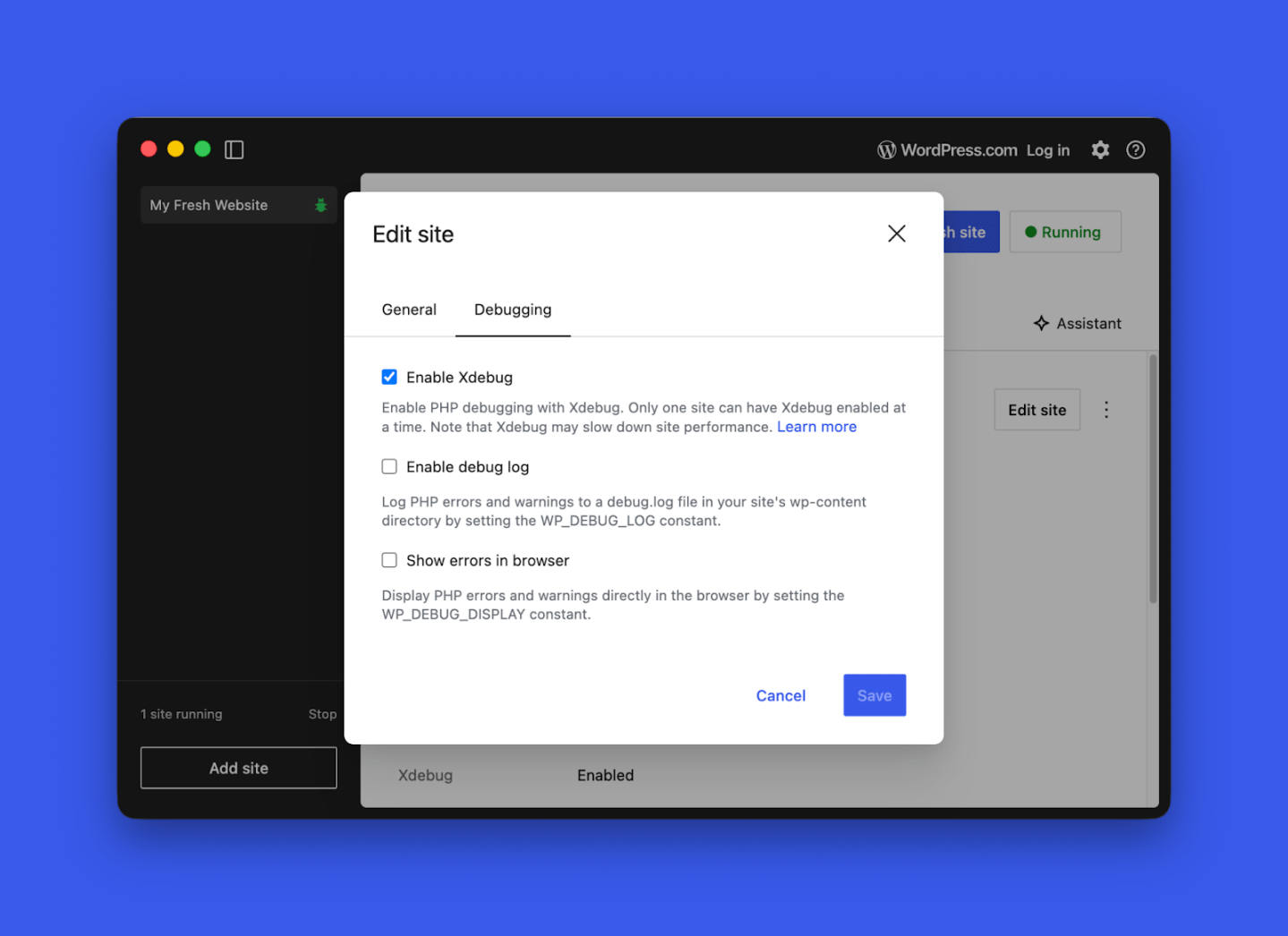
    Wojtek Naruniec writes about two new debugging tools now available in WordPress Studio: Xdebug support and a debug log toggle. Xdebug lets you set breakpoints and step through code line-by-line from your editor on port 9003, no system-level installation is needed. The debug log toggle sets WP_DEBUG and WP_DEBUG_LOG automatically and adds a direct “Open log file” link in Settings. A bonus tip: point your AI agent (Claude Code, Cursor, Codex) at wp-content/debug.log to interpret errors hands-free.

    AI and WordPress

    Jeffrey Paul recaps what’s new in AI Experiments 0.4.0 for the WordPress AI Team. This release, shaped by 14 contributors, introduces prompt-based image generation in the editor and Media Library, along with a Generate Review Notes experiment for accessibility, readability, grammar, and SEO suggestions.

    In another post, Paul outlines what’s new in AI Experiments 0.5.0, a focused release aligning with WordPress 7.0. It removes AI client dependencies, using the WP AI Client in core instead, while previous credentials migrate to a new Connectors screen. The plugin is available in the repository.

    Ray Morey reported on both releases for The Repository: AI Experiments Plugin Gets Two Updates in a Week, With WordPress 7.0 Now the Focus


    Elliott Richmond put wordpress-agent-skills repo and Automattic’s Claude Cowork plugin through its paces and came away impressed. Describe your site, pick from three AI-generated design directions, and a complete block theme — theme.json, templates, patterns, the lot — deploys straight to WordPress Studio in minutes. The generated code follows solid conventions and is yours to iterate on. Setup requires MCP configuration and Studio CLI, so developers will find it straightforward; everyone else faces a steeper climb. Token usage on Opus is substantial.

    Need a plugin .zip from Gutenberg’s master branch?
    Gutenberg Times provides daily build for testing and review.

    Now also available via WordPress Playground. There is no need for a test site locally or on a server. Have you been using it? Email me with your experience.


    Questions? Suggestions? Ideas?
    Don’t hesitate to send them via email or
    send me a message on WordPress Slack or Twitter @bph.


    For questions to be answered on the Gutenberg Changelog,
    send them to changelog@gutenbergtimes.com


    Featured Image:

    We hate spam, too, and won’t give your email address to anyone except to Mailchimp to send out our Weekend Edition.

  • PHP-only blocks, WordCamp Asia, Dev Notes for WordPress 7.0 — Weekend Edition #360

    PHP-only blocks, WordCamp Asia, Dev Notes for WordPress 7.0 — Weekend Edition #360

    Hi there,

    I held my first walk-through of WordPress 7.0 with friends at the Santa Clarita WordPress Meetup. The group was really excited about all the big new features and the small quality-of-life (QoL) improvements.

    Jessica Lyschik and I also discussed many features coming to WordPress 7.0 on our latest podcast episode. Listen in if you are curious.

    Below you also find the links to the first set of Dev Notes for WordPress 7.0. Beta 4 will come out next week (3/12). Release candidate 1 is scheduled for March 19. It is now time to help test WordPress 7.0

    Enjoy your weekend and these notes.

    Yours, 💕
    Birgit


    WordCamp Asia heads to Mumbai on April 10–11, and I shared my personally curated session picks — leaning heavily into block editor, themes, and AI. Highlights include Ryan Welcher on the Interactivity API, a Playground + AI testing pipelines talk by Fellyph Cintra, and a closing keynote from Matt Mullenweg. I will also be leading a Contributor Day workshop on building a block theme from scratch. The schedule still has several TBD slots, so it’s worth checking back.

    Networking at WordCamp Asia

    Get your WordCamp Asia 2026 event pass and join the WordPress community in Mumbai on April 9–11!

    Developing Gutenberg and WordPress

    WordPress 7.0 Beta 3 is now available for testing. The final release is coming closer. It’s the time of the release cycle when Developer Notes are published ahead of Release Candidate 1.


    For the new Breadcrumbs block, Nik Tsekouras documents the two PHP filters developers will want to know. block_core_breadcrumbs_items lets you modify, add, or remove items just before rendering — handy for prepending a custom “Shop” crumb in WooCommerce. block_core_breadcrumbs_post_type_settings gives you control over which taxonomy and term appear in the trail, with sensible fallback behavior when your preferred term isn’t assigned. Props to Karol Manijak for the implementation.


    Dave Smith details one of the more exciting 7.0 additions for theme developers: Customisable Navigation Overlays. Mobile hamburger menus were previously locked to a fixed default design — now you can build your overlay from any blocks and patterns directly in the Site Editor. Themes can bundle overlays as template parts registered with a new navigation-overlay area in theme.json. The feature is opt-in currently full-screen only, and props go to Mike McAlister, whose Ollie Menu Designer plugin helped validate the community demand.


    Luis Herranz outlines key updates in the Interactivity API changes in WordPress 7.0. The main highlight is the new watch() function, which helps developers to track state changes outside the DOM for tasks like logging and analytics. Additionally, state.url in core/router will now be filled by the server, improving navigation tracking. Note that the state.navigation properties are outdated and will be removed in a future version.


    André Maneiro rounds up 166 contributions from 35 authors landing in the DataViews space for WordPress 7.0. Highlights include a new activity timeline layout, expanded field validation rules, a combobox control for large datasets, and a groupBy object replacing the old groupByField string — a breaking change worth noting. DataForm gains a new details layout and collapsible card controls. A lot here for plugin developers building data-rich admin interfaces.


    Miguel Fonseca documents one of the most warmly received 7.0 additions: PHP-only block registration. Pass 'autoRegister' => true in the supports array alongside a render_callback, and your block appears in the editor without a single line of JavaScript. WordPress automatically generates Inspector Controls for supported attribute types — string, integer, boolean, and enum. Implemented by Ricky Pena, the comments section alone tells you how long PHP-first developers have been waiting for this one.

    Ryan Welcher and Ciprian Popescu went deeper on this topic and provided you with examples and explanations on their personal blogs. (See links below.)

    🎙️ The latest episode is Gutenberg Changelog #133 – Gutenberg 23.6 Release and WordPress 7.1 with special guest Faith Imokol, webdeveloper from Uganda.

    In the video, 7.0 Beta, Gutenberg 22.5, Studio & AI: WordPress for Developers in February Ryan Welcher walks you through the February edition of the round-up series What’s new for Developers. You’ll get the highlights from Gutenberg 22.4 and 22.5: per-instance custom CSS, viewport-based block visibility, anchor support for dynamic blocks, and the long-awaited removal of extra editor wrapper divs. The iFrame enforcement planned for 7.0 has been delayed — more breathing room, but time to prepare is now.


    WordPress lead developer Dion Hulse has shipped something quietly useful: WordPress.org now serves clean Markdown output for every page, built on Dennis Snell’s html-to-md plugin. You can access it by appending ?output_format=md to any URL or sending an Accept: text/markdown header. The efficiency gains are real — one developer reported a WordPress docs page shrinking from 68k tokens to 11k. It’s a direct response to Mullenweg’s push to make WordPress.org a canonical knowledge source for AI agents. Ray Morey reporting for The Repository


    In this brief video, Jonathan Bossenger demonstrates WordPress 7.0 Beta 2’s new WP AI Client and Connectors settings page, explaining how connectors can install plugins and how developers can create AI features without tying users to a specific provider. A live CLI demo showcases this approach. Bossenger also discusses connector discovery UX and areas where core improvements are needed before 7.0 is released.

    Plugins, Themes, and Tools for #nocode site builders and owners

    WordPress contributor Nick Hamze has quietly improved the Featured Plugins tab in wp-admin, replacing a list that hadn’t changed in eight years with a rotating selection of eight lesser-known plugins, refreshed every two weeks. The goal, as Matt Cromwell reports for The Repository, is to surface genuinely promising newcomers — “not the giants, not the household names” — that you’d never stumble across through search or popularity rankings. Early results are striking; Ollie Menu Designer tripled its biggest download day within hours of appearing in the tab.

    Theme Development for Full Site Editing and Blocks

    Marko Ivanovic and Noam Almosnino shared their Telex experiments on the Automattic Design blog, showcasing what happens when designers get to build WordPress blocks by simply describing an idea. Telex, Automattic’s AI-powered tool, handles the technical wiring so you can focus on creative exploration. The pair built a text-scrambling interaction inspired by Flash-era pioneer Yugop and an image carousel—all without writing block code themselves. It’s a compelling glimpse at how your design-to-block workflow could change.


    Derek Hanson shares how he shipped Tufte Blocks, a WordPress block theme he couldn’t build a year ago, drawing on Edward Tufte’s typography-first aesthetic. After two failed attempts, the right combination — WordPress Agent Skills and Shaun Andrewsdesign-system-first approach — finally unlocked it. You don’t need to be a designer or developer; Hanson’s project management and rhetoric background turned out to be exactly the right skills for directing AI through a complete, polished theme. Does it sound attractive to you? Download it from GitHub

     “Keeping up with Gutenberg – Index 2026” 
    A chronological list of the WordPress Make Blog posts from various teams involved in Gutenberg development: Design, Theme Review Team, Core Editor, Core JS, Core CSS, Test, and Meta team from Jan. 2024 on. Updated by yours truly. 

    The previous years are also available:
    2020 | 2021 | 2022 | 2023 | 2024

    Building Blocks and Tools for the Block editor.

    Ciprian Popescu walks you through PHP-only block registration in WordPress, the new approach landing in 7.0 that lets you build Gutenberg blocks without JavaScript build tools. By setting autoRegister to true in the supports array, WordPress auto-generates inspector controls from your attributes and uses ServerSideRender for previews. You’ll find practical guidance on block supports, asset enqueueing caveats, and where this approach fits best—think author boxes, CTA banners, and theme-specific components rather than richly interactive blocks.


    Ryan Welcher also explains how PHP-only block registration in WordPress 7.0 lets you skip block.json entirely and define block metadata directly in your register_block_type() call. You’ll see how to enable it with the autoRegister support flag, define attributes that auto-generate inspector controls, and wire up render callbacks with get_block_wrapper_attributes(). The tutorial covers asset registration via handle arrays and helps you streamline your workflow for server-rendered blocks ahead of the April 9 release.


    Paulo Carvajal‘s guide on mastering event handling and DOM interactions with the Interactivity API takes you through the data-wp-on directive for declarative event management. You’ll learn how to handle mouse, keyboard, form, and touch events while connecting them to store actions that update state reactively. The piece covers withSyncEvent() for synchronous access, automatic event delegation, and performance patterns like debouncing and throttling, wrapping up with a complete to-do app that ties it all together.

    AI and WordPress

    If you use Cursor for WordPress block development, JuanMa Garrido explains how to enable JSON schema validation in Cursor, which is disabled by default due to a security vulnerability where the AI agent could trigger outbound requests via $schema fields. You’ll need to add json.schemaDownload.enable to your settings—ideally at the project level in .vscode/settings.json to limit exposure. A quick fix that restores autocompletion and validation for your block.json and theme.json files.


    Need a plugin .zip from Gutenberg’s master branch?
    Gutenberg Times provides daily build for testing and review.

    Now also available via WordPress Playground. There is no need for a test site locally or on a server. Have you been using it? Email me with your experience.


    Questions? Suggestions? Ideas?
    Don’t hesitate to send them via email or
    send me a message on WordPress Slack or Twitter @bph.


    For questions to be answered on the Gutenberg Changelog,
    send them to changelog@gutenbergtimes.com


    Featured Image:

    We hate spam, too, and won’t give your email address to anyone except to Mailchimp to send out our Weekend Edition.

  • Interactivity API, WordPress 7.0 Beta and Telex updates — Weekend Edition 358

    Interactivity API, WordPress 7.0 Beta and Telex updates — Weekend Edition 358

    Greetings from snow-covered Munich — or at least it was when we left Friday for Salzburg, Austria, with a one-hour delay after our locomotive engineer got caught in the city’s snow-induced chaos.

    Have a fabulous weekend!

    Yours, 💕
    Birgit

    Developing Gutenberg and WordPress

    This week, WordPress 7.0 Beta 1 is ready for your testing on a staging or local site, please, not your live site. You can jump in via the WordPress Beta Tester plugin, a direct zip download, WP-CLI, or instantly through WordPress Playground in your browser.

    The most important feature coming to WordPress 7.0 is real-time collaboration, when more than one person can edit a post or page. Even for a single-person blogger this might be helpful when the proofreading buddy and the photographer can also be involved in editing different parts of a post.

    The final release is scheduled for April 9, 2026. Bugs go to the Alpha/Beta support forums or Trac — your testing genuinely shapes what ships. The release post also has an overview of the other features coming to WordPress 7.0, there are quite a lot.


    Gutenberg 22.6 RC1 is also available for testing. Once released it introduces a new Icon block, lightbox support for the Gallery block (a personal favorite of mine), and renames the Verse block to Poetry. Next to improvements to the Navigation overlay and block visibility controls, it also features a new approach to revisions with visual change tracking and block awareness. The final release is planned for February 25, 2026.

    🎙️ The latest episode is Gutenberg Changelog #133 – Gutenberg 23.6 Release and WordPress 7.1 with special guest Faith Imokol, webdeveloper from Uganda.

    Plugins, Themes, and Tools for #nocode site builders and owners

    Content for AI is a hot topic for news sites, especially since they rely on those ad views and sponsored posts, and AI is pulling snippets from their content. It’s a tough situation, and many sites are working hard to keep AI bots from crawling their pages. But here’s the thing: AI really loves quality, long-form content. If your site serves up unique, quality stuff for humans, then it’s also going to catch the attention of AI systems looking to help users with their questions.

    If your site fits the bill, Maddy Osman has put together 9 Steps to Prepare Your WordPress Site for AI Search Engines as a practical guide for the era of ChatGPT and Google’s AI Mode. The good news: WordPress already has most of what AI systems need. You’ll learn to write answer-first content, use structured blocks, add schema markup, and manage your robots.txt — small, actionable tweaks that help your site surface in both traditional and AI-generated search results.


    Jamie Marsland built a plugin for block theme to manage beautiful sticky header variations. He demos it in the video This Sticky Header Trick Makes WordPress Sites Look Incredible! If you are interested in the free plugin you get it on the website.

     “Keeping up with Gutenberg—Index – Index 2025” 
    A chronological list of the WordPress Make Blog posts from various teams involved in Gutenberg development: Design, Theme Review Team, Core Editor, Core JS, Core CSS, Test, and Meta team from Jan. 2024 on. Updated by yours truly. 

    The previous years are also available:
    2020 | 2021 | 2022 | 2023 | 2024

    Building Blocks and Tools for the Block editor.

    Carolina Nymark published two companion lessons on her Full Site Editing resource site. The Block Bindings API guide walks you through connecting dynamic data—post meta, custom sources, and more—to core blocks like paragraphs, images, and buttons, potentially saving you from building custom blocks altogether. In her Block Hooks API lesson, she shows you how plugins can automatically insert blocks into templates and patterns using PHP filters, with practical examples including WooCommerce and context-aware placement.


    In the latest article on the WordPress Developer, I show you exactly How to add custom entries to the editor Preview dropdown. Using the PluginPreviewMenuItem component from @wordpress/editor, you can extend the Preview menu with your own options — the tutorial walks you through building a “Social Card Preview” to show how to add an entry and serve up a modal for content.


    Paulo Carvajal dives deep into Building Dynamic Lists and Collections with data-wp-each on WP Block Editor. The data-wp-each directive from the Interactivity API lets you build reactive lists — product catalogues, task lists, feeds — that update automatically when state changes, no manual DOM manipulation needed. You’ll learn how to coordinate PHP server-side rendering with JavaScript-derived state and implement advanced patterns like filtering, sorting, and pagination following WordPress best practices.


    Ryan Welcher gave a talk at WordCamp Sofia titled From Static to Dynamic: Mastering the Interactivity APIn the Interactivity API. With the arrival of the Interactivity API, WordPress offers a native, declarative way to add client-side behavior to blocks using directives like data-wp-on–click, data-wp-bind, and data-wp-context. Developers can define reactive behavior, state management, and side effects—all while staying in the WordPress stack. The talk’s recording just appeared on WordPressTV. It’s a well-rounded introduction to the Interactivity API with real-life examples.

    AI and WordPress

    Semiha Kocer shares the latest Telex updates from WordPress.com’s AI-powered block creation tool, launched last August. The two headline features are

    • upload reference images — a Figma mockup, a screenshot, or even a napkin sketch — alongside your prompt to guide complex layouts.
    • download your block, edit it in your favorite code editor, and bring it back into Telex seamlessly.

    This week, Jonathan Bossenger explored the WordPress Studio MCP server, which connects WordPress Studio with AI tools via MCP. He set up MCP in VS Code and then used an AI agent to generate a custom block theme for a small coffee shop selling beans and accessories.


    Ray Morey reported on WordPress.com’s launches of a Built-In AI Assistant That Works in Editor, Media Library, and Notes. She notes that in the block editor, users can make plain-language requests — adjust layouts, swap color palettes, rewrite copy — and see changes render in real time. Notes users can tag “@ai” for fact-checks or edits, and the media library gets image generation and editing too. Morey adds that the feature, powered by Google’s Nano Banana models, is available on Business and Commerce plans.

    Need a plugin .zip from Gutenberg’s master branch?
    Gutenberg Times provides daily build for testing and review.

    Now also available via WordPress Playground. There is no need for a test site locally or on a server. Have you been using it? Email me with your experience.


    Questions? Suggestions? Ideas?
    Don’t hesitate to send them via email or
    send me a message on WordPress Slack or Twitter @bph.


    For questions to be answered on the Gutenberg Changelog,
    send them to changelog@gutenbergtimes.com


    Featured Image:

    We hate spam, too, and won’t give your email address to anyone except to Mailchimp to send out our Weekend Edition.

  • Block Theme Guide, AI Galore, Icon Block, WordPress 7.0 — Weekend Edition 357

    Block Theme Guide, AI Galore, Icon Block, WordPress 7.0 — Weekend Edition 357

    Hi there,

    If you celebrate it, Happy Valentines day! 💖

    This week, WordPress developers and co-workers share their experiences exploring AI workflows around development and creation. These are exciting times for sure!

    It’s good to be back behind the mic after an operation that irritated my vocal cord nerve — I’m still a bit hoarse, but that’s nothing new for this podcast, and I’m perfectly healthy otherwise.

    Have a lovely weekend!

    Yours, 💕
    Birgit

    Developing Gutenberg and WordPress

    As a reminder, WordPress 7.0 Beta 1 is scheduled for February 19th and is considered Feature Freeze during this release cycle. Only bug fixes will make it into WordPress 7.0 after that date, until March 19, 2026, Release candidate 1 will be released. Around that time, the Field Guide will be published and it also comes with a String Freeze, so the translators of the Polyglotts team can start their work in translateing WordPress 7.0 into many languages.


    Justin Tadlock‘s February developer roundup covers the rush toward WordPress 7.0 Beta 1. Highlights for your development work include the always-iframed post editor, viewport-based block visibility, per-block instance custom CSS, and a restructured Tabs block with inner blocks. You’ll also find updates to the AI Experiments plugin, new UI primitives and components, the reinstated Pullquote block, Navigation Overlay improvements, and wp-env now running on the Playground runtime.

    Screenshot of viewport-based block visiblity.

    Carolina Nymark is back as Core Contributor and she joined me on our first episode of 2026. On the Gutenberg Changelog #126, we talk about Gutenberg 22.3, 22.4 and 22.5 releases. As the three release had over 700 PRs merged, we were only able to cover the major enhancements and a few improvements. It was a fun conversation again.

    🎙️ The latest episode is Gutenberg Changelog #133 – Gutenberg 23.6 Release and WordPress 7.1 with special guest Faith Imokol, webdeveloper from Uganda.

    JuanMa Garrido is part of the release squad for WordPress 7.0 as a co-triage lead. To make is work a bit easier he created WP TRAC Triager. It’s a Chrome extension helper for the WordPress Trac ticket triage workflow and enhances it with smart timelines, universal role badges, keyword change history, and a fully customizable sidebar. It is ideal for WordPress contributors who want to streamline their triage process and make informed decisions based on complete context. The code is available on GitHub.

    Plugins, Themes, and Tools for #nocode site builders and owners

    Bud Kraus walks you through building WordPress blocks with Telex, Automattic’s browser-based AI tool that generates block plugins from natural language prompts. You’ll see two real examples — a ChatGPT embed and an editor-only Social Draft block — highlighting both the speed of prototyping and the iterative refinement that vibe coding still demands. Telex handles scaffolding, building, and packaging without a local dev environment, though Kraus is clear that understanding block architecture remains essential once you move beyond experimentation.

    And I just tested Telex again, and now it also can build block themes from a plain-english prompt. Try it out!


    Troy Chaplin built ReadEase: Text Resizer — a Gutenberg block that gives your site visitors controls to scale text for better readability. You can choose from four control styles (dropdown, buttons, slider, or icons), configure scale ranges, and scope the effect to the full page or just the content area. Preferences persist via localStorage with cross-tab sync, and the block is fully accessible with keyboard navigation, ARIA labels, and reduced-motion support.

    Theme Development for Full Site Editing and Blocks

    Varun Dubey has put together a thorough guide to WordPress Full Site Editing for 2026, covering everything from your first block theme setup to advanced techniques like the Block Bindings API and synced patterns. You’ll find practical code examples for theme.json configuration, custom templates, template parts, and block patterns, along with a step-by-step classic-to-block-theme migration roadmap. It’s a solid reference whether you’re just getting started with FSE or looking to deepen your understanding ahead of WordPress 7.0.


     “Keeping up with Gutenberg – Index 2025” 
    A chronological list of the WordPress Make Blog posts from various teams involved in Gutenberg development: Design, Theme Review Team, Core Editor, Core JS, Core CSS, Test, and Meta team from Jan. 2024 on. Updated by yours truly. 

    The previous years are also available:
    2020 | 2021 | 2022 | 2023 | 2024

    Building Blocks and Tools for the Block editor

    The saga continues: Ryan Welcher live streamed again on his work on the Icon Block for WordPress 7.0

    Ai and WordPress

    Eric Karkovack sits down with Jason Adams on the WP Minute+ to discuss the AI Team’s big plans for WordPress 7.0. You’ll hear how the Abilities API and MCP adapter lay the groundwork for plugin developers to integrate AI through the WordPress AI client, while WordPress 7.0 aims to ship foundational “under-the-hood” features for your projects. The conversation also covers how web hosts can simplify AI setup and why AI should remain a choice, not a mandate, across the ecosystem.


    In her post WordPress: From CMS to agentic platform Human Made’s Sarah Jones explains that WordPress is changing from a content management system to a more active platform. This change involves new tools like the Abilities API, which helps plugins function better, and MCP, which allows AI agents to use real site data. The important takeaway for businesses is that these agents have the same permissions as human users, maintaining control while benefiting from WordPress’s large network of 60,000 plugins, which offers advantages that closed systems can’t provide.


    I revamped my workflow writing tutorials for the Developer Blog and shared some details on my personal blog: my local tutorial creation flow with Claude Code. I walk you through how I build example plugins, draft developer blog posts in block notation, and publish directly to a local WordPress Studio site — all from the terminal. The setup relies on the WordPress MCP Adapter and a custom Content Abilities plugin to give Claude content access locally. The workflow saves me quite a bit of context switching.

    mermaid chart of workflow.

    According to James LePage, WordPress.com launched the first hosted Claude Connector for WordPress, building on their earlier MCP access and OAuth 2.1 support. You can connect Claude to your site in a few clicks through the connectors directory, choose which tools to expose, and get site-specific answers grounded in your real data. Claude receives read-only access, so nothing on your site changes, and you can revoke the connection at any time.


    in My WP/Woo Plugin Scaffolding in 2026, Brian Coords rethinks plugin scaffolding arguing that coding agents have made mustache-based templates like create-block less essential. He shares a functional Woo extension starter on GitHub, built around React admin screens, DataViews, Interactivity API blocks, and WordPress Scripts. Coords also makes a compelling case for WordPress to invest in strong documentation and example repos so any AI agent can build with core’s UI components successfully.


    Pablo Postigo documents his experiment building a WordPress block theme with Studio and Claude Cowork. After spending four hours hand-crafting a theme with the Create Block Theme plugin, he started fresh with Claude’s Opus 4.5 model — and had a working theme in five minutes, complete with dark mode and custom animations. The post raises thoughtful questions about whether block themes remain the best abstraction now that AI can generate and modify WordPress code so efficiently.


    In Nobody Rips Out the Plumbing, Nick Hamze makes a spirited case that AI isn’t replacing WordPress — it’s enhancing it. Drawing on WordPress’s history of absorbing every supposed threat from mobile to JAMstack, the post argues that AI excels at generating the visible layer but still needs WordPress as the content management backbone underneath. With the Abilities API, MCP Adapter, and tools like Telex already shipping, the real question for your community isn’t the technology — it’s staying open and welcoming. It’s a great article to bookmark and share with people doubting WordPress.


    Rich Tabor argues that the API is becoming the new UI as AI agents emerge as the fastest-growing users of your products. Agents don’t need buttons or drag-and-drop chrome — they need clean schemas, structured data, and predictable endpoints. The visual editor shifts to a review-and-refine layer where you steer what the agent built. For WordPress, the block model already provides the stable foundation agents can write to, making what happens beneath the interface the most important design work ahead.


    In this live stream session, Road to WordPress 7.0: Upcoming Features for AI Integration JuanMa Garrido walks you through the major AI features heading to WordPress 7.0, focusing on the WP AI client and core abilities. He explains how the WP AI client — currently available as a Composer package — provides a foundation layer managing credentials, caching, and HTTP transport for connecting to external models like OpenAI, Anthropic, and Google. Through a working demo, he shows you how WordPress can both consume AI models and, via the Abilities API, become a tool that agents interact with. He then dives into the core abilities proposal, defining built-in capabilities like create_post, get_post, find_posts, and update_post.

    Need a plugin .zip from Gutenberg’s master branch?
    Gutenberg Times provides daily build for testing and review.

    Now also available via WordPress Playground. There is no need for a test site locally or on a server. Have you been using it? Email me with your experience.


    Questions? Suggestions? Ideas?
    Don’t hesitate to send them via email or
    send me a message on WordPress Slack or Twitter @bph.


    For questions to be answered on the Gutenberg Changelog,
    send them to changelog@gutenbergtimes.com


    Featured Image:

    We hate spam, too, and won’t give your email address to anyone except to Mailchimp to send out our Weekend Edition.

  • Block Themes, Icon Block and AI –Weekend Edition #356

    Block Themes, Icon Block and AI –Weekend Edition #356

    Hi there,

    AI is on my mind a lot these days. It speeds up my life when I research or analyze content, tools and technology. Even more so when working on workflow automation. This week saw an “explosion of visible AI progress in the WordPress project” as James LePage calls it. And on my travel through the feeds Block Themes and theme.json appeared as an important topic.

    We are less than two weeks and one Gutenberg release away from WordPress 7.0 Beta 1 release on February 19th. WordPress 6.9.1 and Gutenberg 22.5 were released..

    You all have a wonderful weekend!

    Yours, 💕
    Birgit

    Developing Gutenberg and WordPress

    As mentioned last week, WordPress 6.9.1 Maintenance Release shipped on Tuesday with 49 bugs fixed throughout Core and the Block Editor. If your site has automatic minor updates enabled you should have it by now. Otherwise you definitely should make it a point to update manually.

    Rae Morey, editor of The Repository, has the skinny for you in WordPress 6.9.1 Released


    Gutenberg 22.5 was also released. My post on the Make blog gives you What’s new in Gutenberg 22.5? (04 February). The highlights:

    Screenshot of the Advanced sidebar section to add Custom CSS on the block level.

    In his trac ticket, Fabian Kägy proposed a “coat-of-paint” visual reskin of the WordPress admin for the 7.0 release. The goal is to modernize wp-admin’s appearance. It aims to reduce inconsistencies between older screens and the block editor. All elements should align with the WordPress Design System. Kägy has broken the work into focused sub-tickets covering color variables, buttons, inputs, notices, typography, spacing, and the admin frame. You can test early explorations via WordPress Playground. A new wp-base-styles handle has already landed to share admin color scheme CSS variables across core. Your feedback would be appreciated. 12 days before WordPress 7.0 beta, it’s not clear that it makes it into the next WordPress version. Kägy also mentioned that he is working with Tammie Lister on a post on the Make Core blog.

    🎙️ The latest episode is Gutenberg Changelog #133 – Gutenberg 23.6 Release and WordPress 7.1 with special guest Faith Imokol, webdeveloper from Uganda.

    Plugins, Themes, and Tools for #nocode site builders and owners

    Troy Chaplin released Planned Outage for Block Themes, a simple maintenance-mode plugin for block themes. You can create your maintenance page directly in the Site Editor or use a maintenance.html template in your theme. Logged-in users can still browse normally, while other visitors see a 503 error with a Retry-After header. It also allows search engine bots to keep crawling during extended outages, helping to maintain your rankings while you make updates.


    Johanne Courtright has restructured her Groundworx Core product into a bundle of four focused plugins — Query Filters, Showcase (Embla Carousels), Cards & Sections, and Tabs & Accordion — each now available separately. You can still buy the full bundle or grab just what you need. The core block extensions like responsive column controls and unified breakpoints have been spun off into a free plugin called Foundation, which also adds a new Gravity Forms block with proper block theme styling support.


    Hans-Gerd Gerhards released version 1.5 of his Dynamic Header & Navigation for Block Themes plugin in January, fixing an annoying header flicker when scrolling back near the top of a page. You can now try the plugin instantly via a Live Preview directly from the WordPress plugin directory.

    Theme Development for Full Site Editing and Blocks

    Mike Davey, senior editor at Delicious Brains, published a developer’s cheat sheet to theme.json anatomy. You’ll learn how setting the $schema property unlocks IntelliSense in VS Code. The settings section lets you lock down color pickers and font sizes to prevent design drift. The styles section replaces traditional CSS with auto-generated variables. The post also covers block-specific overrides. “Once understood, [theme.json] offers a level of granular control over what clients can and cannot do that was difficult to achieve in the classic PHP era.” Davey wrote.


    As a side note, the post 15 ways to curate the WordPress editing experience by Nick Diego is still one of the most read articles on the WordPress Developer Blog. You’ll learn how to turn off blocks, unregister variations and styles, lock down color pickers and font sizes via theme.json, restrict access to the Code Editor and Template Editor, and remove Openverse and the Block Directory. The post covers PHP filters, JavaScript techniques, and Editor settings.


    If you want to dive deeper into how to handle common theme-building problems with theme.json, here is a list of articles for your perusal from the WordPress Developer blog, mostly by Justin Tadlock.


    Johanne Courtright makes a compelling case for why she chooses Gutenberg over Elementor. She argues that Elementor became a CMS inside a CMS—duplicating templates, colors, typography, and breakpoints WordPress already provides. The result? Specificity wars, inline styles, and sites that break when you deactivate the plugin. With Gutenberg and theme.json, you get one source of truth: change a spacing value once, see it everywhere. Her clients now update their own sites without calling for help.

     “Keeping up with Gutenberg – Index 2025” 
    A chronological list of the WordPress Make Blog posts from various teams involved in Gutenberg development: Design, Theme Review Team, Core Editor, Core JS, Core CSS, Test, and Meta team from Jan. 2024 on. Updated by yours truly. 

    The previous years are also available:
    2020 | 2021 | 2022 | 2023 | 2024

    Building Blocks and Tools for the Block editor.

    In his latest live stream, Getting the Icon Block ready for WordPress 7.0, Ryan Welcher takes you behind the scenes of contributing. He has been working on the new Icon Block for Gutenberg plugin and the next version of WordPress. He is in crunch mode to finish the new Icon Block in time. Join him to see where we’re at and what needs to be done before then! You can read up about the genesis of this block via the GitHub PR.

    Ai and WordPress

    Jonathan Bossenger has published a helpful article titled From Abilities to AI Agents: Introducing the WordPress MCP Adapter on the WordPress Developer blog. The WordPress MCP Adapter links the Abilities API with AI tools like Claude Desktop. In this article, you’ll learn how to change abilities into MCP tools, connect using STDIO or HTTP transport, and create custom MCP servers for your plugins. It also provides easy configuration examples for each client and security tips for turning existing abilities into AI-ready APIs.


    James LePage rounds up a remarkable burst of AI progress across the WordPress project. You’ll find a proposal to bring an LLM client into WordPress 7.0 core, a mature MCP adapter for building agents, the Abilities API shipping in 6.9, and a new “AI Leaders” micro-credential for students. There’s also WP-Bench for benchmarking model performance on WordPress tasks, plus a growing AI experiments plugin nearing 1,000 commits — covering everything from Typeahead completions to content guidelines in Gutenberg.


    Speaking of which, you can read more about Content Guidelines: A Gutenberg Experiment on the Make AI Blog. In its the first version. Lots of feedback is expected. The goal is to give site owners a first-class place in WordPress to capture the rules and context that shape how content should be written, edited, and managed on their site.


    The WordPress project now has an official Agent Skills repository designed to teach AI coding assistants like Claude, Copilot, and Codex how to build WordPress properly. You’ll find portable bundles of instructions, checklists, and scripts covering block development, block themes, the REST API, Interactivity API, Abilities API, performance, and more. Skills install globally or per-project, helping AI assistants avoid outdated patterns and follow current best practices — contributions are welcome, mostly in Markdown.


    Jeff Paul published a call for testing to explore new AI experiments you can try right now via WordPress Playground. The experiments are

    • Type-ahead suggestions while writing,
    • AI-assisted comment moderation,
    • Markdown feeds for agent consumption,
    • extended provider options,
    • an AI Playground for testing prompts,
    • MCP integration, and
    • request logging for debugging and cost tracking.

    The instructions are quite detailed to follow along. The ask is feedback on UX, usefulness, and flow. Jump in and share your impressions on the post or the PRs links with each experiment.


    Need a plugin .zip from Gutenberg’s master branch?
    Gutenberg Times provides daily build for testing and review.

    Now also available via WordPress Playground. There is no need for a test site locally or on a server. Have you been using it? Email me with your experience.


    Questions? Suggestions? Ideas?
    Don’t hesitate to send them via email or
    send me a message on WordPress Slack or Twitter @bph.


    For questions to be answered on the Gutenberg Changelog,
    send them to changelog@gutenbergtimes.com

    Featured Image:

    We hate spam, too, and won’t give your email address to anyone except to Mailchimp to send out our Weekend Edition.

  • Navigation Overlays, WordPress 7.0, Interactivity API Helper, AI Skills, and  #WCAsia — Weekend Edition #355

    Navigation Overlays, WordPress 7.0, Interactivity API Helper, AI Skills, and #WCAsia — Weekend Edition #355

    Hi, there 👋

    this week, you’ll find a great mix of new releases, new tools, new plugins and events.

    Outside the WordPress sphere I signed up for the FediForum Un-Workshop, an event bringing together people who will discuss obstacles and ideas on growing the Open Social Web. It’ll be a three-hour virtual event on March 2, 2026. It’s NOT on the same day as Human Made’s WP:26 event, which takes place 10 days later.

    I hope you enjoy this week’s edition and I wish you a great weekend!

    Yours, 💕
    Birgit

    Human Made announced WP:26, a virtual event on March 12th exploring where WordPress is heading this year. You’ll hear from Mary Hubbard (WordPress executive director), speakers from Pantheon, Yoast, News UK, and PMC on topics like hybrid CMS architectures, agentic AI systems, and the CMS as orchestration layer. Following last year’s WP:25 with 700+ attendees, this one targets digital leaders, architects, and teams betting on WordPress long-term—registration is open now. It’s free and will be recorded, I reckon.


    WordCamp Asia communication team is publishing great content to get ready for the event: Tickets are still available, Sponsorships as well and you can learn more about Mumbai, Indian culture and food. The WordCamp will take place between April 9 and 11, 2026. The first rounds of speakers are announced, too. Will I see you there? It would be wonderful to meet you! You are welcome to use my public calendar to schedule a meeting.

    Announced speakers WordCamp Asia 2026

    If WordCamp Asia is not on your radar, check out the WordCamp calendar for in person or educational event closer to you or on a different date.

    Developing Gutenberg and WordPress

    WordPress 6.9.1 RC1 is now available. Led by Aaron Jorbin and Aki Hamano, the final release is planned for February 3, 2026. You can test using the Beta Tester plugin, WP-CLI, or a direct download. This maintenance release addresses bugs introduced in 6.9, with 23 Core fixes and 25 Block Editor fixes. Notable corrections include mail function errors, broken styling on the Add Plugins screen, widget accessibility issues, and several Interactivity API router fixes.


    Gutenberg 22.5 RC 1 is also available for testing. The final release is scheduled for February 4, 2025. It will bring practical refinements for your editing workflow. You can now add custom CSS to individual blocks, and the Image block shows aspect ratio controls for wide and full alignments. List View gets more useful with full block titles and actual content displayed for list items. The release also stabilizes viewport-based block visibility and pattern editing, plus adds focal point controls for fixed Cover backgrounds and text column support for Paragraphs.


    Mary Hubbard, executive director of WordPress open-source project, outlines the big picture goals for WordPress in 2026, signaling a return to three releases annually with WordPress 7.0 arriving at WordCamp Asia. You’ll see real-time co-editing move into Phase 3: Collaboration, client-side media processing graduate to Core, and new blocks like Tabs and Icon ship out of the box.

    What I am most excited about is Hubbard’s emphasis on WordPress meetups as the primary front door to contribution and calls on Make teams to prepare clearer onboarding paths for incoming contributors. If there isn’t a WordPress Meetup in your city or region, the community team would love to help you start one. Before my year-end vacation I collaborated with co-organizers, and we revitalized the München WordPress Meetup. If you are in the city, join us on February 11 at 19:00. Or every second Wednesday of the month.


    Anne McCarthy shares her latest round of exploring work in progress for WordPress 7.0, with beta 1 just weeks away. You’ll find hands-on looks at real-time collaboration transport layers, visual revisions, responsive block hiding, customizable navigation overlays, and the Cover block’s new video embed support. The Gallery block gains lightbox navigation, while Tabs and Breadcrumbs blocks continue maturing. McCarthy encourages you to test via WordPress Playground and to leave feedback on GitHub.


    David Smith posted a call for testing customizable navigation mobile overlays targeting WordPress 7.0. This feature finally gives you full control over mobile hamburger menus using blocks and patterns—add branding, calls-to-action, images, and custom styling instead of being stuck with WordPress defaults. Overlays are saved as template parts, so themes can ship their own variations. Feedback is requested by February 9th, with a ready-to-go Playground instance for quick testing.

    Your feedback would ddirectly shapes what ships in core—catching bugs, validating UX decisions, and surfacing edge cases before millions of sites receive the update. It’s one of the most impactful ways to contribute to WordPress without writing code, and the Test Team provides clear scenarios and templates for reporting issues. Give it a whirl, and learn first hand how this new feature works.

    🎙️ The latest episode is Gutenberg Changelog #133 – Gutenberg 23.6 Release and WordPress 7.1 with special guest Faith Imokol, webdeveloper from Uganda.

    Ryan Welcher highlights the most important updates from the What’s New for Developer (January 2026) post in his latest video: Responsive Grids, PHP Blocks, Smarter Tools: WordPress in January.


    Brandon Payton published wp-playground, a new AI agent skill that lets tools like Claude Code and Codex run WordPress via the Playground CLI for fast, repeatable testing. The skill auto-detects where your code belongs—mounting plugins or themes by recognizing file signatures—and reduces the “ready to test” moment from roughly a minute to a few seconds. You can install it via npx openskills install WordPress/agent-skills, and contributions are welcome at the new WordPress/agent-skills repository.

    Plugins, Themes, and Tools for #nocode site builders and owners

    Varun Dubey‘s comprehensive look at Gutenberg blocks in 2026 and WordPress development in the AI era walks you through how the block revolution has fundamentally shifted WordPress workflows. You’ll find practical guidance on when to choose patterns over custom blocks, explore emerging AI tools like WordPress Telex and Kadence’s inline generation, and understand why block metadata makes AI integration particularly powerful. Solid reading whether you’re building blocks or simply trying to keep pace with where WordPress is heading.


    Troy Chaplin‘s Block Finder plugin gives you a dashboard metabox to quickly locate any core or custom Gutenberg block across your entire site. You can filter by post type, detect InnerBlocks nested within parent containers, and jump directly to editing posts containing specific blocks. Particularly handy if you’re managing large-scale migrations or hunting down where a particular block lives—one reviewer credited it with helping audit over 700 sites during a Classic-to-Gutenberg transition.


    Weston Ruter released Post Date Block: Published & Modified, a plugin addressing a long-standing gap in the Date block. You can now display both publish and modified dates when they differ—with configurable prefixes, suffixes, and single-line or two-line layouts. The plugin uses the HTML Tag Processor to inject clean markup with proper microformat classes, and it’s now live on WordPress.org. Ruter positions it as a prototype until something similar lands in core, possibly via the upcoming Shortblocks feature.


    On the WP Builds podcast episode 452, Nathan Wrigley chats with photographer and developer Michael Campanella about FolioBlocks, his block-based gallery plugin built from a working photographer’s perspective. You’ll hear about grid, justified, masonry, carousel, and the clever modular gallery that uses rows and stacks for visual priority. The plugin includes real-time filtering via comma-separated keywords, WooCommerce integration for selling prints, and image downloads—all with true visual parity between editor and frontend.

    Theme Development for Full Site Editing and Blocks

    Kadim Gültekin’s Block Theme Color Switcher lets your visitors preview every style variation your block theme offers without you creating multiple demo sites. The plugin automatically parses theme.json and the styles folder to generate a floating frontend menu where users can swap color palettes instantly—no page reload required. Selections persist via localStorage, making it particularly useful for theme developers showcasing their work or sites offering accessibility options like high-contrast modes.


    Johanne Courtright‘s tutorial on the real power of CSS Grid goes well beyond basic column setups into territory useful for theme builders. You’ll learn how minmax() creates flexible-yet-constrained layouts, how named grid lines with -start and -end suffixes unlock implicit areas, and how grid-template-areas lets you draw layouts in code. The full-width breakout pattern—achieving edge-to-edge elements without negative margins—offers a cleaner alternative to the margin-based approach WordPress core currently uses for wide and full alignments.

    Building Blocks and Tools for the Block editor.

    Ryan Welcher released WordPress Interactivity API Helper, a VS Code extension that brings intelligent autocomplete and validation to data-wp-* directives. You get context-aware suggestions for state, actions, and callbacks based on detected stores in your PHP and JavaScript files, plus warnings for duplicate directives and undefined namespaces with typo suggestions. If you’re building interactive blocks and find yourself constantly referencing the documentation for directive syntax, this extension should smooth out your workflow considerably. Go to Extension > Search for Interactivity and install.


    Nick Diego announced WordPress Studio 1.7.0 with a major CLI upgrade that turns the command line into a full-featured companion for local development. You can now create, start, stop, and delete local sites entirely from the terminal, plus run WP-CLI commands without installing it yourself—Studio handles all the environment configuration. Diego walks through practical examples of pairing the CLI with AI coding tools like Claude Code and Cursor, where agents can spin up sites, run diagnostics, and deploy preview sites without you touching the Studio UI.


    JuanMa Garrido‘s WPSmith brings the Laravel php artisan experience to WordPress, wrapping Playground’s CLI and WP-CLI into one streamlined tool. You can spin up disposable sites with wpsmith new, manage database snapshots via checkpoint and rollback commands, reset to fresh state, or seed test data—workflows that don’t yet exist in tool like Studio’s CLI. Scaffold shortcuts like forge:plugin and forge:block round out the toolkit. It’s designed for both developers and AI agents working entirely from the terminal.You can take a glimspe on how it works on YouTube.

    WordPress and AI

    On his personal blog, Jonathan Bossenger shared four WordPress apps he built with AI that he uses daily. You’ll find

    • WP Debug for quick access to WordPress debug logs,
    • WP SQLite for inspecting WordPress Studio databases,
    • WP Mail for capturing local emails during development, and
    • WP Shell for running PHP snippets.

    Each scratches a specific itch without a steep learning curve—and in a fun twist, the post itself was largely AI-generated using the WP AI Client.

    In his latest video “Benchmarking AI models for WordPress development” , Bossenger walks you through getting started with WP Bench, the AI benchmarking tool for WordPress development tasks. You’ll follow along as he clones the repository, sets up the Python environment, and configures API keys. The real fun comes when he pits his MacBook against an Intel workstation, testing local and cloud models including GPT, Claude Sonnet, Qwen Coder, and Deepseek Coder to see which delivers the best performance for WordPress coding workflows.

    Need a plugin .zip from Gutenberg’s master branch?
    Gutenberg Times provides daily build for testing and review.

    Now also available via WordPress Playground. There is no need for a test site locally or on a server. Have you been using it? Email me with your experience.


    Questions? Suggestions? Ideas?
    Don’t hesitate to send them via email or
    send me a message on WordPress Slack or Twitter @bph.


    For questions to be answered on the Gutenberg Changelog,
    send them to changelog@gutenbergtimes.com


    We hate spam, too, and won’t give your email address to anyone except to Mailchimp to send out our Weekend Edition.

  • AI Experiments, WordPress 7.0, Gutenberg 22.3 and 22.4, Playground for theme builders — Weekend Edition 354

    AI Experiments, WordPress 7.0, Gutenberg 22.3 and 22.4, Playground for theme builders — Weekend Edition 354

    Hi there!

    Yes, it’s been a while. Did you miss me? I hope you and yours had a great start to the new year, and I wish you a healthy, happy and prosperous 2026. I am infinitely grateful you are a reader on this site and newsletter. Thank you for your ongoing support.

    My Year-End vacation directly merged into an intensive training and exploration into AI-first software development. It was eye-opening to say the least and entirely liberating. Ideas can be prototyped fairly quickly and their implementation is not stifled by the level of my personal coding skills. Success heavily depends on a clear vision, architectural consistency and radical quality control.

    Although there was a downturn in publishing over the holidays, I found a plethora of posts and plugins again. This edition catches up on most of it.

    Looking forward to going through our connecting with you in our eighth year of Gutenberg Times.

    Yours, 💕
    Birgit

    Developing Gutenberg and WordPress

    Aaron Jorbin published the WordPress 6.9.1 Release Schedule. RC1 will be next week on January 29, 2026, and the final release on February 3, 2026.

    The GitHub project board of WordPress 6.9.x Editor Tasks lists the PRs that will make it into the release in the Done column. Other core updates are available in this trac report.

    WordPress 7.0

    Jeff Paul announced the WordPress 7.0 release squad, led by Gutenberg’s chief architect Matias Ventura. It’s a team of veterans and newbies spread around the globe.

    Rae Morey, The Repository, also reported with more background and details on the state of real-time collaboration feature in her post: Matías Ventura Named WordPress 7.0 Release Lead as Contributors Close In on Real-Time Collaboration Approach


    WordPress 7.0 will run your post editor inside an iframe by default, so now’s the time to test your blocks for compatibility. If you’re still registering blocks with apiVersion 2, you’ll start seeing console warnings in WordPress 6.9. The main gotcha: your document and window references won’t work inside an iframe. You’ll need to switch to useRefEffect with ownerDocument and defaultView instead of globals. You can find more details in the official migration guide.

    In his post WordPress 7.0 Enforces Block API v3: Why Existing Blocks Begin to Fail, Benjamin Zekavica, core-team rep, also provides some tips and Tricks. Custom blocks that target admin selectors like .wp-admin or .editor-styles-wrapper, rely on global document queries, or initialize libraries globally and now fail consistently. Reading through the article, it seems this is mostly related to agency work, with bespoke theme and block development on sites of the early block era.

    Gutenberg releases

    Gutenberg 22.3 and 22.4 have been released.

    Hector Prieto highlights in his release post Gutenberg 22.3 (December 17)

    JuanMa Garrido led the 22.4 release together with Anne McCarthy and they had to tame quite a large changelog with more than 400 PRs merged by 77 contributors, of whom 16 were first-timers! It must have been difficult to pick the top highlights for their release post What’s new in Gutenberg 22.4? (20 January):


    🎙️ The latest episode is Gutenberg Changelog #133 – Gutenberg 23.6 Release and WordPress 7.1 with special guest Faith Imokol, webdeveloper from Uganda.

    Justin Tadlock‘s January developer roundup covers new responsive Grid blocks with adjustable columns and widths, an easy-to-use Fonts admin screen, and experimental PHP-only block registration with full metadata. New tools include an image cropper and an updated Abilities API client. The Breadcrumbs block is on track for WordPress 7.0, and Navigation overlay tests are allowing template part assignments. Playground now features a DevTools extension and a new dashboard interface.

    Plugins, Themes, and Tools for #nocode site builders and owners

    If you’ve ever watched a client accidentally drag your carefully crafted block layout into chaos, Eric Karkovack has your back. In his guide on How to Protect WordPress Block Layouts From Accidental Changes he walks you through two built-in WordPress safeguards: save your layouts as exportable block patterns you can restore anytime, then use the Lock feature to let clients update content without rearranging your design. You can even lock entire Group blocks at once for extra security.


    Wes Theron demonstrates the Details block for WordPress, showcasing how you can create collapsible sections perfect for FAQs, definitions, transcripts, and supplemental content. The tutorial covers inserting the block, navigating with List View, and customization options for keeping pages organized and tidy. Theron walks through practical examples showing how the accordion-style functionality helps hide and reveal content on demand, offering a native WordPress solution for managing long explanations without cluttering the page layout.


    Matthew Cowan released Find Blocks, Patterns & Shortcodes, a plugin that helps users locate Gutenberg blocks on WordPress sites and allows CSV export for content audits. The tool includes batch processing, post-type filtering, synced pattern searches, and WP-CLI support, with sortable results tables. It also features security measures like rate limiting and XSS prevention, and improves accessibility for screen readers and keyboard navigation.


    In his post How to create magic effects in WordPress with core blocks, Joel Olawanle demonstrates creating cinematic effects using only WordPress core blocks, focusing on the Cover block’s layering capabilities. In his tutorial, Olawanle covers fixed backgrounds for parallax simulation, scroll snap with minimal CSS, creative typography using duotone filters and blend modes, and multi-layered depth through nested Group blocks. Olawanle emphasizes building premium visuals while maintaining performance through native blocks, avoiding heavy page builders and keeping sites lightweight, accessible, and fast.


    Matt Cromwell created the Synced Pattern Popups plugin, which turns WordPress’s reusable synced patterns into modal popups that load content with AJAX and use smart caching. Triggers can be activated using simple class or href attributes, and third-party blocks display correctly with good styling. The plugin supports accessibility with keyboard navigation and ARIA support, has an optional AI-powered summary feature, and works with WordPress 6.9’s Abilities API for automated workflows—all without any setup needed.


    Justin Tadlock‘s Media Data plugin reveals hidden information from uploaded files—like camera settings, audio tags, and video codecs—through easy-to-use editor blocks that need no coding. Photographers can show exposure details below images, podcasters can add artist info next to players, and archivists can log file sizes and lengths, all using WordPress’s existing metadata with customizable labels and complete block theme integration. Users of WordPress 6.9 also benefit from Block Bindings support for improved workflows.


    Troy Chaplin‘s Priority Plus Navigation plugin enhances the core Navigation block by managing menu items more efficiently. When space is limited, it moves items into a dropdown for better accessibility. Using ResizeObserver, it monitors width and changes submenus into a “More” dropdown while following core overlay settings. The plugin fully supports theme.json for customizing dropdown styles, hover effects, and separators, and ensures keyboard navigation and screen reader compatibility.


    Kadim Gültekin created Block Style Modifiers plugin to enhance Gutenberg’s block styles with additional CSS classes that can layer together. Developers can easily add modifiers for specific blocks or globally using simple PHP functions and can reorder these classes in the editor sidebar. An experimental companion pack showcases hover effects, responsive utilities, and overlay treatments.


    In his post, Bernhard Kau presents his Campaign Archive Block plugin, which fixes Mailchimp’s complicated archive problem by creating dynamic API-driven listings instead of manual archives. Annoyed with Mailchimp’s clunky JavaScript and formatting issues, Kau developed a plugin that automatically pulls archives and can share API credentials with other Mailchimp plugins. Users can set the display count, choose between title and subject, and include sender metadata, reducing the need for manual updates after sending emails.


    Johanne Courtright released Groundworx Core 1.3.0 with Dynamic Flow, a query-powered carousel filtering posts by taxonomy or keywords with curated mode for manual selection, Static Flow for building custom slide carousels with any blocks and media pause controls, and Featured Posts displaying content in responsive grids. The update adds responsive breakpoint systems across layouts, block transforms between post disp

    Theme Development for Full Site Editing and Blocks

    In my latest post, I show how WordPress Playground Blueprints turn theme demos from basic setups into fully functional sites in a browser. Developers create demo content locally, export it, and host assets on GitHub to avoid CORS issues. They then make JSON files that define installation steps, including content import and site setup. The WordPress Importer automatically resizes media and updates URLs. Using this method theme builders can share links that launch complete working demos with sample content, navigation, and settings preserved.


    On the Developer Blog, you can read my article Streamlining block theme development with WordPress Playground and GitHub, where I explained a simple workflow using WordPress Playground, the Create Block Theme plugin, and GitHub to connect visual design with version control. Designers can work entirely within browser-based Playground instances, using CBT’s Save Changes to update theme files and submit pull requests to GitHub—without needing to use a terminal or code editor. This method makes it easier for anyone to work on block themes while upholding professional development standards. It’s the blog post to the presentation I gave at WordCamp Gdynia last September. The video is now available on WordPressTV.


     “Keeping up with Gutenberg – Index 2025” 
    A chronological list of the WordPress Make Blog posts from various teams involved in Gutenberg development: Design, Theme Review Team, Core Editor, Core JS, Core CSS, Test, and Meta team from Jan. 2024 on. Updated by yours truly. 

    The previous years are also available:
    2020 | 2021 | 2022 | 2023 | 2024

    Building Blocks and Tools for the Block editor

    Carlo Daniele explores the Block Bindings API for Kinsta, demonstrating how to connect external data sources to Gutenberg blocks. The tutorial walks you through registering custom binding sources, fetching weather data from Open-Meteo API, and creating a UI for custom sources introduced in WordPress 6.9. Daniele builds a practical example binding temperature and conditions to Paragraph blocks, showcasing how the API transforms WordPress into a dynamic application platform beyond traditional blogging.


    Ian Svoboda helps developers with creating custom blocks using the create-block package. He covers static and dynamic rendering options and explains important files like block.json, edit.js, and save.js. In his tutorial, he builds a dismissible Notice block, outlines naming conventions for assets in the editor and frontend, and demonstrates automatic block registration with glob pattern matching. Developers need local environments and build tools like wordpress/scripts or 10up-toolkit.


    In his last week’s live stream, Ryan Welcher went fully into PHP mode and build Custom WordPress Blocks WITHOUT JavaScript. The Gutenberg plugin now also entails a PHP-only block API in version 22.2 and refined in 22.3. Check out the video and see how it all works.


    Paulo Carvajal published a comprehensive guide on managing Interactivity API state flow for large-scale WordPress applications. You’ll learn the three foundational pillars: Global State for page-wide data, Local Context for component isolation, and Derived State for reactive consistency. You also learn unidirectional data patterns, asynchronous actions with withSyncEvent, store namespacing, and server-side hydration strategies to help you build performant enterprise projects.

    WordPress and AI

    In his latest video, Jonathan Bossenger discussed recent AI-related news in WordPress, including the Plugin Check Namer tool for evaluating plugin names and the introduction of the Abilities API JavaScript client in Gutenberg. He also showcased the AI Experiments plugin and WP Bench for evaluating the AI capabilities in WordPress development.


    As James Le Page announced on X, the AI Experiments plugin has received significant updates that include AI-powered excerpt generation fully integrated with the editor, along with a new Abilities Explorer admin screen for viewing registered AI features. The backend now supports Content Summarization and Image Generation experiments, which are pending UI development. Additionally, documentation and onboarding materials were improved, and WordPress Playground preview support was added to streamline workflows, allowing developers to test changes directly from pull requests.

    Ray Morey has the skinny for you here: AI Experiments 0.2.0 Adds Excerpt Generation and Abilities Explorer


    WordVell‘s editorial team examined fourteen practical MCP implementations changing WordPress and WooCommerce workflows from manual tasks to AI-driven automation. This protocol allows natural language commands, such as “publish this post,” to be executed instantly via servers like InstaWP, OttoKit, and n8n. Use cases include AI-driven content creation with SEO, automating admin tasks across sites, product search conversations, personalized customization, and guided checkout experiences.


    James Le Page also announced WP-Bench, a benchmark that measures how well language models understand WordPress development. This tool assesses models on WordPress APIs, hooks, security patterns, and features like the Abilities API while testing code in a secure WordPress environment. The goal is to set a standard evaluation for AI providers, encouraging them to improve for WordPress’s many developers.


    David Levine, a senior software engineer at rtCamp, explained in the article Beyond AI: What the Abilities API means for WordPress Composability that the new Abilities API allows developers to register specific “abilities” using a clear, machine-readable format. This approach replaces scattered hooks and custom REST endpoints, making plugins and core features more composable. It helps third-party code integrate easily without needing extensive knowledge of internal functions. The API also allows AI and automated tools to find and use capabilities automatically, leading to a more modular and future-ready WordPress ecosystem while maintaining backward compatibility for gradual changes.

    Need a plugin .zip from Gutenberg’s master branch?
    Gutenberg Times provides daily build for testing and review.

    Now also available via WordPress Playground. There is no need for a test site locally or on a server. Have you been using it? Email me with your experience.


    Questions? Suggestions? Ideas?
    Don’t hesitate to send them via email or
    send me a message on WordPress Slack or Twitter @bph.


    For questions to be answered on the Gutenberg Changelog,
    send them to changelog@gutenbergtimes.com


    Featured Image: Ai generated.

    We hate spam, too, and won’t give your email address to anyone except to Mailchimp to send out our Weekend Edition.

  • Roadmap for WordPress 7.0 and schedule, commands for the Command Palette, Gutenberg 22.3, and more — Weekend Edition 353

    Roadmap for WordPress 7.0 and schedule, commands for the Command Palette, Gutenberg 22.3, and more — Weekend Edition 353

    Hi there,

    Welcome to our last edition for the year 2025. I am not ready to reflect on the whole year, however, I am excited for 2026. There will be many new features coming to WordPress with the three major releases and also plenty of bug fixes and quality-of-life enhancement towards consistency.

    The first edition for 2026 will have to wait a bit and it is scheduled for January 24, 2026, roughly a month from now, due to my vacation and training schedule.

    I wish you and yours wonderful Holidays and a happy, prosperous and healthy New Year! 🤶🎄🎁🎆🎇

    Yours, 💕
    Birgit

    Steve Burge and Dan Knauss interviewed me for the PublishPress podcast. We covered WordPress 6.9’s six new blocks (accordion, term query, time to read, math, comment count, and comment link) plus editorial notes for team collaboration. The release marks a restart after Automattic’s contribution pause.

    WordPress 7.0 ( April 9, 2025) will bring template management improvements and a tabs block. The AI team is building foundational infrastructure—Abilities API, MCP Adapter, PHP AI SDK, and experiments plugin—enabling plugins to integrate with AI assistants. Real-time collaborative editing remains in development, facing technical hosting challenges. The recording is available on YouTube.

    Roadmap WordPress 7.0 and two more releases in 2026

    In his lates post, Matias Ventura, lead architect of Gutenberg, laid out the plan for WordPress 7.0. It’s aspirational and not all the items will make it into the next major version of WordPress. The very detailed plan covers the project’s shift into Phase 3: Collaboration, a vision for real-time co-editing, and enhanced communication through site notes. Ventura underscores the modernization of the administrative experience via a unified design system and expanded DataViews. By integrating a standardized AI API and advancing responsive editing tools, WordPress 7.0 aims to unify the design and development process. Ultimately, the release promises to deliver a more cohesive and performant platform through refined navigation and versatile new core blocks. Here are the broad topics of the plan.

    Jonathan Desrosiers also published the proposed schedule of the 2026 releases. Following the schedule, we have two more dates to put on our calendars: Beta 1 for WordPress 7.0 will be on February 19, and RC 1 is scheduled for March 19, 2026.

    Table of WordPress release dates for 2026

    Provided the Release squad approves this schedule. I also can offer a timeline for the WordPress 7.0 Source of Truth: First draft will be available for public preview on February 26, 2026, and the post will be published on March 26, 2026.

    🎙️ The latest episode is Gutenberg Changelog #133 – Gutenberg 23.6 Release and WordPress 7.1 with special guest Faith Imokol, webdeveloper from Uganda.

    Gutenberg 22.3 and beyond

    Hector Prieto led the release of Gutenberg 22.3 (December 17). In his release post he highlighted:

    1. Dedicated Fonts page for easier typography management
    2. Image editing improvements
    3. Responsive Grid block
    4. Other highlights

    Dave Smith, core conditrbutor on the GGutenbergProject explains in his video
    The changes leveling up Navigation in WordPress 7.0,He wrote in tthedescription: “Navigation is one of the most important — and most frustrating — parts of building a WordPress site.In this video, I walk you through what’s changing, why it matters, and show the real work already underway — including early prototypes and demos.” Check it out.

    Plugins and Tools for #nocode site builders

    Jamie Marsland is at it again with short videos and teaching you new skills. In his latest video “How to Create a High-Converting Landing Page With WordPress (Free Blueprint)” he gives you step -y -tep instructions for an easy way to create high-converting WordPress landing pages using only core blocks. He built a distraction-free landing page based on the StoryBrand methodology, so each section has a clear purpose and guides visitors through a simple story as they scroll.

    Sarah Perez, consumer tech editor at TechCrunch, reported that “WordPress’s vibe-coding experiment, Telex, is now being used” and it features Automattic’s AI tool for natural language web development. Introduced at the “State of the Word” event, Telex allows users to create complex Gutenberg blocks, like pricing calculators and logo carousels, without coding. Perez highlights how “vibe coding” makes site building accessible for non-tech users, enabling them to create professional results. With the new Abilities API, Telex marks WordPress’s move toward AI-driven workflows that streamline the design process.


    Courtney Robertson Developer advocate at GoDaddy released the plugin Post Formats for Block Themes, which brings back old-school post formats to modern WordPress block themes. It restores useful features for galleries, quotes, and videos often missing in newer themes. You’ll find smart auto-detection, unique block patterns for each format, and a handy Chat Log block for easy transcripts. By combining these classic tools with today’s full-site editing, this plugin helps creators maintain a great design and add variety in a simple and accessible way.


    Valentin Grenier, a WordPress developer from Toulouse, France, just dropped his first plugin: Simple block animations. It’s a cool, lightweight tool for adding some fun scroll-triggered visual effects to your Gutenberg blocks without needing to mess with any custom code. You get five different animation types, like fades and slides,, thatyou can tweak with durations and delays. Built using the Intersection Observer API and good old native CSS, it keeps things running smoothly by loading assets only when they’re needed while also being mindful of motion preferences to make it accessible.

    What’s new in WordPress Playground

    Felyph Centra posted a few video on WordPressTV to showcase various features of WordPress Playground

    Previewing GitHub branches with WordPress Playground. This video demonstrates a method to streamline development reviews. This technique addresses the common pain point of needing complex local environments or relying on static screenshots to share work in progress.

    Introduction to WordPress Playground landing page. The new landing page explains the capabilities of the platform and what is possible with WordPress Playground.

    Using WordPress Playground to work with AI agents. Centra shared how you can use the WordPress Playground to integrate with AI agents. with an example that uses GitHub Copilot agents. Using this flow it executes small tasks for a plugin, such as refactoring code or updating documentation. WordPress Playground can serve as a base to validate the AI agent’s code changes using E2E tests.

    In the post Action required: github-proxy.com shutdown Centra lays out the migration to switch over from a third-party proxy server to Playground’s built -n CORS handling. Your existing blueprints are safe, though. If you worked with Blueprints you can also learn how to reference GitHub repos, folders and files with native Playground resources.

     “Keeping up with Gutenberg—Index- Index 2025” 
    A chronological list of the WordPress Make Blog posts from various teams involved in Gutenberg development: Design, Theme Review Team, Core Editor, Core JS, Core CSS, Test, and Meta team from Jan. 2024 on. Updated by yours truly. 

    The previous years are also available:
    2020 | 2021 | 2022 | 2023 | 2024

    Building Blocks and Tools for the Block editor

    In this week’s livestream JuanMa Garrido explored how to create commands for the Commands Palette. WordPress 6.9 brought the Command Palette to the whole WordPress space and not just restrict it to the Site Editor. Now all plugin developer can register commands together with their plugin’s features.


    Justin Tadlock published the monthly roundup on What’s new for developers? (December 2025), noting WordPress 6.9 “Gene” and pointing to the 6.9 Field Guide and State of the Word. Highlights include the new AI Experiments plugin, Breadcrumbs block improvements heading toward stability, and an experimental Tabs block. Tooling updates cover WPCS 3.3.0, Data Views/Forms and Field API enhancements, @wordpress/boot routing, and a visibility key rename. Themes and Playground also saw notable updates.

    Ryan Welcher shot a video What’s New For WordPress Developers – December 2025, covering the parts of the blog post.


    As a reader of this newsletter you might already know about WordPress Studio, the fast, free, open-source local development tool, that’s based on WordPress Playground. Nick Diego recorded a Getting Started with WordPress Studio video and walks you through  creating local sites, configuring your environment, and using the tools that come bundled with the app. You’ll also learn how to unlock advanced features with a free WordPress.com account, including syncing with WordPress.com and Pressable, sharing live preview links, and using the built-in AI Assistant to accelerate development. Whether you build plugins, create themes, or manage client projects, Studio helps you work faster and smarter.


    In her post, Build Custom Event Lists & Grids With One Block: Event Query Loop Block Ultimate Guide, Lesley Sim shared a comprehensive tutorial for managing EventKoi’s specialized query block within WordPress. The post details how to create custom list and grid layouts using various query parameters, such as date ranges and recurring event instances, without any coding. By explaining the block’s internal structure and the flexible Event Data block, Sim illustrates how users can achieve precise design control and dynamic content display.


    In his latest post for the WordPress Developer Blog, Word Switcher: Extending Core Blocks with Interactivity, JuanMa Garrido provides a practical guide for beginners on enhancing standard WordPress blocks using native tools. Garrido demonstrates how to combine the Format API for editor controls, the HTML API for server-side processing, and the Interactivity API for frontend animations. Developers learn to create a “word switcher” effect that cycles through text variations without relying on heavy external libraries. This approach ensures a lightweight, performant, and professional workflow that bridges the gap between simple content entry and modern, reactive web design.

    Need a plugin .zip from Gutenberg’s master branch?
    Gutenberg Times provides daily build for testing and review.

    Now also available via WordPress Playground. There is no need for a test site locally or on a server. Have you been using it? Email me with your experience.


    Questions? Suggestions? Ideas?
    Don’t hesitate to send them via email or
    send me a message on WordPress Slack or Twitter @bph.


    For questions to be answered on the Gutenberg Changelog,
    send them to changelog@gutenbergtimes.com


    Featured Image:

    We hate spam, too, and won’t give your email address to anyone except to Mailchimp to send out our Weekend Edition.

  • Livestreams on WordPress 6.9, WordPress Importer Improved, MCP Adapter and more — Weekend Edition #351

    Livestreams on WordPress 6.9, WordPress Importer Improved, MCP Adapter and more — Weekend Edition #351

    Hi there,

    In case you celebrated it, I hope you had a wonderful Thanksgiving holiday, lots of turkey, sweet potatoes, beans, stuffing, gravy and pumpkin pie. Or any kind of pie really 🦃🍁🥧. And lots of love and laughter around your family and friends.

    I just want to give a huge shoutout to all the WordPress contributors who teamed up to roll out this next big version of WordPress for the hundreds of millions of websites out there and all their users and visitors. Every update is a big deal and only happens because of teamwork, good vibes, honesty, and trust. Not everyone who contributes is a coder; some work on documentation, translate stuff into loads of languages, create tutorials, and so much more. WordPress 6.9 is dropping on Tuesday if everything goes smoothly!

    Other contributors have already started on the next version, 7.0. We don’t know yet exactly when it will come out. In their last check-in meeting Core committers discussed a release date in March or April of 2026. They are also thinking of going back to three releases per year.

    Have a splendid weekend ahead, and I am so grateful that you are here. Your presence makes me want to write every week. Be well.

    Yours, 💕
    Birgit


    My team mate, Jonathan Bossenger and I were on this week’s panel for This Week in WordPress #356 episode, together with Taco Verdonschot and Nathan Wrigley. It includes “Birgit Pauli-Haack gives a whirlwind tour of her epic WordPress 6.9 Source of Truth “. There was a lot more of course.

    Videos and posts about WordPress 6.9 release

    WordPress 6.9 Release Candidate 3 is now available! The WordPress 6.9 Field Guide has arrived, too.

    Rae Morey, The Repository has the skinny for you in WordPress 6.9 RC3 Arrives as Field Guide Drops and Final Release Nears.


    Hector Prieto published the Dev Note Miscellaneous Editor Changes in WordPress 6.9, highlighting various refinements to the block editor. The release improves keyboard navigation, selection, and focus handling, adds small UI polish, and refines patterns and templates behavior. It also updates APIs and deprecations to keep block development consistent, enhances accessibility and stability, and smooths authoring flows, ensuring theme and plugin authors can better integrate with the evolving editor experience.


    Nick Diego and Ryan Welcher livestreamed their WordPress 6.9 Walkthrough. They guided viewers through the key updates arriving in WordPress 6.9 ahead of its December 2 release.


    In his livestream this week, Jonathan Bossenger tested the Block Bindings coming to WordPress 6.9. He tested the new enhancements in the date and image blocks, as well as custom source registration. Throughout the stream, Bossenger troubleshot and documented his process, exploring how these updates can lay the foundation for future developments. You can join him as he navigates through the intricacies and potentials of these new WordPress features!


    In his video WordPress 6.9 New Features, Pascal Claro demonstrates all new features for the Block editor coming to a WordPress instance near you.


    Maruti Mohanty held a Learn WordPress workshop on How to Prepare Your WordPress Site for WordPress 6.9. The recording is now available on WordPressTV. You will learn how to use the Beta/RC releases to test your site for the upcoming releases. This will be a practical walkthrough to build your staging, test for compatibility, and plan a safe rollout.


    In his post The Foundation for AI-Powered, Composable, and Editor-Friendly Websites, David Levine covers the WordPress 6.9 release and its focus on incremental yet impactful improvements to the site editor and performance. The post highlights refined pattern management, better style controls, and workflow enhancements for building and editing layouts.


    The Abilities API will launch with WordPress 6.9. TrewKnowledge has published a simple guide for builders, publishers, and product teams. It explains how “abilities” bring together capabilities and permissions in the editor and admin, allowing for better control over tasks. With examples and clear advice, the article helps agencies and product teams create safer workflows, customize roles, and improve user experiences.


    Rae Morey, The Repository, reports on how WordPress 6.9 to Introduce Notes, Bringing Asynchronous Collaboration to the Post Editor. Notes let users comment on specific parts of content, reply in threads, and mention teammates without being online together. The feature builds on Blocks and Phase 3 collaboration goals, aiming to replace scattered feedback via email or chat with contextual, in-editor discussions that improve editorial workflows and multi-author content reviews.


    Codeable Expert James Roberts also covered the release for his co-workers in WordPress 6.9: What To Expect, outlining key updates to the Site Editor, patterns, and design tools that make building full sites more intuitive. The article also explains what agencies and clients should do to prepare, test, and safely adopt the new features.

    Gutenberg and other WordPress updates

    🎙️ The latest episode is Gutenberg Changelog #133 – Gutenberg 23.6 Release and WordPress 7.1 with special guest Faith Imokol, webdeveloper from Uganda.

    In his video, WordPress 6.9 and More: Key Updates for Developers, Ryan Welcher gives you TL:DR of the latest What’s new for developers? (November 2025) post from the WordPress Developer Blog.


    Gutenberg 22.2 RC 1 is now available for testing. It comprised 161 Pull Requests by 49 contributors, four of whom are first-timers. The release focuses on performance, block editor polish, and a series of accessibility and developer experience improvements. It is intended for testing ahead of the stable 22.2.0 release on December 3 and is not recommended for production sites.


    In the next Gutenberg Changelog episode, I had a chat with JC Palmes, the principal technical manager at WebDevStudios, about how their team has totally jumped on the Blocks and block themes bandwagon. It’s been a game changer for their workflow and super helpful for their clients’ editorial teams, too. We also shared favorites features of the upcoming WordPress 6.9 release and the latest Gutenberg updates, 22.1 and 22.2. So, keep an eye out for the episode arriving in your favorite podcast app this weekend!

    Gutenberg Changelog 125 with JC Palmes and host Birgit Pauli-Haack

    Have you been avoiding the WordPress Importer when moving sites? It received a major enhancement from Adam Zieliński and other contributors. Zieliński published the announcement on the Core Make Blog: WordPress Importer can now migrate URLs in your content. This enhancement made it feasible to us the WordPress importer for the Playground blueprint step importWxr and it is now also compatible with content built in block themes, as URL in navigation blocks and image references in background-image css are also converted to the new site.

    WordPress for #nocode site builders and owners

    If you need to add FAQ schema to your Accordion Block, Andrew Viney, developer from Bristol, UK, has you covered with his accordion-faq-schema-toggle plugin.

    If you are a developer yourself, you can use Justin Tadlock’s Snippet: Schema.org microdata for Accordion block FAQs


    Mohammad Shoeb announced that the free WPMozo Blocks Plugin for WordPress just got five new Blocks. The update introduces Hero Heading, Logo Showcase, Notice, Highlight Text, and Flipbox blocks, focused on speed, flexibility, and visual appeal. These blocks support layout and style customization, icons, gradients, hover effects, and responsive controls, enabling users to build standout sections, alerts, logo grids, and interactive content without performance loss or complex configuration.


    Wes Theron published another nice tutorial for content creators on YouTube: How to add social icons to your WordPress site. He shows “you exactly how to add and customize social icons on your WordPress.com site, making it easy for visitors to connect with you across all your social platforms.”

    Designing Block Themes

    Bud Kraus wrote a tutorial on Scaling typeface gracefully with fluid typography that explains how to make font sizes adjust smoothly to different screen sizes using CSS functions like clamp(). He elaborates on how to use continuous scaling instead of fixed breakpoints, which helps improve readability and minimizes size jumps. The article provides examples for headings and body text, covers design tips, and shows how to implement fluid typography in WordPress themes.


    Karol Król mentioned he was inspired by my talk at WordCamp Gdynia to explore the Create Block theme plugin some more. He created this tutorial on how to easily transfer Block Theme changes to another WordPress site


    Elliot Richmond created a Block Theme Cheat Sheet for WordPress that collects key block theme concepts, file structure, and template examples in one place. It outlines essential theme.json settings, common templates and template parts, and useful block patterns for building modern block themes. The resource is designed as a quick reference for developers who want a practical, copy‑and‑paste style guide while learning or refining their block theme workflow.

     “Keeping up with Gutenberg – Index 2025” 
    A chronological list of the WordPress Make Blog posts from various teams involved in Gutenberg development: Design, Theme Review Team, Core Editor, Core JS, Core CSS, Test, and Meta team from Jan. 2024 on. Updated by yours truly. 

    The previous years are also available:
    2020 | 2021 | 2022 | 2023 | 2024

    Building Blocks

    Bryce Culp of WebDev Studios created A Developer’s Guide: The Future of the WordPress Gutenberg Block Editor. He explains modern block patterns, theme architecture, and tooling, emphasizing best practices for performance, reusability, and accessibility. The guide helps developers transition from classic approaches to a Gutenberg-first mindset, leveraging React-based blocks, block.json configuration, and evolving WordPress APIs to build scalable, future-ready experiences.


    Jos Velasco, DreamHost, found a way to simplify WordPress Plugin development with Telex and shared his workflow in this post. He has some tips and consideration on how to best work with the AI Block builder.

    What’s new with Playground

    Fellyph Cintra announced that Debugging with Xdebug is now available in WordPress Playground letting WordPress developers better understand what’s happening when something breaks. Now you can pause WordPress, look at what’s going on, and move through each step of the process in a browser. It works with simple tools or code editors, needs little setup, and is great for learning, testing ideas, and fixing problems more easily.


    Cintra also published Playground CLI, adds ImageMagick, SOAP, and AVIF support. These additions make it easier to work with images, talk to other online services, and test modern image formats in temporary WordPress sites. Together, they help developers and site builders try more real-world features without complex setup on their own computers.


    The latest article by Fellyph Cintra reveals that Playground allows developers to create temporary sites with specific Gutenberg branches in their browser. You can use special Playground URLs or blueprints to access nightly or feature branches, test new editor features safely, share consistent environments, and give feedback earlier in the Gutenberg development process.

    Need a plugin .zip from Gutenberg’s trunk branch?
    Gutenberg Times provides daily build for testing and review.

    Now also available via WordPress Playground. There is no need for a test site locally or on a server. Have you been using it? Email me with your experience.

    AI in WordPress

    Jeff Paul announced AI Experiments Plugin v0.1.0 . Team rep in the AI Team, James Le Page wrote on X (former Twitter) “This is a pretty big release. It’s the first time all building blocks are used together and represents a really great reference for developers that surfaces in features that you can use right now.”


    Ovidiu Galatan posted the Release announcement: MCP Adapter v0.3.0! This update brings official WordPress support for the Model Context Protocol. Version 0.3.0 is all about making things smoother with transport, better observability, and handling errors. They’ve unified the HTTP transport, put together a standard way to deal with WP_Error for MCP error responses, and revamped the observability handlers. Plus, they’ve standardized hook names, rolled out some detailed migration docs, and squashed some bugs, making sure everything works nicely with Abilities API v0.4.0 as part of WordPress’s awesome AI Building Blocks collection!


    On his blog, James Le Page shared a two-part series about the Abilities API. The posts explain how WordPress “abilities” have changed from old permission systems to a clearer way of defining what users and tools can do. They describe abilities as easy-to-understand labels for capabilities used in core, plugins, and the editor. With examples of AI features, the series shows how abilities help developers provide safe actions, manage access, and create smoother user experiences.


    Questions? Suggestions? Ideas?
    Don’t hesitate to send them via email or
    send me a message on WordPress Slack or Twitter @bph.


    For questions to be answered on the Gutenberg Changelog,
    send them to changelog@gutenbergtimes.com


    Featured Image:

    We hate spam, too, and won’t give your email address to anyone except to Mailchimp to send out our Weekend Edition.